Aetas Ferrea - Extras Integration
Polishes and replaces select items from utility and decorative mods in the Aetas Ferrea modpack. It overrides textures for FTB Quests, Serene Seasons, and Immersive Paintings with high-fidelity, medieval-inspired.
Features
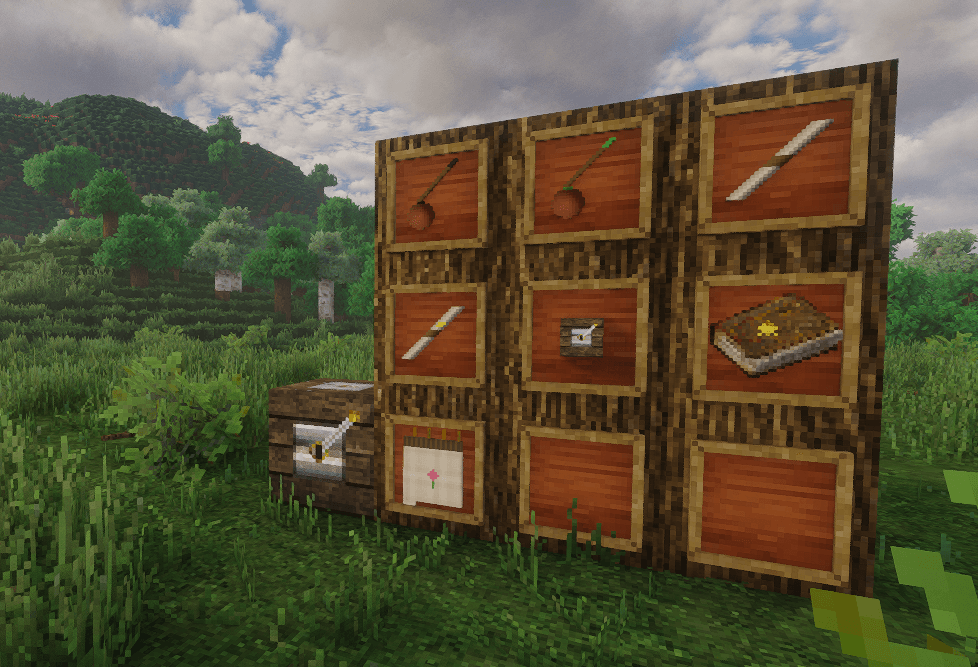
- FTB Quests: Re-imagines the Quest Book with a highly polished golden embossed star on a leather cover, and overhauls the Loot Crate Opener block to look like a heavy medieval spruce and brass crank station.
- Serene Seasons: Overhauls the pocket calendar into a textured parchment flip-book bound in leather with brass loops. Features unique hand-drawn medieval seasonal illustrations for all 12 sub-seasons (roses for Spring, suns for Summer, maple leaves for Autumn, snowflakes for Winter, rainclouds for Wet, and cracked suns for Dry).
- Immersive Paintings: Replaces standard paintings and graffiti items with rustic parchment scrolls bound in leather cords and clay paint jars containing paintbrushes. Includes neon-glowing slime ink variants for glow paintings and glow graffiti.
Dependencies: Immersive Paintings, Serene Seasons, FTB Quests.
THE FOLLOWING WEBSITES ARE THE ONLY OFFICIAL WEBSITES THAT HOST AETAS FERREA CONTENT. ALL OTHER WEBSITES ARE NOT ASSOCIATED WITH US AND ANY CLAIMS OF THEM BEING OFFICIAL ARE FALSE. PLEASE AVOID THEM AT ALL COSTS AS THEY MIGHT CONTAIN MALICIOUS CONTENT.
Aetas Ferrea is NOT affiliated with or endorsed by Mojang, Microsoft, or any other third party. All other trademarks are the property of their respective owners.
NOT AN OFFICIAL MINECRAFT PRODUCT. NOT APPROVED BY OR ASSOCIATED WITH MOJANG OR MICROSOFT.