Mineuniverse
Resource Packs
Admiral'sTrapPVP

Admiral'sTrapPVP

RESOURCE PACK
A PVP Resource Pack With Trap and Hopefully PBR
by oniikore
Download Claim this project
1,091 downloads
0 likes
Updated Oct 14, 2026
0 hypes
512x and Higher Miscellaneous Photo Realistic
Advertisement Remove ads with Premium →

1.16 RP will only have 1 version with the latest official minecraft updates

NEEDS OPTIFINE

PBR is planned but for the time being only the textures have been done. All artwork credits go to the respective artists. Should be relatively easy to find because of reverse image search and unzip to find the sources.
Done
- All Swords
- All Axes

- Enderpearl
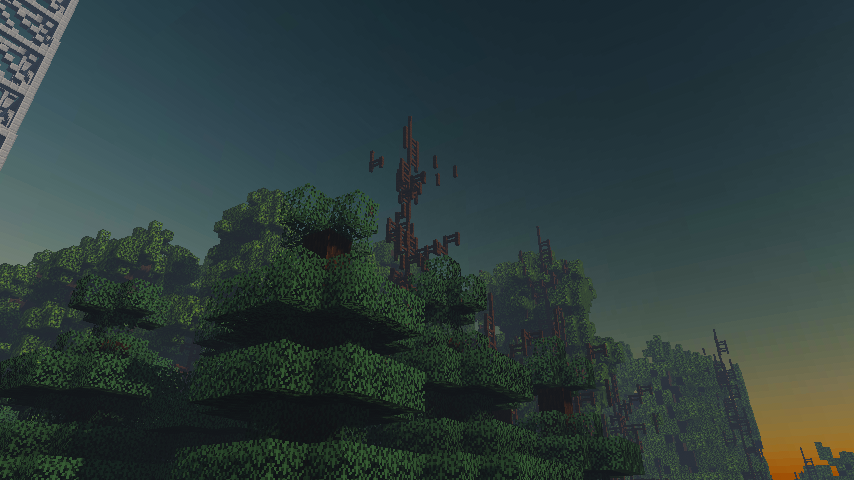
- Nishita Skybox (Better Skies RP by BurnblazeX and me)


Planned
- PBR

- Paintings


Screenshot of Upcoming Update

Discord

- You can find my other unreleased works here

discord logo duh  https://discord.gg/Xky7muSTEa

Admiral'sTrapPVP1024x
MC 1.16-Snapshot, 1.16.3, 1.13.1, 1.15-Snapshot, 1.16.1, 1.14.4, 1.14.1, 1.14.3, 1.15, 1.16, 1.13, 1.16.5, 1.15.2, 1.14, 1.16.4, 1.14.2, 1.16.2, 1.13-Snapshot, 1.14-Snapshot
Release 2021-01-27 Get
Admiral'sTrapPVP1024x
MC 1.16-Snapshot, 1.16.3, 1.15-Snapshot, 1.16.1, 1.14.4, 1.14.1, 1.14.3, 1.15, 1.16, 1.15.2, 1.14, 1.16.4, 1.14.2, 1.16.2, 1.14-Snapshot, 1.15.1
Release 2021-01-07 Get
Admiral'sTrapPVP1024x
MC 1.16-Snapshot, 1.16.3, 1.15-Snapshot, 1.16.1, 1.14.4, 1.14.1, 1.14.3, 1.15, 1.16, 1.15.2, 1.14, 1.16.4, 1.14.2, 1.16.2, 1.14-Snapshot, 1.15.1
Release 2021-01-06 Get
Admiral'sPVPPack1024x
MC 1.16-Snapshot, 1.16.3, 1.13.1, 1.15-Snapshot, 1.16.1, 1.14.4, 1.14.1, 1.14.3, 1.15, 1.16, 1.13, 1.15.2, 1.14, 1.16.4, 1.14.2, 1.16.2, 1.13-Snapshot, 1.14-Snapshot, 1.13.2
Release 2020-12-02 Get
Admiral'sPVPPack1024x.zip
MC 1.16-Snapshot, 1.16.3, 1.13.1, 1.15-Snapshot, 1.16.1, 1.14.4, 1.14.1, 1.14.3, 1.15, 1.16, 1.13, 1.15.2, 1.14, 1.16.4, 1.14.2, 1.16.2, 1.13-Snapshot, 1.14-Snapshot, 1.13.2
Release 2020-12-01 Get

Requirements & install

How to use this resource pack in Minecraft
Resolution
512x+
Minecraft
1.15.2 – 1.16.5
Install folder
.minecraft/resourcepacks

How to install resource packs

  1. Download the resource pack .zip file (do not extract it).
  2. In Minecraft open Options → Resource Packs → Open Pack Folder.
  3. Drop the .zip into the resourcepacks folder (.minecraft/resourcepacks).
  4. Move the pack to the Selected column and click Done.

512x packs need a strong GPU and at least 4 GB of RAM for Minecraft; a performance mod such as Sodium is strongly recommended.

Browse more: 16x resource packs 32x resource packs 64x resource packs 128x resource packs 256x resource packs 512x+ resource packs Resource Packs for 1.16.5 All resource packs

More from oniikore

Advertisement Remove ads with Premium →

You Might Also Like