Mineuniverse
Resource Packs
(1.21.5) Celesta 32x | Slick PvP Texture Pack

(1.21.5) Celesta 32x | Slick PvP Texture Pack

RESOURCE PACK
An Amazing 32x Knife PvP Pack with Smooth Gradient Textures, Items & Blocks for 1.21.5
by Reptilator
Download Claim this project
Add a badge to your pageLink to (1.21.5) Celesta 32x | Slick PvP Texture Pack from a README, website or forum post.
Preview: Badge

Badges update automatically and link to the resource pack page on MineUniverse.

208,355 downloads
0 likes
0 followers
Updated Oct 14, 2026
0 hypes
Follow0
32x Miscellaneous Modern Photo Realistic
Advertisement Remove ads with Premium →

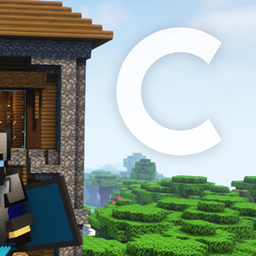
Prepare for PvP battles like never before with Celesta, a visually stunning 32x texture pack designed to enhance your competitive Minecraft experience. Featuring vibrant colors, sharp details, and smooth gradient textures, Celesta immerses you in a world of high-definition visuals and unparalleled PvP optimization. Dominate the battlefield with a clean and intuitive interface, customizable features, and regular updates that keep you at the forefront of the PvP scene. Elevate your PvP performance with Celesta and conquer the competition with style.
 
 
Supported Minecraft Versions:
Celesta v3.3 and older: 1.13 ➔ 1.20.1
Celesta v3.4: 1.20.2 ➔ 1.21.5


© All Rights Reserved to Reptilator. Do not republish this pack or its content or claim it as your own.
[1.20.2+ ONLY] Celesta v3.4 (1.20.2 ➔ 1.21.5)
MC 1.20.2, 1.21.2-Snapshot, 1.21, 1.20.5, 1.21.5, 1.20.5-Snapshot, 1.21.1-Snapshot, 1.21.4, 1.21.5-Snapshot, 1.20.3-Snapshot, 1.20.3, 1.20.6, 1.20.4, 1.21-Snapshot, 1.21.3, 1.21.1
Release 2024-06-27 Get
Celesta v3.3 (1.13 ➜ 1.20.1)
MC 1.16-Snapshot, 1.17.1, 1.16.3, 1.13.1, 1.19.3, 1.15-Snapshot, 1.16.1, 1.18.1, 1.19.4-Snapshot, 1.14.4, 1.14.1, 1.17, 1.14.3, 1.15, 1.16, 1.13, 1.19.4, 1.19-Snapshot, 1.16.5
Release 2023-07-16 Get

Requirements & install

How to use this resource pack in Minecraft
Resolution
32x
Minecraft
1.21 – 1.21.5
Install folder
.minecraft/resourcepacks

How to install resource packs

  1. Download the resource pack .zip file (do not extract it).
  2. In Minecraft open Options → Resource Packs → Open Pack Folder.
  3. Drop the .zip into the resourcepacks folder (.minecraft/resourcepacks).
  4. Move the pack to the Selected column and click Done.
Browse more: 16x resource packs 32x resource packs 64x resource packs 128x resource packs 256x resource packs 512x+ resource packs Resource Packs for 1.21.5 All resource packs

More from Reptilator

Advertisement Remove ads with Premium →

You Might Also Like