Badges update automatically and link to the plugin page on MineUniverse.
Finally, SilkChests gives you the control to break chests with a silk touch item and store their contents within the chest! Using the most efficient item storage system, items are stored securely without being lost when the server shuts down. And don't worry, no storage files (exception the config.yml file) is used to store locations of items.
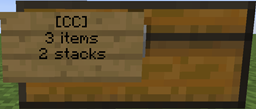
When you break a chest with an item with the silk touch enchantment, the chest will drop a SilkChest which, when placed, will contain all of the contents that the chest had before you broke it. If the "canStoreChestInChest" configuration is enabled, you can store SilkChests inside other SilkChests to maximise storage exponentially.
A video explanation of SilkChests version 1.3, courtesy of M3DDLER:
As of version 1.5, commands have been added. Command permission is silkchests.admin
| Command | What it does |
|---|---|
| /silkchests | Shows the list of help information |
| /silkchests reload | Reloads the config |
| /silkchests config | Shows the current config |
| /silkchests configupdate <config> <value> | Updates the config |
Configupdate configs:
Configupdate example: /silkchests configupdate canStoreChestInChest false
| Action | Permission required |
|---|---|
| Breaking a SilkChest | silkchest.use |
Enabling SilkChests to be stored in other SilkChests can be configured in the config.yml file Version 1.3 has support for trapped chests, ensure that your config.yml file is updated (by deleting it and allowing it to be recreated) before using.
canStoreChestInChest: false
# Version 1.3 upwards
useTrappedChests: true
Installing the plugin is as simple as putting the SilkChests.jar file into your /plugins/ folder and restart/reloading the server.
To update, place the new SilkChests.jar file into your /plugins/ folder. Delete the old config.yml file and then restart/reload the server. This will then recreate a new config.yml, which you can edit. To apply the changes, save the file and restart/reload the server.
Source code is available on GitHub: here