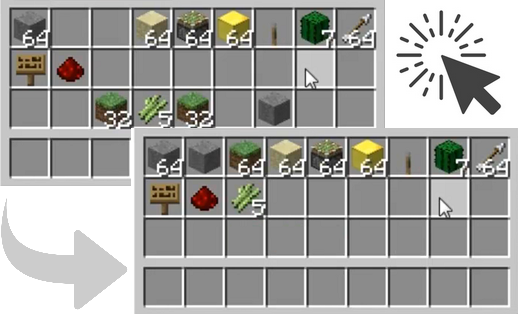
ClickSort is a Bukkit plugin which makes it very easy for players to sort their inventories (player/chest/dispenser) with a single or double click of the mouse. Players can sort by item ID, item name, switch between single- and double-clicking, or disable sorting entirely, all on a per-player basis and without needing any commands; it's all done with mouse clicks in inventory windows.
All versions above should work on Spigot.
A review of v1.0.0, with thanks to VariationVault :
bukkit/plugins folder and reload/restart your CraftBukkit server.bukkit/plugins/ClickSort folder will be automatically created, containing a config.yml file./clicksort reload to reload. See Configuration for details.As of v1.3.2, you'll have to put your item names into items.yml manually if you want to sort by item names.
ClickSort operates as follows:
Any mode changes will give the player a feedback message indicating the new sort or click mode. Player sort/click modes are persistent across server restarts.
As of v1.1.0, it is also possible for players to disable shift-click mode changing (on a per-player basis); some players may find themselves annoyed by accidentally shift-clicking empty inventory slots. To avoid this, players can use the /clicksort shiftclick command to toggle shift-clicking for themselves.
Also as of v1.1.0, two commands have been added to allow players to set their sort or click modes directly; these are most useful if shift-click mode changing has been disabled:
/clicksort sort <id|name|group|value>/clicksort click <middle|double|single|swap|none>ClickSort attempts to respect protection plugins which cancel InventoryClickEvent by running its own event handler as late as possible and ignoring cancelled events.
Fully anonymous usage statistics are collected using bStats.