Players can publish their written books in a shop, so other players can buy the written books. There are two ways of creating a BookShop:
Please note:
- AdminShops always duplicate the book!
It works the same way than a publisher: It copies the book in the chest and sells it to the player.
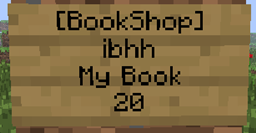
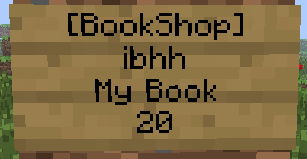
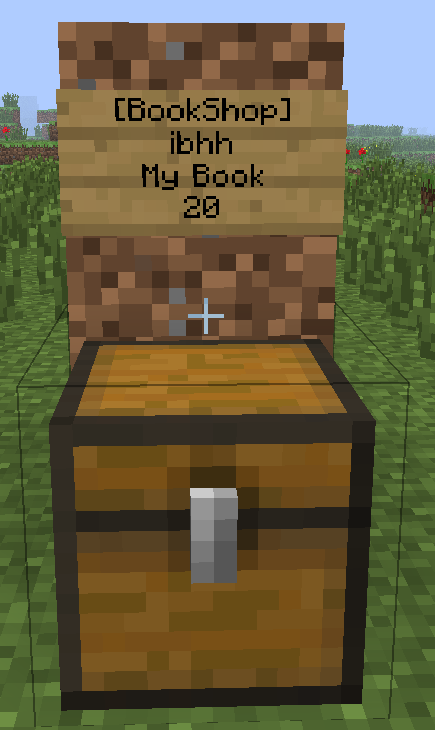
To create a shop, you have to place an empty chest first. Then you can create a sign with following content
Please note: Only ONE book per shop is allowed!
| Line | Text |
|---|---|
| 1 | [BookShop] |
| 2 | |
| 3 | The books name (automatically added after closing the chest with the book), but you can let it empty ;) |
| 4 | price of the book |
OR:
| Line | Text |
|---|---|
| 1 | [BookShop] |
| 2 | |
| 3 | The books name (automatically added after closing the chest with the book), but you can let it empty ;) |
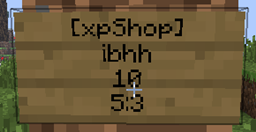
| 4 | price of the book:price of the book if the player has a book and quill in the hand |
To create an AdminShop:
| Line | Text |
|---|---|
| 1 | [BookShop] |
| 2 | AdminShop |
| 3 | The books name (automatically added after closing the chest with the book), but you can let it empty ;) |
| 4 | price of the book |
To create a Newspaper shop:
| Line | Text |
|---|---|
| 1 | [BookShop] |
| 2 | Newspapers |
| 3 | The books name (automatically added after closing the chest with the book), but you can let it empty ;) |
| 4 | price of the newspapers |
With the newspaper shop you are able to sell several books at a time. E.g. a book with rules and a book with a plugin info. If the player hits the sign he receives the two books.
If you don't like the keywords on the sign, you can edit them in the Shopconfig.yml´file!
At the end it should look like this:

| Action | Permission node |
|---|---|
| Create a shop | BookShop.create |
| Create a shop of an other player | BookShop.create.other |
| Sell books of other players | BookShop.sell.other |
| Create a Adminshop | BookShop.create.admin |
| Use the shop | BookShop.use |
| Destroy own shop | BookShop.create |
| Destroy shop of someone else or AdminShop | BookShop.create.admin |
| Message to admins that someone created a shop | BookShop.admin |
| Command | Permission node | Explanation |
|---|---|---|
| /BookShop setwelcomebook | BookShop.setwelcomebook | Sets a book which has every new player in the inventory |
| /BookShop removewelcomebook | BookShop.removewelcomebook | Unsets a book which has every new player in the inventory |
| /BookShop giveall | BookShop.giveall | Gives a book to every player who joined the server before |
| /BookShop give | BookShop.give | Gives a book to a player |
| /BookShop backupbook | BookShop.backupbook | Backups a book |
| /BookShop loadbook | BookShop.loadbook | Loads a book |
| /BookShop reload | BookShop.reload | Reloads the plugin |
| /BookShop debugfile | BookShop.debugfile | Turn the debugfile on and off |
| /BookShop internet | BookShop.internet | Turns the internet access on and off |
| /BookShop version | BookShop.version | Shows the current version of BookShop |
| /BookShop update | BookShop.admin | Updates the plugin to the latest vesrsion on dev.bukkit.org |
| /BookShop deletedebug | BookShop.admin | Deletes the debugfile to give you free space on the hdd |
| /BookShop log | BookShop.admin | Returns the current size of the debugfile |
| /BookShop toggle | BookShop.admin | Turns BookShop immediately off |
| /BookShop language <language> | BookShop.admin | Select the ingame language (by default english) |
| /BookShop help | BookShop.help | Returns all command which the player can execute |
| /BookShop showdebug | BookShop.showdebug | Shows you console messages ingame |