download version 0.4
download version 0.2
Bukkit version 1.2+ compatibile
Velocity multiply code based on PlgRailBoost mod by Plague
v 0.4 changelog
You can configure your server to get custom velocity for powered rails.
By default, all minecarts have a different velocity which can be taken from powered rail.
A little information about speed-up and velocity:
As can you see in a list above, all minecarts have a different velocity feature.
So, it may be not so good if you are trying to build railroad, metropolitan or simply mine elevator.
You must put 2 or 3 powered rails to get empty minecart up, but oly one for the minecart with somebody inside.
Powered rails requires gold ingots to craft, so it's a little expensive to craft a numbers rails only to serve empty carts.
But now, you can define velocity multiplier for each type of the minecart and all you carts will moves longer.
Installation
Put module JAR file ( for e.g. advancedRails.jar ) into your server plugins dir.
This module requires configuration file and it will not work without config/
Configuring
After you put JAR file into th plugins dir, you need to create directory with name advancedRails, then after create config file named advancedRailsConfig.yml
Note: you can find sample config file inside the JAR file. JAR file also have mod sources.
Generaly, configuration file keep two arrays: enabled/disabled multiplier for each type and multipliers for carts.
Check this sample
# Force immediately stop cart on unpowered rail
unpowered.force_stop: true

# Which cart will boost
boost: {
    standart: true,
    storage: true,
    powered: false
}

# Define multiplier for each cart type
multiply: {
    standart: 1000,
    storage: 1000,
    powered: 1
}
boost — array keep boost state ( enabled/disabled )
multipy — define velocity multipliers for each type of carts.
standart — is for standart minecart ( empty or with passenger )
storage — means minecart with a chest
powered — define values for loco-cart ( Minecart with Furnace )
Multipliers is an integer number.
Value for multiplier cannot be negative or less than 1.
Multiplier value 1 — turns off velocity multipling for the cart type.
If you define velocity multiplier for the carts they may not stop on a single unpowered rail bcause of highvelocity.
But now, you can force cart to stop on any unpowered rail.
You can do it in two ways:
add to the configfile this parameter
unpowered.force_stop: true
FORCE STOP or STOP or FS
Version 0.4 gives you new handily configuring modelfor rails.
For now, you can leave your configuration file empty and define parameters for each rails separately.
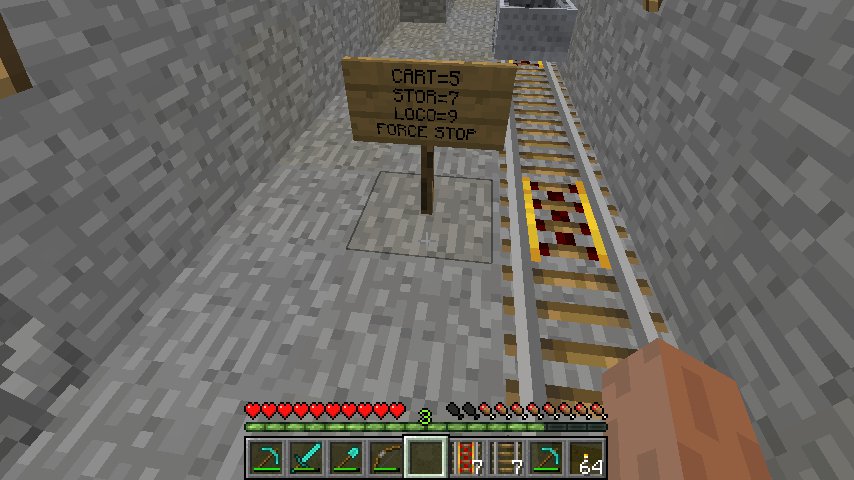
You just need toput sign by the side ( left or right side ) of the powered rail, and define configuration syntax.
Right sign post has high priority.
There are 4 instruction are supported by the sign-configuration:
CART,STOR, LOCO and FORCE STOP ( or FS, or STOP )
First three can be used to setvelocity multiplier for each minecart type, and fourth to stop carts on unpowered rail.
You can define all four instruction in same timeon a sane sign.
Check this example:
CART=8
STOR=11
FORCE STOP
If you wrote this instructions on a sign placed near the powered rail, this will be interpreted as:
Version prior to 0.4 are check for updated every time you load/reload your server.
It's means,thah the module will perform network request to the http://azure.km.ua to get latest version
v 0.4 will not check for updatesautomatically, but you can enable updates.
Open config file located in plugins/advancedRails/advancedRailsConfig.yml and putintothe file following line:
updates.allow: true
This line will enable autoupdates on module load.
Please, send all your messages to the [email protected]