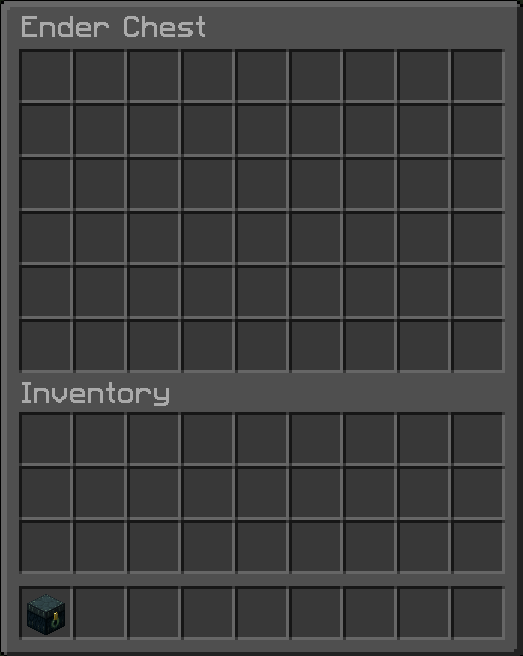
A Fabric mod that expands your enderchest from the vanilla 3 rows (27 slots) to up to 6 rows (54 slots).
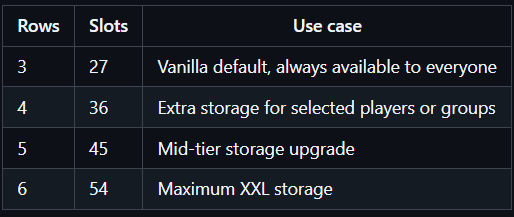
XXL Enderchest always keeps the internal ender chest container at 54 slots so data is never thrown away.
What players can actually open depends on the active mode:
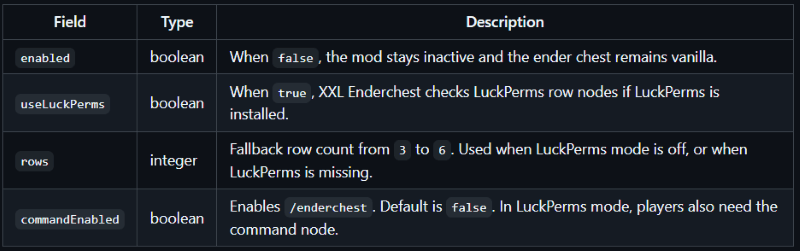
`enabled=false`: vanilla behavior only, 3 rows.
`enabled=true` and `useLuckPerms=false`: everyone gets the configured `rows` value.
`enabled=true` and `useLuckPerms=true` with LuckPerms installed: everyone keeps vanilla 3 rows by default, and permissions can upgrade that to 4, 5, or 6 rows.
`enabled=true` and `useLuckPerms=true` without LuckPerms installed: automatic fallback to configured `rows`.
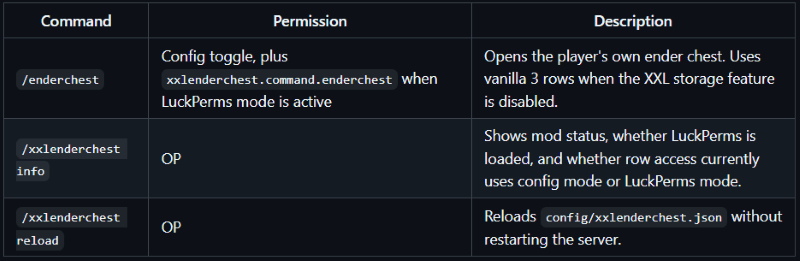
`commandEnabled=true`: players can use `/enderchest`; in LuckPerms mode they also need the command permission node.
Config file: `config/xxlenderchest.json`
json
{
"enabled": true,
"useLuckPerms": false,
"rows": 6,
"commandEnabled": false
}
After editing the config, run `/xxlenderchest reload`.
If you install Mod Menu and Cloth Config API on the client, XXL Enderchest exposes a full config screen in-game.
There is intentionally no `use` permission.
Every player must always be able to open a vanilla 3-row ender chest.
If LuckPerms mode is active, these nodes can increase the available rows:
Highest granted row wins.
LuckPerms quick start
Example: default users get 4 rows, moderators get 5 rows, VIPs get 6 rows.
Example: give one player full 6-row access.
Example: enable the `/enderchest` command for one player.
Official LuckPerms docs:
Lowering row access
If a player had access to more rows before, the extra items remain stored.
They are simply hidden until that player regains enough rows again.
Removing the mod
Vanilla Minecraft only uses the first 27 ender chest slots.
If you remove XXL Enderchest from an existing world, items stored below the first 3 rows may no longer be accessible.
Make a backup before removing the mod from a world or server.
Feel free to join my Minecraft server to test my mods: play.swordfishbe.eu