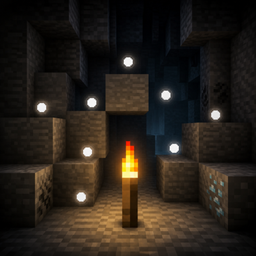
# Torch Spots
**Torch Spots** helps you light up your base and caves safely by showing where hostile mobs can spawn.
Hold a torch, tap **Shift** quickly three times, and floating white dots appear on nearby spawnable blocks. Place torches until the dots disappear — then those spots are safe.
## Features
- Shows floating white dots on blocks where monsters can spawn
- Toggle overlay by holding a torch and tapping Shift 3 times quickly
- Works with Torch, Soul Torch, Redstone Torch, and Copper Torch (when available)
- Markers refresh as you move
- Spots disappear once the area is lit enough that mobs can no longer spawn there
- Compatible with Iris shader packs (optional)
## How to use
1. Hold a torch in your main hand or offhand.
2. Tap **Shift** quickly 3 times.
3. Floating white dots appear on nearby spawnable blocks.
4. Tap Shift quickly 3 times again (while holding a torch) to hide them.
## Requirements
- Minecraft (version matching the file you download)
- Fabric Loader
- Fabric API
## Notes
- Client-side overlay for spawn spotting while exploring and building
- Designed to make torch placement faster and clearer
## License
CC0-1.0 (Creative Commons Zero) — free to use, modify, and redistribute.