Badges update automatically and link to the resource pack page on MineUniverse.
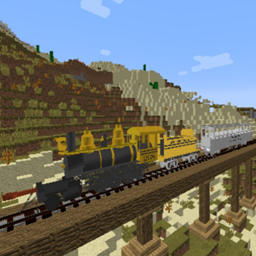
This Resource pack was created by ZoraSlade, and is for Immersive Railroading 1.12, Download the Mod here if you don't have it already.
Note: This pack is in the process of being remastered, with more detailed and accurate models, more liveries, and better sounds. You can view my progress here: https://trello.com/b/ngzQZO4h/titfield-thunderbold-remastered-project
The Titfield Thunderbolt is an Ealing comedy movie made in 1953 which takes place in the south-western part of England. A Vicker of the village of Titfield is trying to save it's Branch line from being closed by British railways.
Installation instructions:
1) Download the Titfield+Thunderbolt+Pack.zip
2) Place the .zip in your C:\Users\[your user]\AppData\Roaming\.Minecraft\resourcepacks folder
3) Start Minecraft and enable the Resource Pack from the Options menu
What's included?
LOCOMOTIVES:
GWR 14XX CLASS (Liveries:1401.1420,1436,1450 GWR, 1450 BR, 1466)

GWR 1401 (and 1450 disguised as 1401) is the locomotive that was mainly used on the branch line. Coupled up with the W&U Tramway coach No.8 and GWR Toad Brake van, it ran daily services from Titfield to Mallingford. Later in the film, both 1401 and the W&U Tramway coach were badly damaged in an act of sabotage by the local opposing Bus company.
After the Film: Unfortunately, #1401 was scrapped after the film. However, the North Norfolk Railway had renumbered one of their 14xx class to 1401 and ran Titfield Thunderbolt re-enactment rides in 2012.
LMR #57 "LION" as "THUNDERBOLT"

Thunderbolt was a locomotive in the Museum during most of the movie and was highly praised by the Vicker. The night that 1401 was derailed and damaged, the Vicker got all of the town's people together to pull Thunderbolt out of the museum and steam her up before the railway trial in the morning. She pulled the Loriot with Dan's house on top with the Toad brake van on a trial between Titfield and Mallingford. In the end, Thunderbolt successfully completed the trial and the Titfield Branch line was officially approved for a Light Railway Order.
After the Film: LMR 57 Lion is now on display at the Museum of Liverpool, and has no future plans to be steamed up again.
OTHER ROLLING STOCK:
WISBECH & UPWELL TRAMWAY COACH #8

This is a primary coach used during the film. It is uniquely fitted with a bar in the rear of the coach as per the request of the Railway's new owner, Mr. Valentine. It too was derailed along with 1401 and damaged beyond repair.
After the film: It is believed that the original coach used in the film was either destroyed in the making of the film or is missing. However, another 4-axle tramway coach survives and is used on the North Norfolk Railway along with the re-numbered 1401.
GWR TOAD BRAKEVAN

The GWR Toad brake van that was used with both consists during the movie.
DAN'S COACH HOME MOUNTED ON A LORIOT Y WAGON

After the wreck of the Tramway Coach and 1401, the fireman's house was used as a makeshift carriage for the trial. It was mounted on a GWR Loriot wagon.
After the film: The Coach itself was a movie prop and was likely dismantled after filming. The Loriot's fate is unknown.