Features:
- New players begin in
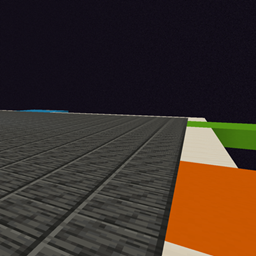
realmfoundry:hub, a shared void platform with vertical building space and six guarded gateway corridors.
- Each gateway controls one real, separate dimension with normal, superflat, or amplified terrain.
- Right-click an empty gateway to choose terrain, a starting climate, and world-border radius.
- Border radius can be selected from 500 through 2000 blocks.
- The creating survival player owns that realm slot. Its owner or an operator can replace or retire it; everyone may enter it.
- Replacing a realm evacuates players to the hub and moves the slot to untouched terrain at runtime. Existing terrain is no longer reachable through the gate.
- Every realm has an above-ground protected arrival platform.
- Every player receives a reusable Foundry Atlas that returns them to the hub.
- A reusable Netherway Key travels to a protected shared shelter in the vanilla Nether. It can be supplied through quests, commands, or an optional server setting.
- Sneak-right-click any hub gate to open its management screen.
/realmfoundry manage [slot]
/realmfoundry hub
/realmfoundry enter <slot>
/realmfoundry generate <slot> <terrain> <climate> <radius>
/realmfoundry replace <slot> <terrain> <climate> <radius> confirm
/realmfoundry retire <slot> confirm
/realmfoundry status
Climate choices are random, temperate, warm, cold, mountain, and forest. Terrain choices are normal, superflat, and amplified. Superflat always uses plains.
The travel items can also be granted by commands:
/give <player> realmfoundry:foundry_atlas
/give <player> realmfoundry:netherway_key
The server's config/realmfoundry-server.toml file includes:
giveNetherwayKeyOnLogin = false
Set it to true to automatically give missing Netherway Keys on login and respawn.