Mineuniverse
Mods
One Dimension

One Dimension

MOD
A vertical overhaul mod that merges all three vanilla dimensions into a single continuous world. Instead of separate Nether, Overworld, and End dimensions, the world is stacked by height inside one seamless dimension
by CodxIO
Download Claim this project
9,434 downloads
0 likes
0 followers
Updated Oct 14, 2026
0 hypes
Follow0
World Gen
Advertisement Remove ads with Premium →

Buy Me A Coffee

One Dimension

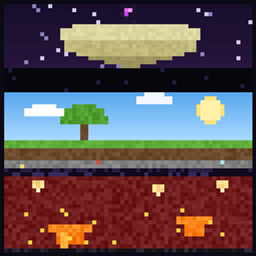
All dimensions in one world, stacked on top of each other. The End floats above the Overworld and the Nether sits underneath it. Dig down far enough and you break into the Nether roof. Build up high enough and you reach the End islands.

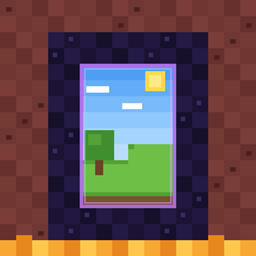
There are no portals needed and no loading screens, because it really is one world. You can stand in a Nether cave and tunnel straight up to your base.

Making a world

When you press Create New World you get one extra screen. It lists every dimension your world will have, including the ones added by mods and datapacks, with the top of the world first. The default order is:

The End
Overworld
The Nether
anything your mods add

You can move them around, leave some out so they stay normal dimensions, or turn the whole thing off for that world and get a regular one.

The other options on that screen:

  • Bottom joins top makes the world loop. Fall out of the bottom and you come back in at the top.
  • Space below sets how many empty blocks sit between two worlds.
  • Remove empty space above roofs cuts the unused part of a world, like the 128 blocks above the Nether roof.
  • Separate skies gives every world its own sky, so the Overworld does not cast a shadow on the Nether and the Nether stays dark.
  • Replace bedrock turns the bedrock between worlds into another block so you can dig through. It is obsidian by default, so you still need a diamond pickaxe.
  • Spawn in picks the world you start in.
  • Nether portals can keep the normal 8 to 1 travel or go 1 to 1, which puts you at the same spot as if you had dug down.

The loop

With the loop on you can look down through the bottom of the world and see the top of it far below you, and the other way around. Mobs, items, water and lava can go through as well.

If you turn the loop on you get a second screen where you choose how far away you can still see through it, how sharp that view is, and whether mobs and fluids are allowed to cross. Those settings only apply to the loop. Normal portals are not touched.

Servers

A dedicated server has no create world screen, so it uses the defaults in config/one-dimension.json. The file is written the first time the server starts and every option in it has a line explaining what it does.

Worlds that were made before you installed the mod stay the way they are.

Requirements

  • Minecraft 26.3
  • Fabric Loader 0.19.5 or newer
  • Fabric API
  • CodxLib
  • CustomChunks, which does the stacking
  • Planeshift, which does the loop

The mod has to be installed on the server and on every client.

one-dimension-5.0.3.jar
MC Client, Fabric, Server, 26.3
Release 2026-10-08 Get
one-dimension-5.0.1.jar
MC Client, Fabric, Server, 26.3
Release 2026-10-06 Get
one-dimension-5.0.2.jar
MC Client, Fabric, Server, 26.3
Release 2026-10-06 Get
one-dimension-5.0.0.jar
MC Client, Fabric, Server, 26.3
Release 2026-10-05 Get
one-dimension-4.0.1.jar
MC Client, Fabric, Server, 26.3
Release 2026-09-29 Get
one-dimension-4.0.jar
MC Client, Fabric, Server, 26.3
Release 2026-09-28 Get
OneDimension 3.1.0 — Fabric 26.2
MC Client, Fabric, Server, 26.2
Release 2026-08-30 Get
OneDimension 3.1.0 — Fabric 1.20.1
MC Client, Fabric, 1.20.1, Server
Release 2026-08-30 Get
OneDimension 3.1.0 — Forge 1.20.1
MC Client, 1.20.1, Forge, Server
Release 2026-08-30 Get
OneDimension 3.1.0 — Fabric 1.20.2
MC Client, 1.20.2, Fabric, Server
Release 2026-08-30 Get
OneDimension 3.1.0 — Fabric 1.20.3
MC Client, Fabric, 1.20.3, Server
Release 2026-08-30 Get
OneDimension 3.1.0 — Fabric 1.20.4
MC Client, Fabric, 1.20.4, Server
Release 2026-08-30 Get
OneDimension 3.1.0 — Forge 1.20.4
MC Client, Forge, 1.20.4, Server
Release 2026-08-30 Get
OneDimension 3.1.0 — NeoForge 1.20.4
MC Client, 1.20.4, NeoForge, Server
Release 2026-08-30 Get
OneDimension 3.1.0 — Fabric 1.20.5
MC Client, Fabric, 1.20.5, Server
Release 2026-08-30 Get
OneDimension 3.1.0 — Fabric 1.20.6
MC Client, Fabric, 1.20.6, Server
Release 2026-08-30 Get
OneDimension 3.1.0 — Forge 1.20.6
MC Client, Forge, 1.20.6, Server
Release 2026-08-30 Get
OneDimension 3.1.0 — NeoForge 1.20.6
MC Client, 1.20.6, NeoForge, Server
Release 2026-08-30 Get
OneDimension 3.1.0 — Fabric 1.21
MC 1.21, Client, Fabric, Server
Release 2026-08-30 Get
OneDimension 3.1.0 — Forge 1.21
MC 1.21, Client, Forge, Server
Release 2026-08-30 Get
OneDimension 3.1.0 — NeoForge 1.21
MC 1.21, Client, NeoForge, Server
Release 2026-08-30 Get
OneDimension 3.1.0 — Fabric 1.21.1
MC Client, Fabric, 1.21.1, Server
Release 2026-08-30 Get
OneDimension 3.1.0 — Forge 1.21.1
MC Client, Forge, 1.21.1, Server
Release 2026-08-30 Get
OneDimension 3.1.0 — NeoForge 1.21.1
MC Client, 1.21.1, NeoForge, Server
Release 2026-08-30 Get
OneDimension 3.1.0 — Fabric 1.21.2
MC Client, Fabric, Server, 1.21.2
Release 2026-08-30 Get
OneDimension 3.1.0 — NeoForge 1.21.2
MC Client, NeoForge, Server, 1.21.2
Release 2026-08-30 Get
OneDimension 3.1.0 — Fabric 1.21.3
MC Client, Fabric, 1.21.3, Server
Release 2026-08-30 Get
OneDimension 3.1.0 — Forge 1.21.3
MC Client, Forge, 1.21.3, Server
Release 2026-08-30 Get
OneDimension 3.1.0 — NeoForge 1.21.3
MC Client, 1.21.3, NeoForge, Server
Release 2026-08-30 Get
OneDimension 3.1.0 — Fabric 1.21.4
MC Client, Fabric, 1.21.4, Server
Release 2026-08-30 Get
OneDimension 3.1.0 — Forge 1.21.4
MC Client, 1.21.4, Forge, Server
Release 2026-08-30 Get
OneDimension 3.1.0 — NeoForge 1.21.4
MC Client, 1.21.4, NeoForge, Server
Release 2026-08-30 Get
OneDimension 3.1.0 — Fabric 1.21.5
MC Client, Fabric, 1.21.5, Server
Release 2026-08-30 Get
OneDimension 3.1.0 — Forge 1.21.5
MC Client, 1.21.5, Forge, Server
Release 2026-08-30 Get
OneDimension 3.1.0 — NeoForge 1.21.5
MC Client, 1.21.5, NeoForge, Server
Release 2026-08-30 Get
OneDimension 3.1.0 — Fabric 1.21.6
MC Client, Fabric, 1.21.6, Server
Release 2026-08-30 Get
OneDimension 3.1.0 — Forge 1.21.6
MC Client, Forge, 1.21.6, Server
Release 2026-08-30 Get
OneDimension 3.1.0 — NeoForge 1.21.6
MC Client, 1.21.6, NeoForge, Server
Release 2026-08-30 Get
OneDimension 3.1.0 — Fabric 1.21.7
MC Client, Fabric, 1.21.7, Server
Release 2026-08-30 Get
OneDimension 3.1.0 — Forge 1.21.7
MC Client, Forge, 1.21.7, Server
Release 2026-08-30 Get
OneDimension 3.1.0 — NeoForge 1.21.7
MC Client, 1.21.7, NeoForge, Server
Release 2026-08-30 Get
OneDimension 3.1.0 — Fabric 1.21.8
MC Client, Fabric, 1.21.8, Server
Release 2026-08-30 Get
OneDimension 3.1.0 — Forge 1.21.8
MC Client, 1.21.8, Forge, Server
Release 2026-08-30 Get
OneDimension 3.1.0 — NeoForge 1.21.8
MC Client, 1.21.8, NeoForge, Server
Release 2026-08-30 Get
OneDimension 3.1.0 — Fabric 1.21.9
MC Client, Fabric, Server, 1.21.9
Release 2026-08-30 Get
OneDimension 3.1.0 — Forge 1.21.9
MC Client, Forge, Server, 1.21.9
Release 2026-08-30 Get
OneDimension 3.1.0 — NeoForge 1.21.9
MC Client, NeoForge, Server, 1.21.9
Release 2026-08-30 Get
OneDimension 3.1.0 — Fabric 1.21.10
MC Client, Fabric, Server, 1.21.10
Release 2026-08-30 Get
OneDimension 3.1.0 — Forge 1.21.10
MC Client, Forge, Server, 1.21.10
Release 2026-08-30 Get
OneDimension 3.1.0 — NeoForge 1.21.10
MC Client, NeoForge, Server, 1.21.10
Release 2026-08-30 Get

More from CodxIO

Advertisement Remove ads with Premium →

You Might Also Like