
Loading...
Beta Modpages Unclaimed

NetherPortalFix

Ensures correct destinations when travelling back and forth through Nether Portals in Multiplayer.

Likes
152423188 Downloads
Created by

Description

NetherPortalFix

Requires Balm Support on Patreon

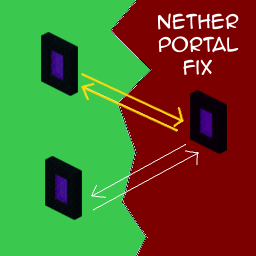
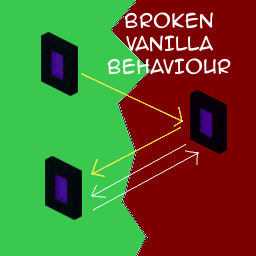
Ever played on a multiplayer server, built near other players and when returning from the Nether, surprisingly found yourself in another player's base? It's because of the 8:1 block ratio between the Nether and the Overworld. It's really weird though that you enter a portal in the overworld, and then when going back through where you came, come out of a different portal in the overworld. This mod fixes that issue.

It keeps track of what portals a player went through in order to ensure correct destinations when the player is going back through the same portals. The 1:8 ratio remains, portals just get smarter and remember where you came from.

This mod is available for NeoForge, Fabric and Forge. It requires Balm, which must be installed alongside the mod.

Features

  • As long as players use the same portal to return to the overworld, they will end up where they came from
  • Only needs to be installed on the server (but works in singleplayer as well)


AD Become Premium to remove Ads!

What means Verified?

  • Compatibility: The mod should be compatible with the latest version of Minecraft and be clearly labeled with its supported versions.
  • Functionality: The mod should work as advertised and not cause any game-breaking bugs or crashes.
  • Security: The mod should not contain any malicious code or attempts to steal personal information.
  • Performance: The mod should not cause a significant decrease in the game's performance, such as by causing lag or reducing frame rates.
  • Originality: The mod should be original and not a copy of someone else's work.
  • Up-to-date: The mod should be regularly updated to fix bugs, improve performance, and maintain compatibility with the latest version of Minecraft.
  • Support: The mod should have an active developer who provides support and troubleshooting assistance to users.
  • License: The mod should be released under a clear and open source license that allows others to use, modify, and redistribute the code.
  • Documentation: The mod should come with clear and detailed documentation on how to install and use it.

AD Become Premium to remove Ads!

How to Install

1

Download Forge & Java

Download Forge from the offical Site or here. If you dont have Java installed then install it now from here. After Downloading Forge you can run the file with Java.

2

Prepare

Lounch Minecraft and select your Forge istallation as Version this will create a Folder called Mods.

3

Add Mods

Type Win+R and type %appdata% and open the .minecraft Folder. There will you find your Folder called Mods. Place all Mods you want to play in this Folder

4

Enjoy

You are now Ready. Re-start your Game and start Playing.

More Mods like this

Controlling

Adds a search bar to the Key-Bindings menu

Cupboard

Cupboard provides code, frameworks, and utilities for minecraft mods

Crafting Tweaks

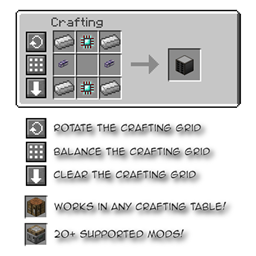
Allows you to rotate, balance or clear the crafting matrix by the press of a button, in any (supported) crafting window.

KleeSlabs

Break only the half of a double slab that you're looking at.

Configured

Automatic in-game configuration menus for every mod!

TrashSlot

Adds a trash slot to the inventory screen that allows deletion of unwanted items.

Essential Mod

The best way to play Minecraft. Enhanced Minecraft features in one simple mod. Fast, friendly, and for everyone!

Amendments

Cauldron Potion Mixing, Lanterns Animation, Carpeted Stairs, Candle Skulls, Double Cakes, Better Lilypads and much more