Mineuniverse
Resource Packs
Maxi's JourneyMap Cobblemon Minimap Icons

Maxi's JourneyMap Cobblemon Minimap Icons

RESOURCE PACK
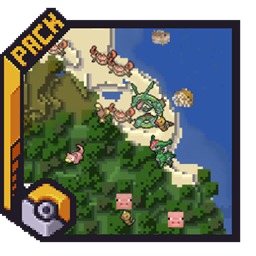
Adds entity icons of Pokémon found in the Cobblemon Mod to JourneyMap
by Maxitotito
Download Claim this project
Add a badge to your pageLink to Maxi's JourneyMap Cobblemon Minimap Icons from a README, website or forum post.
Preview: Badge

Badges update automatically and link to the resource pack page on MineUniverse.

2,443,754 downloads
0 likes
0 followers
Updated Oct 14, 2026
0 hypes
Follow0
32x Mod Support
Advertisement Remove ads with Premium →

<center>
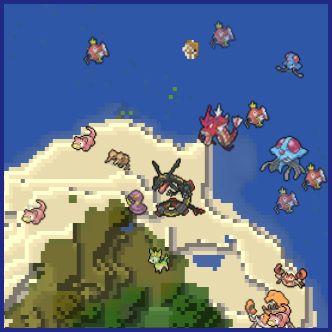
No matter the dimension nor form (regional, normal & shiny), you will see your Pokémon!</center>


This resource pack adds entity icons of Pokémon found in the Cobblemon Mod to JourneyMap' minimap and fullscreen map, in pixel-art style. Supports up-to-date Cobblemon version.


  • JourneyMap version 5.9.5 or newer


<center></center> <center></center>
Pixel Icons & Shinier Shinies: For those who want an old style and also want to spot Shinies slightly easier. Shuffle Icons: For those who want a fun style while searching for those Pokémon.


  1. Download the JourneyMap+Cobblemon.zip.
  2. Put it inside the folder resourcepacks of your Minecraft installation. An easy way to access this folder is via the ingame Options → Resource Packs, and click the bottom left button (Open Pack Folder).
  3. Select the JourneyMap+Cobblemon resourse pack from the available packs ingame (Options → Resource Packs).
  4. Click Done.
  5. On JourneyMap Options, both minimap Preset and Fullscreen map, set Mob Display to Icons.


  • I can't see any Pokémon on my map
    For you to see Pokémon on your minimap/fullscreen map, you have to set Mob Display to Icons in your JourneyMap options. You have to set this for both presets and fullscreen map options.
    <center></center>


  • I've set Mob Display to Icons but I still can't see any Pokémon
    You have to make sure to, at least, have the version 5.9.5 of JourneyMap for the resourcepack to work.


  • I have the correct JM version but I still don't see my Pokémon
    Remember to Select (move to the right column) the correct resourcepack from your Available list on your game Options → Resource Packs.


  • How can I make the icons bigger?
    Just as seen above, aside from the Mob Display option is Mob Display Scale, you can set this number to your preference. Remember to set this number on the preset you will be using and/or on the fullscreen map.


Check out my other projects!

Maxi's-JM+CM Update 11: FullDex v1.000
MC 1.21.1
Release 2026-03-21 Get
Maxi's-JM+CM Update 10
MC 1.21.1
Release 2026-02-13 Get
Maxi's-JM+CM Update 9
MC 1.21.1
Release 2026-02-07 Get
Maxi's-JM+CM Update 8
MC 1.21.1
Release 2025-11-26 Get
Maxi's-JM+CM Update 7
MC 1.21.1
Release 2025-06-15 Get
6_Shuffle
MC 1.21.1
Release 2025-01-28 Get
6_Pixel
MC 1.21.1
Release 2025-01-28 Get
5_Pixel+ShinierShinies
MC 1.21.1
Release 2025-01-02 Get
5_Shuffle
MC 1.21.1
Release 2025-01-01 Get
JM+Cobblemon1.3.2
MC 1.19.2
Release 2023-04-10 Get
JM+Cobblemon1.3.2_ShinierShinies
MC 1.19.2
Release 2023-04-10 Get
JourneyMap+Cobblemon1.3.2_1.19.2.zip
MC 1.19.2
Release 2023-04-03 Get

Requirements & install

How to use this resource pack in Minecraft
Resolution
32x
Minecraft
1.19.2 – 1.21.1
Install folder
.minecraft/resourcepacks

How to install resource packs

  1. Download the resource pack .zip file (do not extract it).
  2. In Minecraft open Options → Resource Packs → Open Pack Folder.
  3. Drop the .zip into the resourcepacks folder (.minecraft/resourcepacks).
  4. Move the pack to the Selected column and click Done.
Browse more: 16x resource packs 32x resource packs 64x resource packs 128x resource packs 256x resource packs 512x+ resource packs Resource Packs for 1.21.1 All resource packs

More from Maxitotito

Advertisement Remove ads with Premium →

You Might Also Like