Mineuniverse
Data Packs
Caterpie Homes

Caterpie Homes

DATA PACK
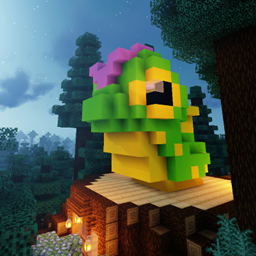
This datapack brings you a fully decorated command structure Caterpie with three styles!
by Maxitotito
Download Claim this project
21 downloads
0 likes
Updated Oct 14, 2026
0 hypes
Adventure Miscellaneous
Advertisement Remove ads with Premium →
Caterpie Homes Presentation Image

Caterpie will wait for you!


This datapack brings you the fully decorated command structure Caterpie with three styles!

🪞 Three Styles

Caterpie House Caterpie Trunk Caterpie
Name Caterpie House Caterpie Trunk Caterpie
Description Caterpie on top of their Trunk and with Old Taiga Woods (very tiny) around. Caterpie on top of their Trunk. Caterpie alone.
/place structure pokehouse: caterpiehouse caterpietrunk caterpie

🏯 Plenty room for your homy needs

This Caterpie brings you with plenty of room for you to use and enjoy!

🪑 The first floor of both Caterpie House & Trunk offers you a cozy trunk environment with a in-door field, a kitchen and a enchanting table ready to be used!

Trunk in-door Field Trunk Kitchen Trunk Enchanting Table Trunk Entrance

🪜 The second floor of all Caterpies offers you with a cozy escalated room for you to rest and enjoy leisure time.

Caterpie Room Photo #1 Caterpie Room Photo #2

⛺ Standalone Caterpie also offers you with a built-in kitchen and entrance!

Standalone Caterpie Room Photo #1 Standalone Caterpie Room Photo #2 Standalone Caterpie Room Photo #3

⚠️ Requirements

  • Minecraft Java (presummably) from 1.20.5 to 1.21.11.

🚫 Attention

  • To ensure not losing any previous structure close to you, we suggest you place the caterpies away from any other structure to avoid misplacing and losing any previous builds.
  • Since this is a command-only structure (for now, at least), please do not use /locate structure command on these Caterpies, the game will not find any and will freeze too, having to close the game forcefully.

Caterpie Homes 1.0
MC 1.21, 1.21.8, 1.20.5, 1.21.5, 1.21.4, 1.20.6, 1.21.1, 1.21.6, 1.21.3, 1.21.7, 1.21.2, 1.21.9, 1.21.10, 1.21.11
Release 2026-05-05 Get

Requirements & install

How to use this data pack in Minecraft
Mods needed
None, works in vanilla
Minecraft
1.21.4 – 1.21.11
Install folder
saves/<world>/datapacks

How to install data packs

  1. Download the data pack .zip file (do not extract it).
  2. New world: click Data Packs on the world creation screen and drop the .zip in. Existing world: open .minecraft/saves/<world>/datapacks.
  3. Put the .zip into the datapacks folder of the world (servers: world/datapacks).
  4. Run /reload in game (or rejoin the world) and check it with /datapack list.
Browse more: Data Packs for 1.21.11 All data packs

More from Maxitotito

Advertisement Remove ads with Premium →

You Might Also Like