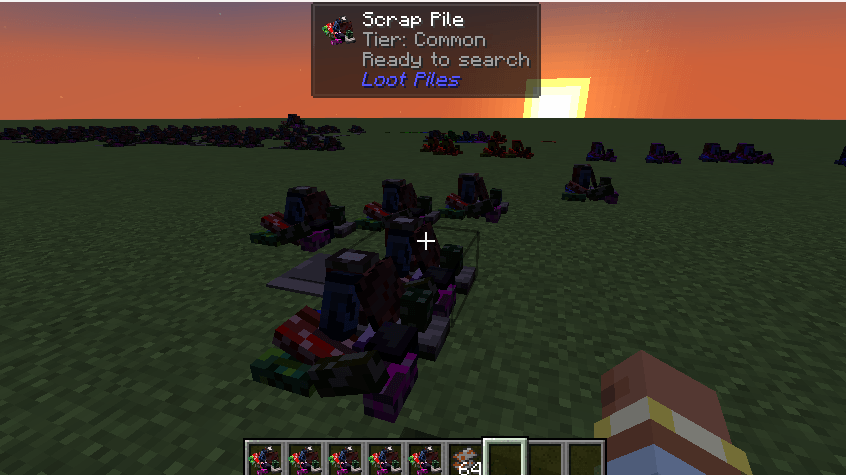
NeoForge mod for Minecraft 1.21.1 that adds tiered scrap pile loot blocks with shared cooldowns and a performance-focused server architecture.
SavedData cooldown manager — no ticking block entitiesconfig/lootpiles-server.tomltintindex: 0)CUSTOM_NAME data components)metal_scrap loot item./gradlew build
./gradlew runClient
./gradlew runServer
run-client/ (singleplayer saves)run-server/ (dedicated world + console)Dev in NeoForge userdevrun-server/eula.txt (eula=true) on first launch.\gradlew.bat runServerDev is granted OP automatically on first run (dev/server/ops.json is copied)op Dev
localhost (with online-mode=false)invalidplayerdata on the clientThis happens when a world under run/saves/ is corrupted (stats/advancements exist but playerdata/ is missing).
Fix: delete broken worlds and create a new one:
Remove-Item -Recurse -Force run\saves\Dev, run\saves\"New World"
# or delete everything:
Remove-Item -Recurse -Force run\saves\*
With the current Gradle setup, saves live under run-client/saves/ after running runClient.
JADE and JEI are loaded via localRuntime for local testing only.
| Command | Description |
|---|---|
/scrappile spawn <tier> [x y z] |
Place a scrap pile |
/scrappile reset all |
Clear all cooldowns in the current dimension |
/scrappile reset <x> <y> <z> |
Reset one pile |
/scrappile status <x> <y> <z> |
Show tier and cooldown status |
Alias: /lootpiles
Server config file: config/lootpiles-server.toml
Default cooldowns (ticks):
| Tier | Ticks | Time |
|---|---|---|
| Common | 12000 | 10 min |
| Uncommon | 24000 | 20 min |
| Rare | 36000 | 30 min |
| Epic | 60000 | 50 min |
| Legendary | 120000 | 100 min |
scrap_pile.json) using lootpile_base.png (64×64 atlas)scrap_pile_empty.json) switched via blockstate when depleted=true| Tier | Block tint | Item name style |
|---|---|---|
| Common | #909090 |
Gray |
| Uncommon | #1EFF00 |
Green |
| Rare | #0070DD |
Blue, bold |
| Epic | #A335EE |
Purple, bold |
| Legendary | #FF8000 |
Orange, bold, underlined |
| Secret | Description |
|---|---|
CURSEFORGE_TOKEN |
CurseForge API token |
CURSEFORGE_PROJECT_ID |
Numeric CurseForge project ID |
git tag v1.0.0
git push origin v1.0.0
The Publish Mod to CurseForge workflow builds the jar, uploads to CurseForge, and generates a GitHub release changelog when no per-version file exists.
Run the Publish Mod to CurseForge workflow from the Actions tab and set the mod version input (e.g. 1.0.0).
Per-version changelogs live in docs/changelogs/<version>.md (for example docs/changelogs/1.0.0.md). When that file exists, it is uploaded to CurseForge as the release notes.
Version type is inferred automatically:
*-alpha → alpha*-beta → betaMIT — see LICENSE.