Mineuniverse
Data Packs
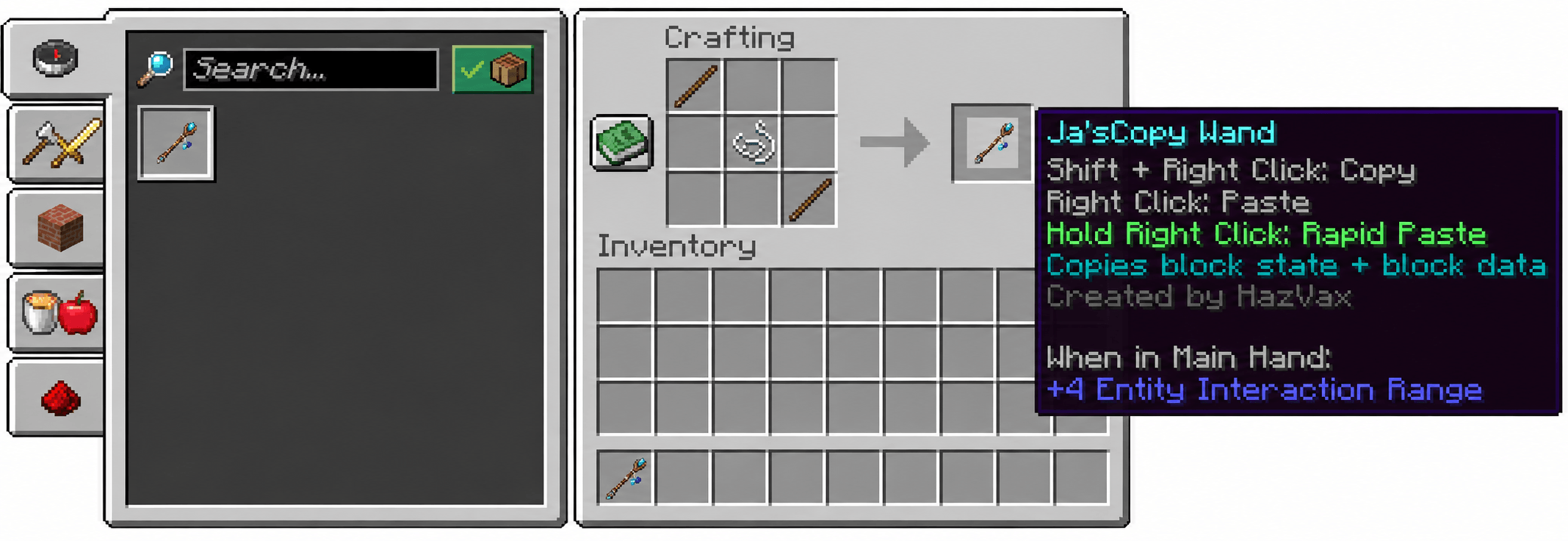
Ja'sCopy Wand

Ja'sCopy Wand

DATA PACK
Ja’sCopy Wand lets players copy a block with Sneak + Right Click and paste it anywhere with Right Click. Hold Right Click to rapidly place copied blocks while building. It works in all Gamemodes.
by HazVax
Download Claim this project
10 downloads
0 likes
0 followers
Updated Oct 14, 2026
0 hypes
Follow0
Fantasy Magic Tech Utility
Advertisement Remove ads with Premium →
<main class="min-h-[calc(100vh-4.5rem-310.59px)]">

Ja’sCopy Wand lets players copy a block with Sneak + Right Click and paste it anywhere with Right Click. Hold Right Click to rapidly place copied blocks while building. It works in Survival, Adventure, and Creative, preserves block state and data, supports double chests, beds, doors, and tall plants, and includes optional safety controls and personal settings. See Crafting Recipe in Gallery.

You must use our complimentatry resourcepack for this datapack called Ja'sCopy Wand (Resource Pack) to enjoy the datapack visually.

Inspired by Awhikax's Copy Paste Wand. This project uses no code or assets from the original work.


</main>
JasCopyWand-DataPack
MC 26.2
Release 2026-09-21 Get

Requirements & install

How to use this data pack in Minecraft
Mods needed
None, works in vanilla
Minecraft
26.2
Install folder
saves/<world>/datapacks

How to install data packs

  1. Download the data pack .zip file (do not extract it).
  2. New world: click Data Packs on the world creation screen and drop the .zip in. Existing world: open .minecraft/saves/<world>/datapacks.
  3. Put the .zip into the datapacks folder of the world (servers: world/datapacks).
  4. Run /reload in game (or rejoin the world) and check it with /datapack list.
Browse more: Data Packs for 26.2 All data packs

More from HazVax

Advertisement Remove ads with Premium →

You Might Also Like