TL;DR; I won't maintain the 1.20.5+ versions myself anymore, at least for now. There are ports by Sakura-Ryoko. They will be here once they are more stable, see the post for the links and details before then.
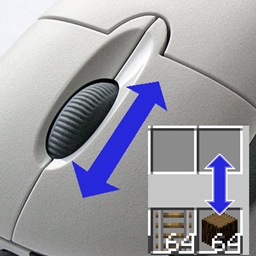
A client-side mod that adds several ways of moving items in inventory GUIs. This is done by scrolling the mouse wheel over item slots (optionally while holding some modifier keys) or by holding down modifier keys and then left- or right-click dragging over the slots.
The mod has a few modifier keys (Shift, Ctrl and Ctrl + Shift) to move entire stacks, all matching items or all items. It also has special handling for Villagers to ease the annoying clicking around while trading. As of version 0.11.0, it also has special crafting inventory handling (with a 18-slot internal "recipe memory").
The basic item scrolling is similar to what NEI (and some other mods) also did/do. But I wanted more control and more ways to move items, so I made this mod to have all those modes that I find useful, in one distinct, client-side mod (so it also works on vanilla servers all the same).
There are config options to individually enable or disable more or less any of the modes. There are also options to reverse the scroll directions, or to change what for example "scrolling up" means. All the configs are accessible via the in-game config menu.
Note: All recent Item Scroller versions (starting from version 0.13.0) require the malilib library mod:
https://minecraft.curseforge.com/projects/malilib
Note: Before version 0.6.1, the Shift + right click and hold + drag functionality required one empty slot in the source inventory for an intermediate click action.
Villager GUI has special handling (if enabled in the configs). It is only used when you hover over the output slot.
So basically you can just hold shift and scroll down/up repeatedly to trade items fast & easy.
Starting from version 0.11.0, there is support for crafting grid re-filling and mass crafting of items.
Old Crafting Scrolling behaviour in 0.11.0:
NOTE: This feature is actually in no way tied to crafting grids/tables. All the to-be-supported crafting grids must be added to the configuration. The vanilla crafting grids, plus all the crafting grids from Ender Utilities have been added there by default (and thus also serve as examples of how the config should look like).
To find out the GUI class name, the output slot class name and the slot numbers for the output slot and the ingredient slots, you can use the debug key combination Ctrl + Alt + Shift + I. To get the GUI class name, press it while not hovering over any slots.
To get the output slot's class and slotNumber, press it while hovering over the output slot. And then also get the ingredient slot range by pressing it while over the first and last slots for the grid. All the output will be printed to the console.
NOTE: In the output, you want the slotNumber value, not the getSlotIndex() value.
All the crafting inventories that should be supported, must be added to the scrollableCraftingGrids configuration value.
The format of one config line for adding crafting grids is:
guiclassname,outputslotclassname,outputslotnumber,gridfirstslotnumber-gridlastslotnumber
Here is an example of what one such crafting grid definition line will look like (taken from the default config, for the vanilla Crafting Table):
net.minecraft.client.gui.inventory.GuiCrafting,net.minecraft.inventory.SlotCrafting,0,1-9
Note that you must NOT use any spaces in it, or otherwise the regex won't match.
Slot and GUI blacklisting was added in version 0.10.0. By default the ME Terminal slots from Applied Energistics 2, and the Crafting Station side inventory slots from Tinkers' Construct are blacklisted. You can blacklist problematic slots or entire GUIs via the in-game config menu (the blackListedSlots and the blackListedGuis options). To find out the required class name to add to the blacklist, use the debug key combination Ctrl + Alt + Shift + I while hovering over a slot to get information about the slot, or while NOT hovering over a slot to see the GUI class name.
Alternatively, (as of 0.9.0) you can also simply toggle ON/OFF Item Scroller as-needed while inside a GUI, by pressing the toggle key, (which is Ctrl + S by default, can be configured in the Controls menu). The ON/OFF status is retained for as long as the game is running. There are two different noteblock sounds to indicate what the status changed to: the higher-pitch pling when enabling, and the lower-pitch bass when disabling.
The option useSlotPositionAwareScrollDirection (added in 0.7.0) changes the behaviour of the the scrolling direction so that it tries to detect if the "other inventory" on the screen is above or below the slot that is being scrolled over. The scroll direction will then be "scroll up to move to the inventory above, scroll down to move to the inventory below" instead of the normal "scroll up to move to the other inventory, scroll down to move to this slot/inventory". The reverse scroll direction options will also be applied on top of it still.
All the item moving in this mod is done by emulating mouse clicks on the slots.
Note: Some other mods also add the same functionality. You don't want to have multiple mods installed and doing this at the same time.
Mods that add the single item scrolling functionality in Minecraft 1.8.9+, that I know about: Mouse Tweaks, Inventory Sorter. So make sure you don't have the (single item) scroll functionality enabled in more than one mod at a time.
Note: This is a client-side-only mod!
If you have questions or need help with something, the best/fastest way to get answers is on my Discord server.