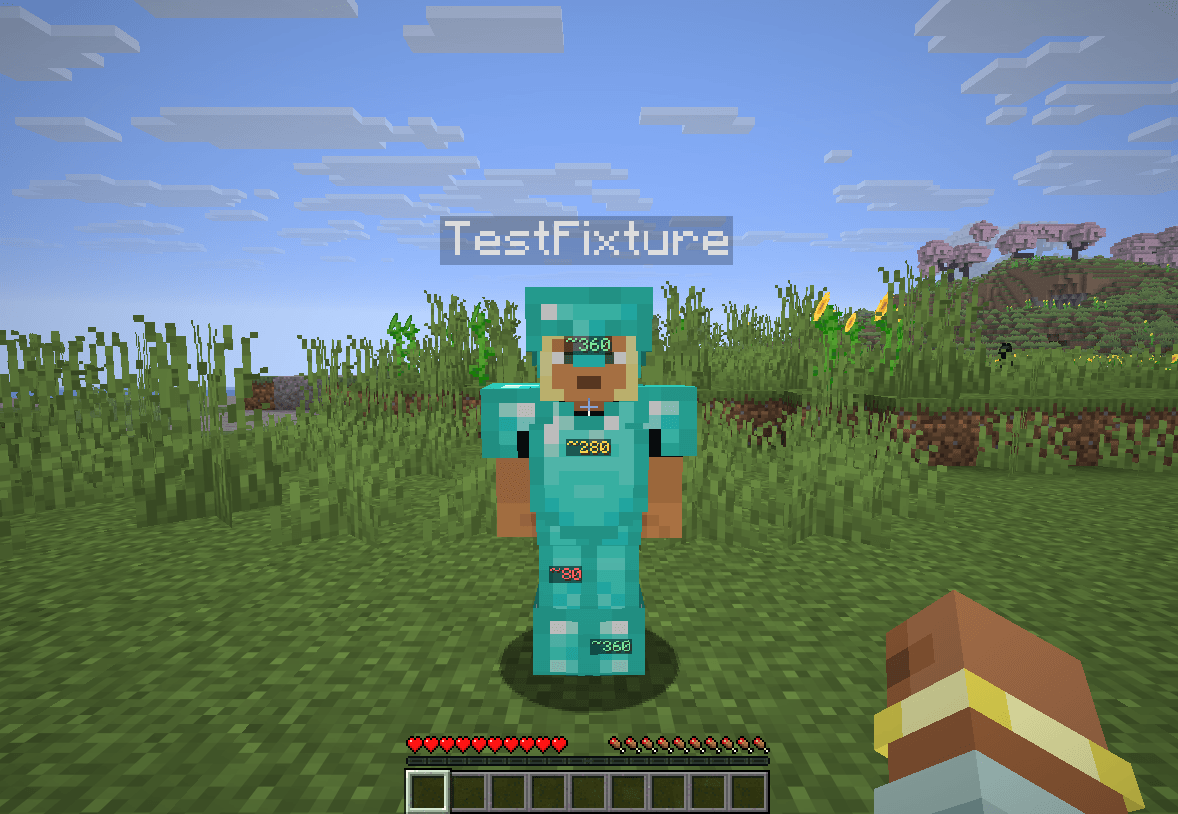
Color-coded durability numbers on visible players’ diamond and netherite armor. Separate client-only Fabric and NeoForge files for Minecraft Java 1.21.8, 1.21.9, 1.21.10, 1.21.11, 26.1, 26.1.1, 26.1.2, 26.2 and 26.3.
Labels follow the front/back armor surfaces of other visible players standing or crouching within 16 blocks by default. They are depth-tested and require line of sight. Invisible players, spectators, your own player, mobs, unsupported armor assets and sleeping/swimming/crawling/flying poses are excluded. Capes, shields and other geometry may cover labels naturally. This is a rendered overlay rather than a shared texture replacement.
F7 toggles labels, F8 cycles size, and F9 cycles the green/yellow/red and blue/yellow/orange palettes. Rebind under Options → Controls → Key Binds → DurabilityView. F1 hides labels with the HUD. Settings stay in config/durabilityview-client.properties; colors, range (2–32 blocks) and scale (0.65–1.5) can be edited with Minecraft closed.
Use Java 21 for Minecraft 1.21.x or Java 25 for 26.x. Place one JAR for your exact Minecraft version and loader in your client’s mods folder. Each file’s changelog lists its matching loader and Fabric API requirements.
NeoForge needs no extra configuration library. Do not install both loader variants. No server installation is needed.
Servers can hide or substitute equipment data, which a client cannot recover or authenticate. DurabilityView does not infer hidden values, bypass obfuscation, reveal invisible players, alter equipment or send custom network requests. Follow your server’s rules.
MIT licensed. An independent community mod, unrelated to other similarly named projects and not affiliated with Mojang or Microsoft.