弹幕落下的地方,团子替你把远方的陪伴轻轻带进方块世界。
Where danmaku falls, a little companion carries the warmth of distant company into the blocky world.
Minecraft 26.1.2 · NeoForge 26.1.2.103 · Version v1.0.0 · English / 中文
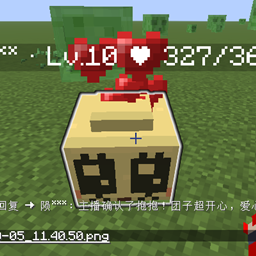
Companion Tuanzi turns viewers from your livestream into little "Tuanzi" companions inside your Minecraft world.
Each Tuanzi follows the streamer it's bound to, displays its viewer's nickname, level, and intimacy above its head, and grows gradually through danmaku check-ins, interactions, feeding, and watching the stream.
/tuanzi reload.!签到 (check-in) to receive a Tuanzi egg, which hatches after accumulating enough valid watch activity.Config file location:
config/companion_tuanzi.toml
It is auto-generated on first launch. After editing, run:
/tuanzi reload
Level thresholds are calculated with the following formula, where n = target level - 1:
required intimacy = base + linear × n + quadratic × n²
Corresponding config in [level]:
[level]
base = 1
linear = 6
quadratic = 3
max = 20
health_per_level = 1
feed_health = 2
max — the maximum level allowed by config. Even if a new level has no exclusive ability yet, viewers can still keep leveling up.health_per_level — HP added per level; base max HP is 10.feed_health — HP restored when the streamer feeds the Tuanzi once./tuanzi bind
/tuanzi status
/tuanzi enable
/tuanzi disable
/tuanzi reload
/tuanzi room bili <room ID>
/tuanzi room dy <room ID>
/tuanzi test !签到
/tuanzi watch <viewer nickname> <minutes>
For the full list of subcommands, check the in-game /tuanzi prompt.
After a streamer is bound, danmaku sent while unbound will not create profiles, spawn Tuanzi, or add intimacy.
Common danmaku commands include:
!签到
!抱抱
!摸摸
!击掌
!玩耍
!查询
!回来
!加油
Interactions need to be confirmed by the streamer in-game.
Per-viewer command cooldown can be adjusted in the config — for testing, set interact.command_cooldown_seconds to 0.
By default, the server creates the following under the world directory:
companion_tuanzi/companions.json
companion_tuanzi/events.jsonl
You can use data.shared_data_dir to point multiple server instances at a shared data directory.
伴行团子把直播间里的观众化作 Minecraft 世界中的小团子。
团子会跟随绑定的主播行动,头顶显示观众昵称、等级与亲密度,并通过弹幕签到、互动、喂食和观看活动逐步成长。
/tuanzi reload 热重载。!签到 获得团子蛋,累计有效观看活动后孵化。配置文件位于:
config/companion_tuanzi.toml
配置文件首次启动时自动生成。修改后执行:
/tuanzi reload
等级阈值由以下公式计算,其中 n = 目标等级 - 1:
所需亲密度 = base + linear × n + quadratic × n²
对应配置位于 [level]:
[level]
base = 1
linear = 6
quadratic = 3
max = 20
health_per_level = 1
feed_health = 2
max:配置允许的最高等级。即使某个新等级暂时没有专属能力,观众仍可继续升级。health_per_level:每级增加的生命上限,基础生命上限为 10 点。feed_health:主播喂食一次恢复的生命点数。/tuanzi bind
/tuanzi status
/tuanzi enable
/tuanzi disable
/tuanzi reload
/tuanzi room bili <房间号>
/tuanzi room dy <房间号>
/tuanzi test !签到
/tuanzi watch <观众昵称> <分钟>
具体可用子命令以游戏内 /tuanzi 的提示为准。
主播绑定后,未绑定状态下的弹幕不会创建档案、生成团子或增加亲密度。
常用弹幕指令包括:
!签到
!抱抱
!摸摸
!击掌
!玩耍
!查询
!回来
!加油
互动需要主播在游戏中确认。
同一观众的指令冷却可在配置中调整,测试时可将 interact.command_cooldown_seconds 设为 0。
默认情况下,服务端会在世界目录下创建:
companion_tuanzi/companions.json
companion_tuanzi/events.jsonl
可以通过 data.shared_data_dir 指定多个服务端实例共享的数据目录。
弹幕落下的地方,团子替你把远方的陪伴轻轻带进方块世界。
Where danmaku falls, a little companion carries the warmth of distant company into the blocky world.