Mineuniverse
Resource Packs
Clear Glass with Connected Textures! [16x]

Clear Glass with Connected Textures! [16x]

RESOURCE PACK
Clean Glass! Remove line streaks from Glass & Stained Glass!
by Dnator
Download Claim this project
Add a badge to your pageLink to Clear Glass with Connected Textures! [16x] from a README, website or forum post.
Preview: Badge

Badges update automatically and link to the resource pack page on MineUniverse.

10,721,353 downloads
0 likes
0 followers
Updated Oct 14, 2026
0 hypes
Follow0
16x Miscellaneous Modern Steampunk Traditional
Advertisement Remove ads with Premium →

Now Available for 1.20.4!

DISCLAIMER: To access Connected Textures you must have Optifine, Continuity, or a Connected Texture alternative installed.


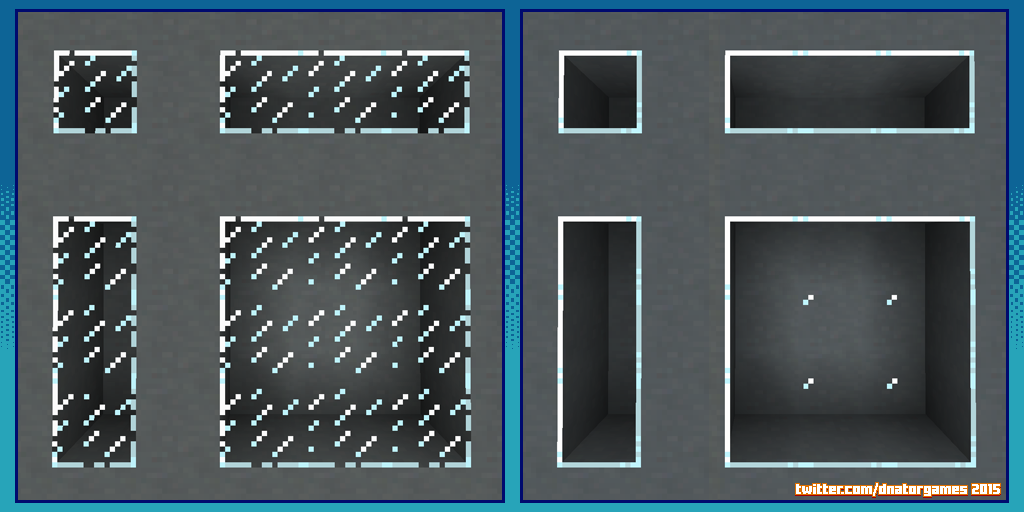
Remove those pesky streaks in the glass and ice textures and see like never before!

Hey Internets! This resource pack was made after I browsed the web for a simple, clear glass texture pack. I feel like these are all over the place yet something always feels... off. Sometimes I would find a glass pack that used the wrong colors. Other times the pack lacked connected texture support. And sometimes the resolution was just wrong. So I got to work and made my own!

WHY THIS CLEAR GLASS PACK?

  • Most Glass Packs don't include connected textures. 
  • No "Invisible Walls" to bump into for large windows.
  • 100% accuracy to Vanilla's Stained Glass color.

THIS PACK INCLUDES:

  • Clear Regular Glass with Connected Textures (Fancy)
  • Clear Stained Glass Varieties with Connected Textures (Fancy)
  • Tinted Glass with Connected Textures (Fancy)

If you are a content creator and wish to use this pack please put the Download Link into your video description or wherever you feel it suits for your platform. It helps more than you know and makes me smile! 

CLEAR GLASS CREDIT TEMPLATE

Clear Glass Pack by @DnatorGames (http://twitter.com/DnatorGames)

Download at (https://minecraft.curseforge.com/projects/clear-glass-pack)


This Pack features CLEAR GLASS with CONNECTED TEXTURES!

Clear Glass animated GIF Showcase


 DISCLAIMER: To access Connected Textures you must have Optifine installed.


Clear Glass Pack 26.2
MC 26.2
Release 2026-07-16 Get
Clear Glass Pack 1.21.4
MC 1.21.4
Release 2026-03-31 Get
Clear Glass Pack 1.21.5
MC 1.21.5
Release 2026-03-31 Get
Clear Glass Pack 1.21.6
MC 1.21.6
Release 2026-03-31 Get
Clear Glass Pack 1.21.7 to 1.21.8
MC 1.21.8, 1.21.7
Release 2026-03-31 Get
Clear Glass Pack 1.21.9 to 1.21.10
MC 1.21.9, 1.21.10
Release 2026-03-31 Get
Clear Glass Pack 1.21.11
MC 1.21.11
Release 2026-03-31 Get
Clear Glass Pack 26.1
MC 26.1
Release 2026-03-31 Get
Clear Glass Pack 1.21.2
MC 1.21.3, 1.21.2
Release 2024-11-15 Get
Clear Glass Pack 1.20.5 to 1.20.6
MC 1.20.5, 1.20.6
Release 2024-06-15 Get
Clear Glass Pack 1.21 to 1.21.1
MC 1.21, 1.21.1
Release 2024-06-15 Get
Clear Glass Pack 1.20.3 to 1.20.4
MC 1.20.3, 1.20.4
Release 2024-03-15 Get
Clear Glass Pack 1.20.2
MC 1.20.2
Release 2023-11-09 Get
Clear Glass Pack 1.19.4
MC 1.19.4
Release 2023-06-12 Get
Clear Glass Pack 1.20 to 1.20.1
MC 1.20.1, 1.20
Release 2023-06-12 Get
Clear Glass Pack 1.19.3
MC 1.19.3
Release 2023-01-09 Get
Clear Glass Pack 1.19 to 1.19.2
MC 1.19.2, 1.19.1, 1.19
Release 2022-06-18 Get
Clear Glass Pack 1.18
MC 1.18.1, 1.18.2, 1.18
Release 2021-12-14 Get
Clear Glass Pack 1.13 - 1.14
MC 1.13.1, 1.14.4, 1.14.1, 1.14.3, 1.13, 1.14, 1.14.2, 1.13.2
Release 2021-08-15 Get
Clear Glass Pack 1.15 - 1.16.1
MC 1.16.1, 1.15, 1.16, 1.15.2, 1.15.1
Release 2021-08-15 Get
Clear Glass Pack 1.16.2
MC 1.16.3, 1.16.5, 1.16.4, 1.16.2
Release 2021-08-15 Get
Clear Glass Pack 1.17
MC 1.17.1, 1.17
Release 2021-08-15 Get
Clear Glass Pack 1.8
MC 1.7.6, 1.8.7, 1.7.4, 1.7.7, 1.7.5, 1.6.1, 1.8.4, 1.7.9, 1.8.8, 1.7.2, 1.8-Snapshot, 1.8.3, 1.8.6, 1.7.8, 1.6.4, 1.7.10, 1.8, 1.8.2, 1.8.5, 1.8.9, 1.8.1, 1.6.2
Release 2018-09-19 Get
Clear Glass Pack 1.9 or 1.10
MC 1.9.1, 1.9.3, 1.10-Snapshot, 1.9.4, 1.9.2, 1.10.2, 1.10, 1.10.1, 1.9-Snapshot, 1.9
Release 2018-09-19 Get
Clear Glass Pack 1.11 - 1.12
MC 1.12.1, 1.12, 1.11, 1.11.1, 1.11.2, 1.11-Snapshot, 1.12.2, 1.12-Snapshot
Release 2018-09-19 Get

Requirements & install

How to use this resource pack in Minecraft
Resolution
16x
Minecraft
1.21.6 – 26.2
Install folder
.minecraft/resourcepacks

How to install resource packs

  1. Download the resource pack .zip file (do not extract it).
  2. In Minecraft open Options → Resource Packs → Open Pack Folder.
  3. Drop the .zip into the resourcepacks folder (.minecraft/resourcepacks).
  4. Move the pack to the Selected column and click Done.
Browse more: 16x resource packs 32x resource packs 64x resource packs 128x resource packs 256x resource packs 512x+ resource packs Resource Packs for 26.2 All resource packs

More from Dnator

Advertisement Remove ads with Premium →

You Might Also Like