Mineuniverse
Data Packs
Bigger Stack Size

Bigger Stack Size

DATA PACK
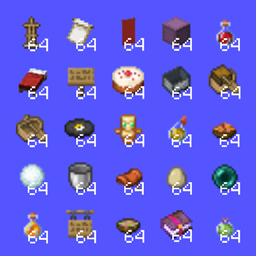
Stack size of 64 for all items!
by Jodek
Download Claim this project
8,951 downloads
0 likes
Updated Oct 14, 2026
0 hypes
Miscellaneous Tech Utility
Advertisement Remove ads with Premium →

minecraft datapack bigger stack size mod custom stack size mod

jodeks discord - discord badge - pixel badge - pixel discord badge - jodeks datapacks - datapacks discord   datapacks jodek youtube   armor stand arms minecraft datapack codeberg issues   jodeks datapacks kofi - jodek kofi - minecraft datapack kofi donation

All items are stackable by default to 64, they get updated once they're in your inventory

All items that are normally stackable up to 1 or 16 are now stackable up to 64

Config

/trigger bigger_stack_size.config

If disabled in the config, all items will reset when you split them up in your inventory

To choose what items are stackable

Edit this file:

datapack/bigger_stack_size/tags/item/stackable.json

To make certain items temporarily unstackable, e.g. for an item sorter:

Name the item "unstackable" with an anvil

To update items from a version below 1.21.6

/trigger bigger_stack_size.update_items

Updates every item in your inventory, make sure to not have items that have custom data you don't want to loose (e.g. from other datapacks)

Showcase

Embed Removed: https://www.youtube-nocookie.com/embed/cjL4vdu4QBQ

Stackable Items

  • Armor stands
  • Banner patterns
  • Banners
  • Beds
  • Boats
  • Cake
  • Chest boats
  • Discs
  • Empty buckets
  • Empty shulker boxes
  • Eggs
  • Ender pearls
  • (Enchanted Books) [next update]
  • Honey bottles
  • Hanging signs
  • Lingering Potions
  • Minecarts
  • Potions
  • Saddles
  • Signs
  • Snowballs
  • Splash Potions
  • Stews
  • Totems of Undying
  • Spyglasses
  • Writable books
  • Goat Horns
  • Horse armor

--> All of them are stackable up to 64

bigger-stack-size-v2.5.1.0
MC 26.3
Release 2026-09-28 Get
bigger-stack-size-v2.5.0
MC 26.3
Release 2026-09-21 Get
bigger-stack-size-v2.5.1
MC 26.3
Release 2026-09-21 Get
Bigger-Stack-Size v2.4.3
MC 1.21.8, 1.21.6, 1.21.7, 1.21.9, 1.21.10, 1.21.11, 26.1, 26.1.1, 26.1.2, 26.2
Release 2026-07-06 Get
Bigger-Stack-Size v2.4.1
MC 1.21.8, 1.21.6, 1.21.7, 1.21.9, 1.21.10, 1.21.11, 26.1, 26.1.1, 26.1.2
Release 2026-05-07 Get
Bigger-Stack-Size v2.4.2
MC 1.21.8, 1.21.6, 1.21.7, 1.21.9, 1.21.10, 1.21.11, 26.1, 26.1.1, 26.1.2
Release 2026-05-07 Get
Bigger-Stack-Size v2.4.4
MC 1.21.8, 1.21.6, 1.21.7, 1.21.9, 1.21.10, 1.21.11, 26.1, 26.1.1, 26.1.2
Release 2026-05-05 Get
bigger-stack-size v2.3.4.1
MC 1.21.8, 1.21.6, 1.21.7, 1.21.9, 1.21.10, 1.21.11, 26.1, 26.1.1, 26.1.2
Release 2026-04-10 Get
Bigger-Stack-Size v2.3.4.2
MC 1.21.8, 1.21.6, 1.21.7, 1.21.9, 1.21.10, 1.21.11, 26.1, 26.1.1, 26.1.2
Release 2026-04-10 Get
Bigger-Stack-Size v2.3.4.1
MC 1.21.8, 1.21.6, 1.21.7, 1.21.9, 1.21.10, 1.21.11, 26.1
Release 2026-03-31 Get
Bigger-Stack-Size v2.3.4
MC 1.21.8, 1.21.6, 1.21.7, 1.21.9, 1.21.10, 1.21.11, 26.1
Release 2026-03-26 Get
Bigger-Stack-Size v2.3.3
MC 1.21.8, 1.21.6, 1.21.7, 1.21.9, 1.21.10, 1.21.11
Release 2026-03-08 Get
Bigger-Stack-Size v2.3.2
MC 1.21.8, 1.21.6, 1.21.7, 1.21.9, 1.21.10, 1.21.11
Release 2026-01-11 Get

Requirements & install

How to use this data pack in Minecraft
Mods needed
None, works in vanilla
Minecraft
1.21.9 – 26.3
Install folder
saves/<world>/datapacks

How to install data packs

  1. Download the data pack .zip file (do not extract it).
  2. New world: click Data Packs on the world creation screen and drop the .zip in. Existing world: open .minecraft/saves/<world>/datapacks.
  3. Put the .zip into the datapacks folder of the world (servers: world/datapacks).
  4. Run /reload in game (or rejoin the world) and check it with /datapack list.
Browse more: Data Packs for 26.3 All data packs

More from Jodek

Advertisement Remove ads with Premium →

You Might Also Like