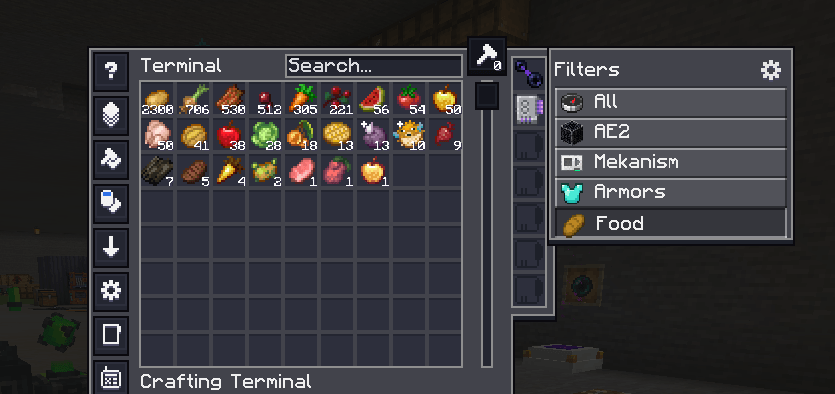
A client-side NeoForge mod that adds user-defined filter tabs to Applied Energistics 2 terminals. Create tabs that narrow the ME/Crafting terminal to just the items you want — by mod, item tag, name, or per-stack data component (NBT) — and switch between them with one click.
AE2 already filters and sorts the terminal list on the client; AE2Organizer hooks into that view, so tabs are purely client-side with zero server load — they work even when you connect to a server that doesn't have the mod.
A "Filters" panel attaches to the right edge of every ME / Crafting / Pattern / Wireless terminal:
The panel matches the terminal's height and is drawn with AE2's own GUI style, so AE2 "dark mode" resource packs reskin it too. Its size is adjustable (Settings → Tab size). A tab's filter combines with AE2's own search box (AND), so you can pick a broad tab and then type to narrow further.
Click the ⚙ gear to open the editor. On the left you add / rename / reorder / delete tabs (the list scrolls); on the right you edit the selected tab (name, icon, match mode, conditions).
Set a tab's icon and the item for mod / tag / text conditions in any of three ways:
… button to open a searchable item grid (works without JEI).What a chosen item does, by condition type: mod → its mod id · text → its display name · tag → opens a list of that item's tags to pick from (no need to know tag ids) · the icon slot → sets it as the tab icon.
Each tab combines its conditions with Match ANY (OR) or Match ALL (AND):
| Type | Matches | Example |
|---|---|---|
mod |
items from a mod id | create |
tag |
items in an item tag | c:ingots |
text |
display name contains text (case-insensitive) | sword |
component |
a per-stack data component (see below) | — |
Component checks:
enchanted — has enchantments (or stored enchantments, for books)named — has a custom namedamaged — has taken damagecustom_data_key — its custom data contains a given NBT key (the arg field)component_type — has a given component type id, e.g. minecraft:potion_contents (the arg field)Tag tip (1.21): common tags use the
c:namespace on NeoForge —c:ingots,c:nuggets,c:ores, and so on. The oldforge:namespace is gone. Dragging an item onto atagcondition lists its real tags, so you don't have to guess.
In the editor, click Settings…:
mod → @mod, tag → #tag, text → the name — joined to mirror the tab's Match ANY (| / OR) or Match ALL (space / AND) mode. Component conditions have no JEI equivalent and are skipped. Off (default).