Mineuniverse
Data Packs
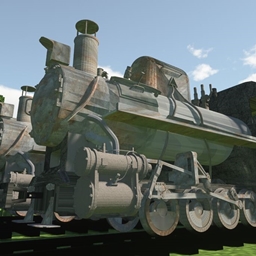
The last narrow-gauge steam locomotive

The last narrow-gauge steam locomotive

DATA PACK
a addon-pack to add train for IR
by wululapuda
Download Claim this project
Add a badge to your pageLink to The last narrow-gauge steam locomotive from a README, website or forum post.
Preview: Badge

Badges update automatically and link to the data pack page on MineUniverse.

1,850 downloads
0 likes
0 followers
Updated Oct 14, 2026
0 hypes
Follow0
Miscellaneous Tech
Advertisement Remove ads with Premium →

Description provided by Microsoft Translator,,There may be some grammatical inaccuracies,thank you for your understanding 

The link for IR:Immersive Railroading - Minecraft Mods - CurseForge

Overview of Packet Situation:

Achieved:

1. Jiayang ZM16-4 steam locomotive;

2.ZM16-4 steam locomotive tender;

3. Jiayang small old-fashioned passenger carriages;

4. A kind of coal car in Jiayang;

Future Updates Planned:

1. Jiayang large old-fashioned passenger carriages;

2. More coal cars;

3. Heilongjiang Huanan Forestry Bureau C2 steam locomotive;

4. Huanan Forestry Bureau car.

Packet Compatibility:

The packet supports all IR versions, but version 1.12.2 is the best,because it is working best in 1.12.2,It is also supported IR version 1.10 and above.

Note: Due to the lack of art in the working group, the stickers are made from online resources, so there may be visual inconsistencies, which will be fixed in subsequent versions. Official complaint: Bankruptcy wind

If it doesn't load, you can go to the Discord server and send the logs.

Our discord server address: https://discord.com/invite/UGd4ea4QY8


jiayang_0.1.3c_formal.zip
MC 1.12.2
Release 2024-09-04 Get
jiayang_0.1.3b_formal.zip
MC 1.12.2
Release 2024-09-02 Get
jiayang_0.1.1f_formal.zip
MC 1.12.2
Release 2024-09-01 Get
jiayang_0.1.0a_formal.zip
MC 1.12.2
Release 2024-08-26 Get
jiayang_0.1.0b_formal.zip
MC 1.12.2
Release 2024-08-26 Get
jiayang_0.1.1a_beta.zip
MC 1.12.2
Beta 2024-08-26 Get

Requirements & install

How to use this data pack in Minecraft
Mods needed
None, works in vanilla
Minecraft
1.12.2
Install folder
saves/<world>/datapacks

How to install data packs

  1. Download the data pack .zip file (do not extract it).
  2. New world: click Data Packs on the world creation screen and drop the .zip in. Existing world: open .minecraft/saves/<world>/datapacks.
  3. Put the .zip into the datapacks folder of the world (servers: world/datapacks).
  4. Run /reload in game (or rejoin the world) and check it with /datapack list.
Browse more: Data Packs for 1.12.2 All data packs
Advertisement Remove ads with Premium →

You Might Also Like