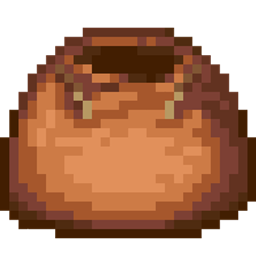
The Best Bundle Backport includes:
-Bundle and its modern recipe (1 string + 1 leather)
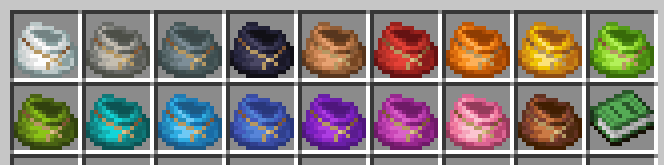
-Dyed bundles (craftable and accessible via commands)
-Bundles as village loot
How to install:
Place the datapack in your world's datapacks folder and in your resourcepacks folder
Give Commands:
Black Bundle - /give @s minecraft:bundle{CustomModelData:711}
Blue Bundle - /give @s minecraft:bundle{CustomModelData:712}
Brown Bundle - /give @s minecraft:bundle{CustomModelData:713}
Cyan Bundle - /give @s minecraft:bundle{CustomModelData:714}
Gray Bundle - /give @s minecraft:bundle{CustomModelData:715}
Green Bundle - /give @s minecraft:bundle{CustomModelData:716}
Light Blue Bundle - /give @s minecraft:bundle{CustomModelData:717}
Light Gray Bundle - /give @s minecraft:bundle{CustomModelData:718}
Lime Bundle - /give @s minecraft:bundle{CustomModelData:719}
Magenta Bundle - /give @s minecraft:bundle{CustomModelData:720}
Orange Bundle - /give @s minecraft:bundle{CustomModelData:721}
Pink Bundle - /give @s minecraft:bundle{CustomModelData:722}
Purple Bundle - /give @s minecraft:bundle{CustomModelData:723}
Red Bundle - /give @s minecraft:bundle{CustomModelData:724}
White Bundle - /give @s minecraft:bundle{CustomModelData:725}
Yellow Bundle - /give @s minecraft:bundle{CustomModelData:726}
Knowledge Book - /give @p minecraft:knowledge_book{display:{Name:'{"text":"Knowledge Book","italic":false}'},CustomModelData:711}
This datapack uses a Knowledge Book as a dummy item in recipes and changes its texture to look like a bundle. However, if you want to get the classic Knowledge Book, you can still do so using the command above