Badges update automatically and link to the data pack page on MineUniverse.
This datapack comes from my experience trying to get all the spirits needed to become a hero It was so time-consuming that I wished there were a pity system for it. Eventually, I ended up making this datapack.
The pity system is pretty bare-bones and straightforward. Being a datapack is quite limiting, but making a mod is simply beyond my abilities.
I made sure to make this as configurable as possible. You can probably configure almost everything if you know what you're doing. If not, just stick to the config.mcfunction file in the datapack. It probably contains everything you might want to change. I've added comments to the relevant lines so you can understand what each setting does.
If you already have all the spirits of a certain tier, for example, Lesser, that tier will be removed and won't count toward the pity system anymore.
The default pity values are:
However, you can easily change these values in the config. I'm not sure what would be considered a well-balanced value, so feel free to adjust them to your liking.
Use /scoreboard players set YourName pty.pity number if you want to manually change your pity value.
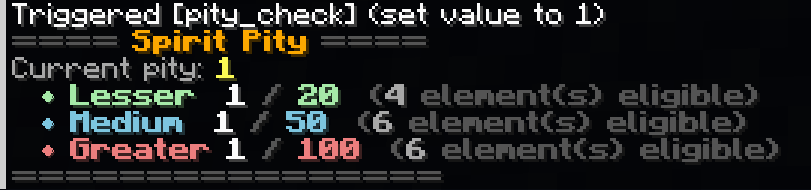
There's also a command to check your current pity status:
Operators:
/function tensura_pity:pity_check
Survival:
/trigger pity_check set 1