Mineuniverse
Data Packs
TaTe's Food Tweaks

TaTe's Food Tweaks

DATA PACK
Makes Many More Items Consumable, Buffs a Few Existing Food Items, and Adds a Couple New Food Items!
by AverageTaTeMan
Download Claim this project
Add a badge to your pageLink to TaTe's Food Tweaks from a README, website or forum post.
Preview: Badge

Badges update automatically and link to the data pack page on MineUniverse.

2,454 downloads
0 likes
0 followers
Updated Oct 14, 2026
0 hypes
Follow0
Utility
Advertisement Remove ads with Premium →

IMPORTANT - I (AverageTaTeMan) only share my content on Planet Minecraft, Modrinth, and CurseForge.  If you see this project on any other site, IT IS NOT ME AND SHOULD NOT BE TRUSTED!

Have you ever felt like there's some items that you should be able to eat, but can't? Or how about buffing some underwhelming food options? Well, this Data Pack aims to remedy that, making many more items consumable, improving a few of the laughably bad food options, and adding a couple new food items. Enjoy!

If upgrading your pack and the new food items are missing their textures, run the following command(s) with the items in your inventory - /function tatefood:upgrade/self

Runs the previous command for all players - /function tatefood:upgrade/all_players


Affected Foods:

Unless otherwise stated, all foods take the default time to eat (1.6 Seconds)

New Foods:

  • Glistering Melon Slice: 6 Nutrition, 10 Saturation
  • Melon: 10 Nutrition, 6 Saturation, Eaten in 4 Seconds
  • Normal/Carved Pumpkin: 5 Nutrition, 5 Saturation, Eaten in 4 Seconds
  • Beetroot/Pumpkin/Melon/Torchflower Seeds, Pitcher Pod, and Sugar: 1 Nutrition, 1 Saturation, Eaten in 0.8 Seconds
  • Red/Brown Mushrooms/Blocks and Crimson/Warped Fungi: 2 Nutrition, 2 Saturation
  • Fermented Spider Eye: 4 Nutrition, 6 Saturation, 80% Chance to Get Weakness for 5 Seconds
  • Dried Kelp Block: 8 Nutrition, 5 Saturation, Eaten in 3 Seconds
  • Honeycomb: 3 Nutrition, 3 Saturation
  • Honeycomb Block: 9 Nutrition, 10 Saturation, Eaten in 4 Seconds
  • Honey Block: 12 Nutrition, 10 Saturation, Eaten in 4 Seconds, Removes Poison Effect
  • Cake (Item in Inventory): 10 Nutrition, 3 Saturation, Eaten in 4 Seconds
  • Ghast Tear: Consumed in 1 Second, 100% Chance to Get Regeneration for 3 Seconds
  • Baguette: Crafted with 3 Bread in a Crafting Table, 15 Nutrition, 12 Saturation, Eaten in 3.2 Seconds
  • Fried Egg: Crafted by Cooking Eggs in a Furnace/Smoker/Campfire, 6 Nutrition, 12 Saturation

Buffed Foods:

  • Glow Berries: 50% Chance to Get Glowing for 3 Seconds
  • Cookie/Beetroot: Eaten in 0.8 Seconds
  • Beetroot Soup: 8 Nutrition, 10 Saturation, Eaten in 1.2 Seconds
  • Rabbit Stew: 15 Nutrition, 18 Saturation


Installation Instructions to Get the Data AND Resource Packs:

1) Select "Files"

2) Select a Version
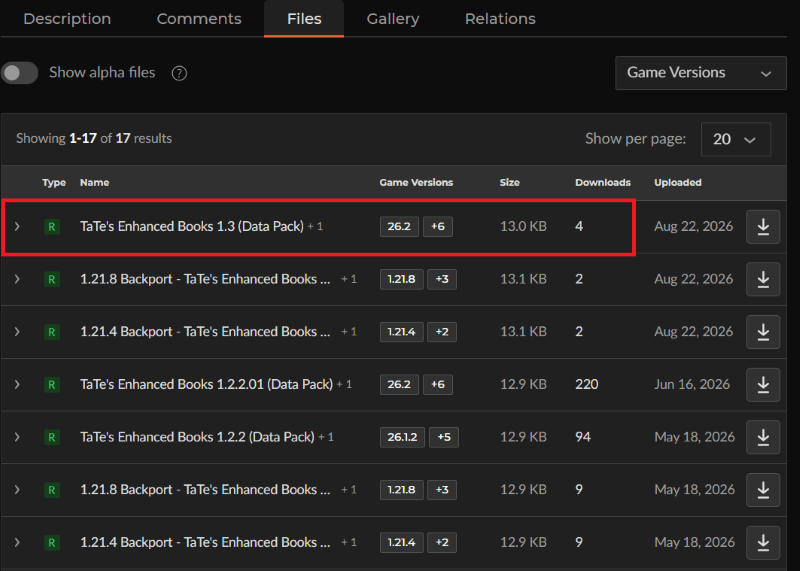
3) Click "View Full Page"
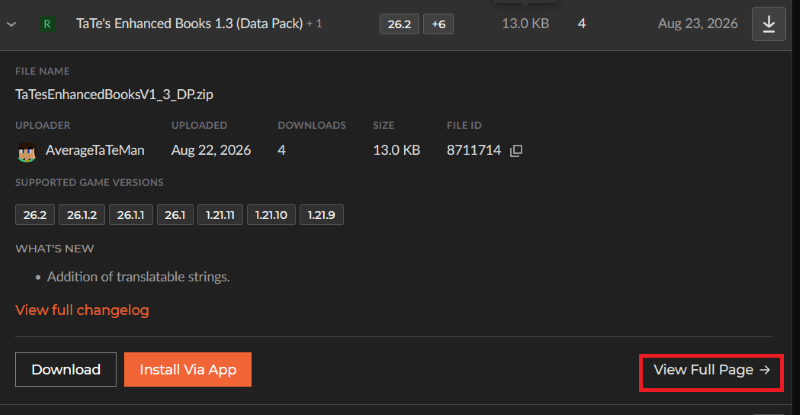
4) Click "Download" to download the data pack file, click "Additonal Files" to show the resource pack file, then click the download icon to download it, as shown below.
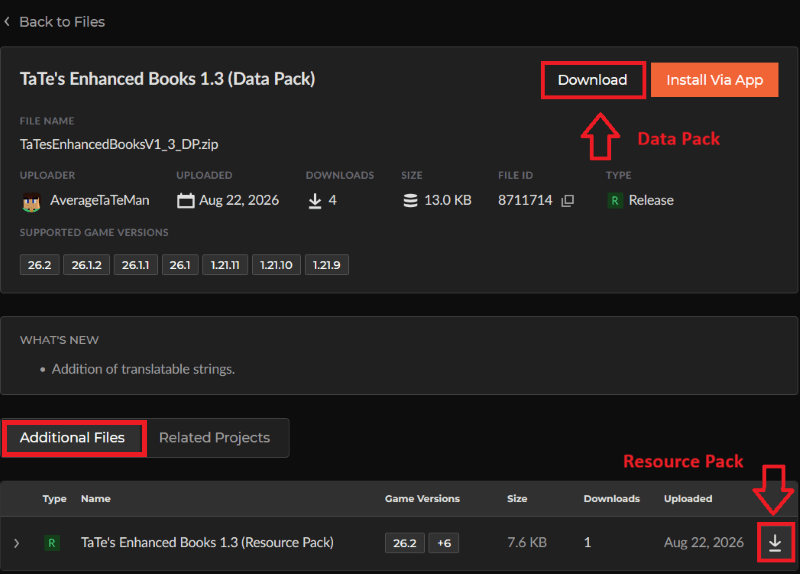
 

5) Unzip the files (optional, but recommended as that's how I use/test them). 

6) Add the resource pack to your Selected Packs (ideally at the top) in your Resource Packs menu. 

7) Add the data pack to either your Selected Packs in the Data Packs menu (if adding at world creation) OR put it in your world's 'datapacks' folder (if adding afterwards.  Recommended to either not have world open at the time or to close and reopen it afterwards).

8) You may get a prompt about experimental settings not being supported when opening the world.  This can safely be ignored, but it's also never a bad idea to make a backup if it's a world you care about.


TaTe's Food Tweaks 1.5 (Data Pack)
MC 26.3
Release 2026-09-15 Get
1.20.6 Backport - TaTe's Food Tweaks 1.2 (Data Pack)
MC 1.20.5, 1.20.6
Release 2026-08-25 Get
1.21.1 Backport - TaTe's Food Tweaks 1.2 (Data Pack)
MC 1.21, 1.21.1
Release 2026-08-25 Get
1.21.3 Backport - TaTe's Food Tweaks 1.2 (Data Pack)
MC 1.21.3, 1.21.2
Release 2026-08-25 Get
1.21.4 Backport - TaTe's Food Tweaks 1.2 (Data Pack)
MC 1.21.4
Release 2026-08-25 Get
1.21.8 Backport - TaTe's Food Tweaks 1.2 (Data Pack)
MC 1.21.8, 1.21.5, 1.21.6, 1.21.7
Release 2026-08-25 Get
TaTe's Food Tweaks 1.4 (Data Pack)
MC 1.21.9, 1.21.10, 1.21.11, 26.1, 26.1.1, 26.1.2, 26.2
Release 2026-08-25 Get
1.20.6 Backport - TaTe's Food Tweaks 1.1 (Data Pack)
MC 1.20.5, 1.20.6
Release 2026-08-24 Get
1.21.1 Backport - TaTe's Food Tweaks 1.1 (Data Pack)
MC 1.21, 1.21.1
Release 2026-08-24 Get
1.21.3 Backport - TaTe's Food Tweaks 1.1 (Data Pack)
MC 1.21.3, 1.21.2
Release 2026-08-24 Get
1.21.4 Backport - TaTe's Food Tweaks 1.1 (Data Pack)
MC 1.21.4
Release 2026-08-24 Get
1.21.8 Backport - TaTe's Food Tweaks 1.1 (Data Pack)
MC 1.21.8, 1.21.5, 1.21.6, 1.21.7
Release 2026-08-24 Get
TaTe's Food Tweaks 1.3 (Data Pack)
MC 1.21.9, 1.21.10, 1.21.11, 26.1, 26.1.1, 26.1.2, 26.2
Release 2026-08-24 Get
TaTe's Food Tweaks 1.2.1.01
MC 1.21.9, 1.21.10, 1.21.11, 26.1, 26.1.1, 26.1.2, 26.2
Release 2026-06-16 Get
1.20.6 Backport - TaTe's Food Tweaks 1.0
MC 1.20.5, 1.20.6
Release 2026-05-18 Get
1.21.1 Backport - TaTe's Food Tweaks 1.0
MC 1.21, 1.21.1
Release 2026-05-18 Get
1.21.4 Backport - TaTe's Food Tweaks 1.0
MC 1.21.4, 1.21.3, 1.21.2
Release 2026-05-18 Get
1.21.8 Backport - TaTe's Food Tweaks 1.0
MC 1.21.8, 1.21.5, 1.21.6, 1.21.7
Release 2026-05-18 Get
TaTe's Food Tweaks 1.2.1
MC 1.21.9, 1.21.10, 1.21.11, 26.1, 26.1.1, 26.1.2
Release 2026-05-18 Get
TaTe's Food Tweaks 1.2.02
MC 1.21.9, 1.21.10, 1.21.11, 26.1, 26.1.1, 26.1.2
Release 2026-03-26 Get
TaTe's Food Tweaks 1.2.01
MC 1.21.9, 1.21.10, 1.21.11, 26.1
Release 2026-03-24 Get
TaTe's Food Tweaks 1.2
MC 1.21.9, 1.21.10, 1.21.11
Release 2025-12-09 Get
TaTe's Food Tweaks 1.1
MC 1.21.9, 1.21.10
Release 2025-10-01 Get
TaTe's Food Tweaks 1.0.02
MC 1.21.5, 1.21.8, 1.21.7, 1.21.6
Release 2025-07-01 Get
TaTe's Food Tweaks 1.0.01
MC 1.21.5, 1.21.6
Release 2025-06-18 Get
TaTe's Food Tweaks 1.0
MC 1.21.5
Release 2025-05-24 Get

Requirements & install

How to use this data pack in Minecraft
Mods needed
None, works in vanilla
Minecraft
1.21.9 – 26.3
Install folder
saves/<world>/datapacks

How to install data packs

  1. Download the data pack .zip file (do not extract it).
  2. New world: click Data Packs on the world creation screen and drop the .zip in. Existing world: open .minecraft/saves/<world>/datapacks.
  3. Put the .zip into the datapacks folder of the world (servers: world/datapacks).
  4. Run /reload in game (or rejoin the world) and check it with /datapack list.
Browse more: Data Packs for 26.3 All data packs

More from AverageTaTeMan

Advertisement Remove ads with Premium →

You Might Also Like