Mineuniverse
Data Packs
TaTe's Extra Trims

TaTe's Extra Trims

DATA PACK
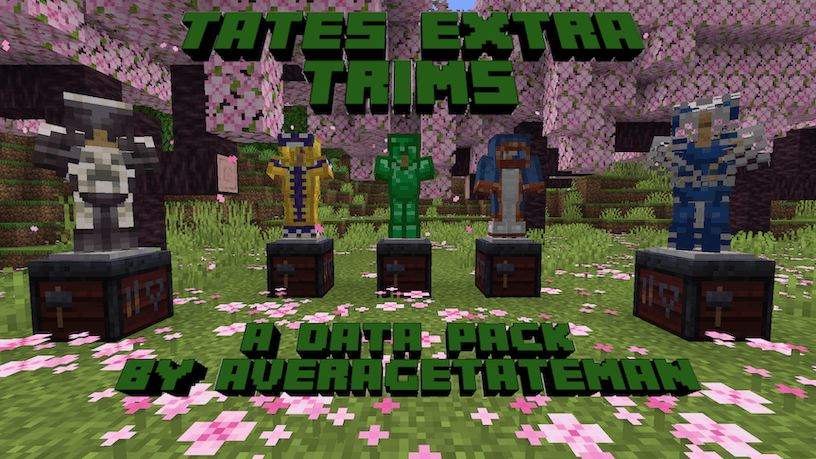
20 New Trim Patterns and 52 New Materials That Can Be Utilized Using Various Items + Extra Functionality for Modifying Trims!
by AverageTaTeMan
Download Claim this project
17,424 downloads
0 likes
0 followers
Updated Oct 14, 2026
0 hypes
Follow0
Miscellaneous Tech Utility
Advertisement Remove ads with Premium →

IMPORTANT - I (AverageTaTeMan) only share my content on Planet Minecraft, Modrinth, and CurseForge.  If you see this project on any other site, IT IS NOT ME AND SHOULD NOT BE TRUSTED!

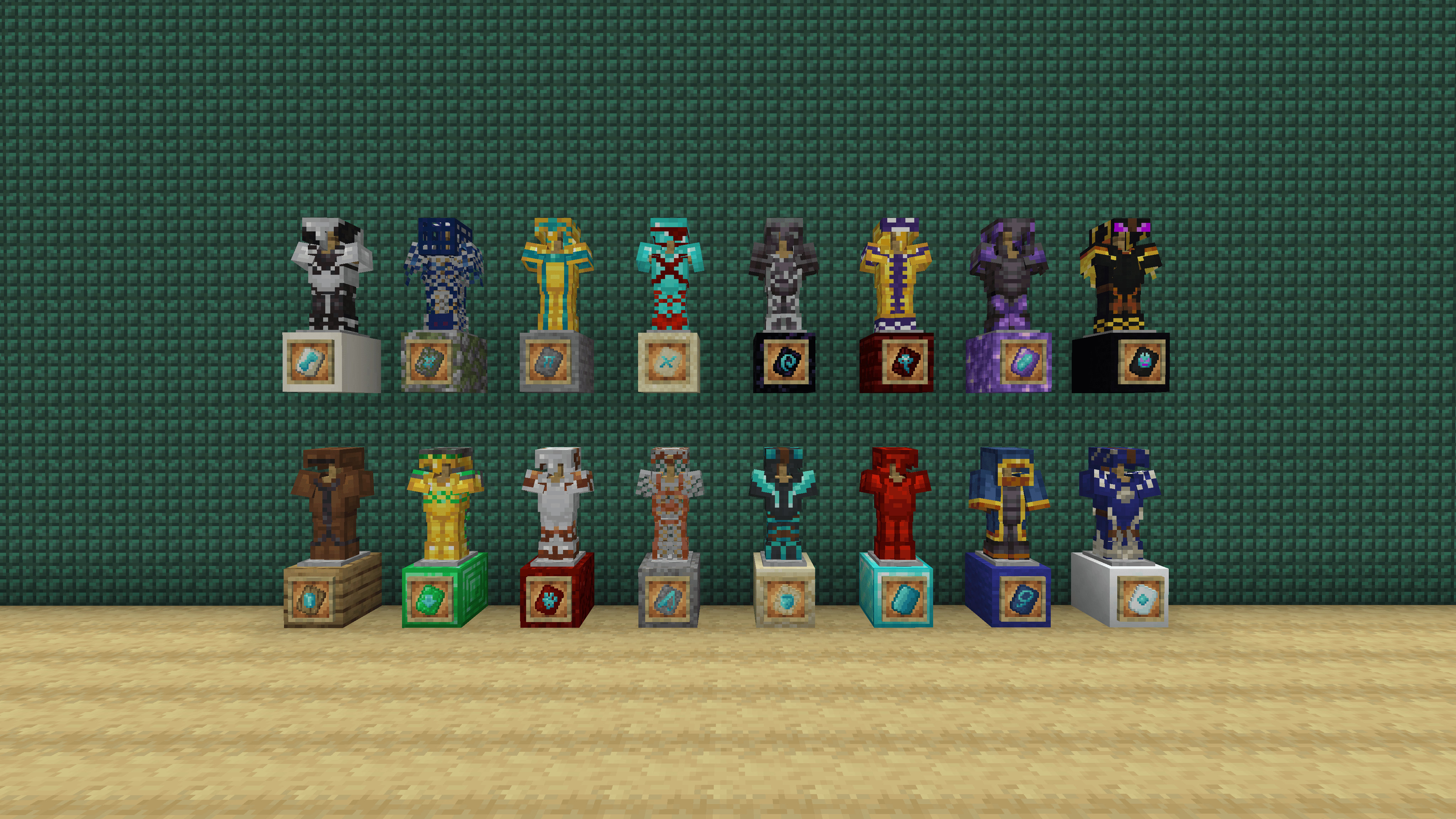
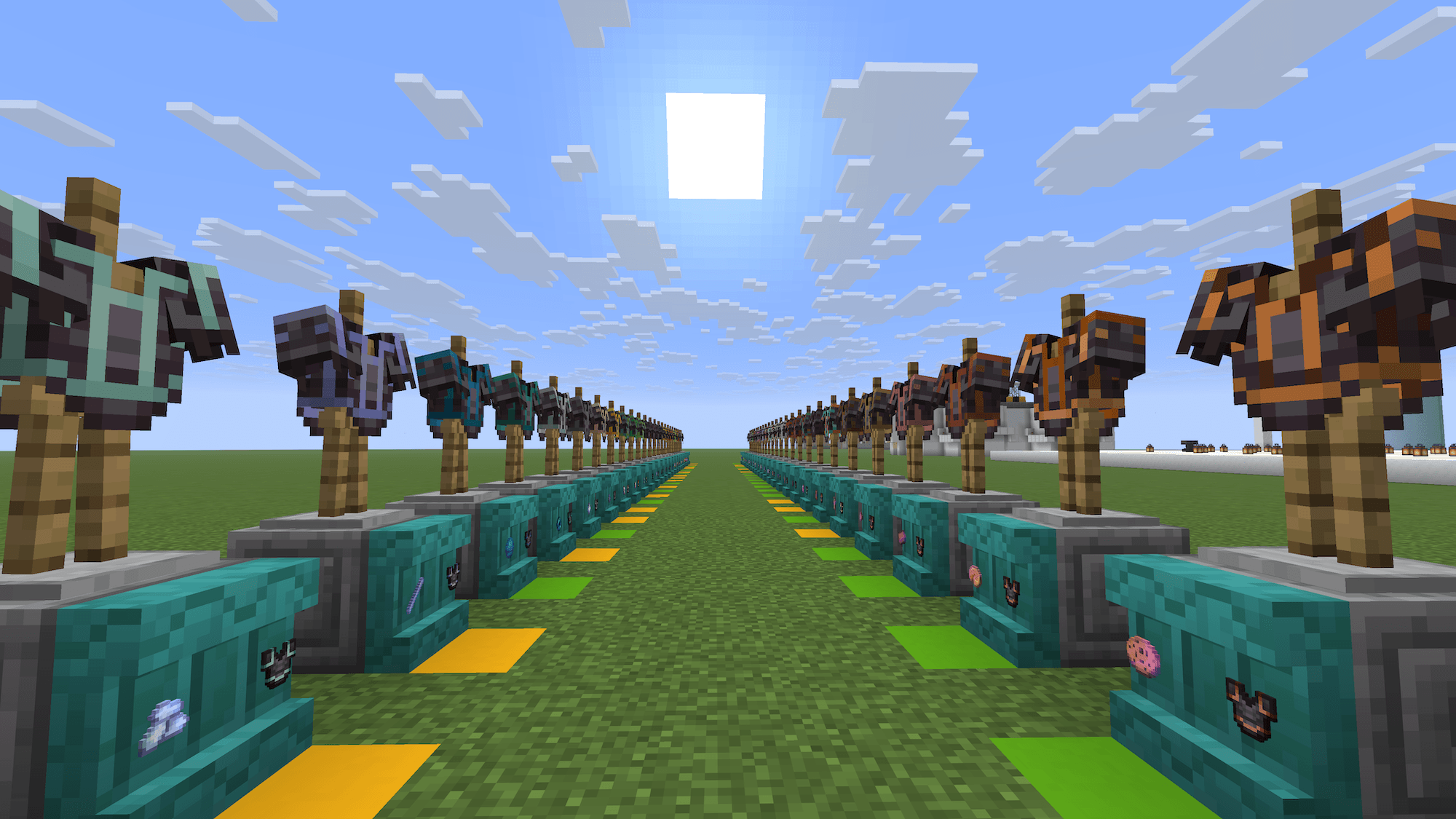
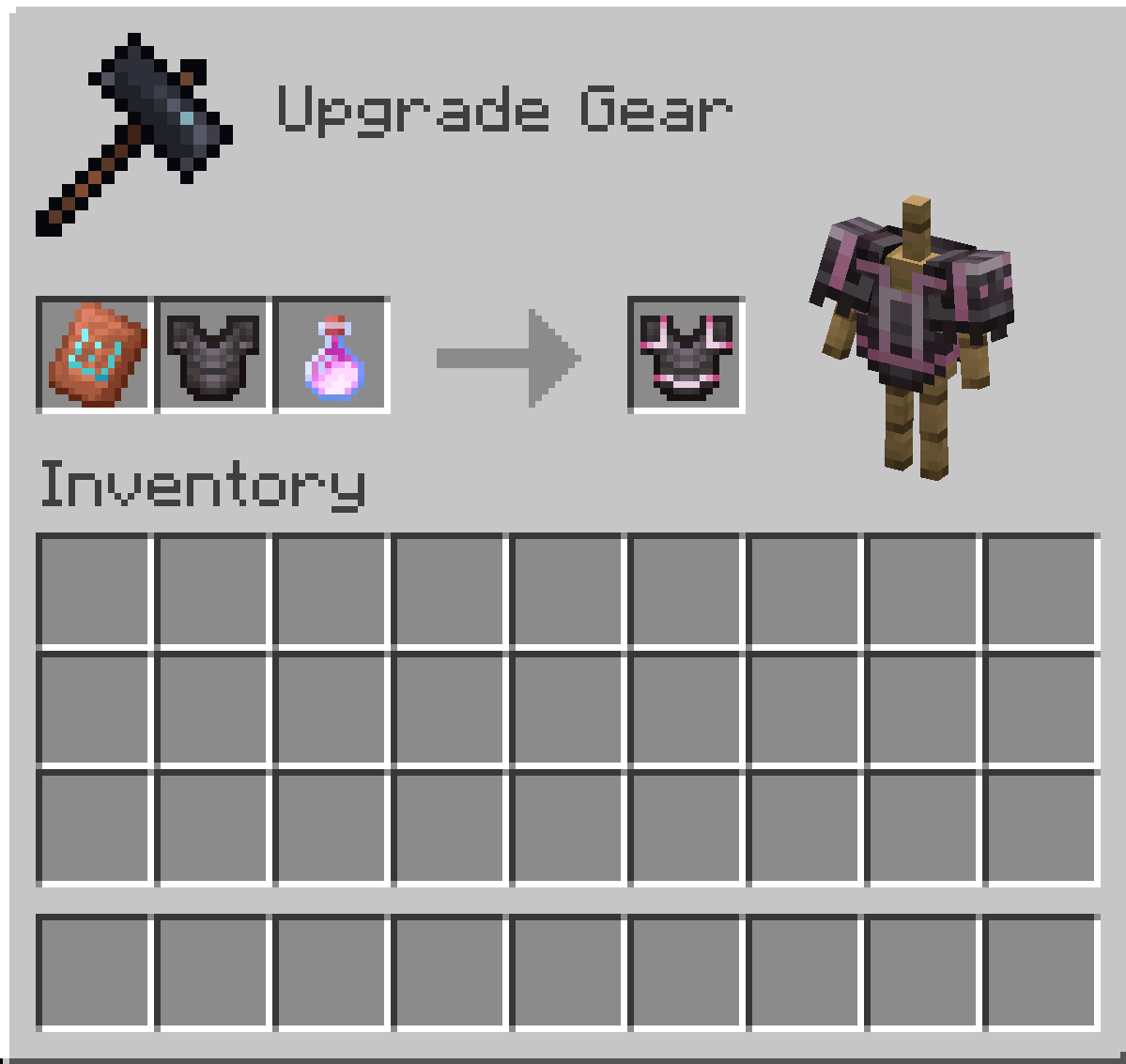
This pack adds an additional 20 Armor Trim patterns representing areas of the games that are unrepresented in the existing Armor Trim set.  These new Trims can be obtained using various items (listed below) in place of what would be the Smithing Template in the Smithing Table.  There are also 52 new Armor Trim materials to further customize the Armor's color, which can be obtained by putting the item through the Stonecutter first (Stonecutter step not required in versions before 1.21.5).  It also adds functionality to remove Armor Trims from  Armor by dropping it on a Grindstone and replace the Trim material by dropping the Armor with the new material on top of a Smithing Table.
New Trim Patterns and Their Items

  • Fool (Full Trim) - Diamond Block
  • Brimfool (Full Trim for Netherite) - Netherite Ingot
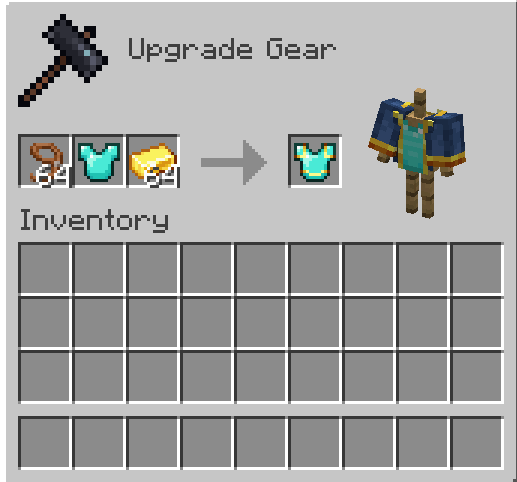
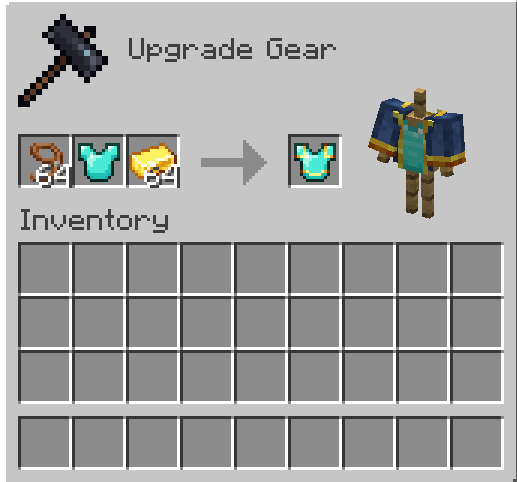
  • Wanderer (Wandering Trader) - Lead
  • Freeze (Igloo) - Powder Snow Bucket
  • Bone (Fossil) - Bone Block
  • Wart (Witch Hut) - Nether Wart
  • Oasis (Desert Well) - Water Bucket
  • Worker (Village) - Emerald
  • Champion (Hero of the Village) - Totem of Undying
  • Flood (Ocean Ruins) - Fishing Rod
  • Plunder (Buried Treasure) - Heart of The Sea
  • Shell (Armadillo) - Armadillo Scute
  • Creep (Creeper) - TNT
  • Scent (Sniffer) - Torchflower
  • Cage (Dungeon) - Iron Chain
  • Miner (Mineshaft) - Iron Pickaxe
  • Triumvirate (Wither) - Nether Star
  • Gateway (Ruined Portal) - Crying Obsidian
  • Crystal (Geode) - Block of Amethyst
  • Dragon (Ender Dragon) - Dragon Head

Example of Applying the Wanderer Trim Template

Example of Applying the Wanderer Trim Template

New Trim Materials

Armadillo Scute
Blaze Rod
Bone
Breeze Rod
Brick
Cake
Charcoal
Popped Chorus Fruit
Clay Ball
Coal
Cookie
Heavy Core
Creeper Head
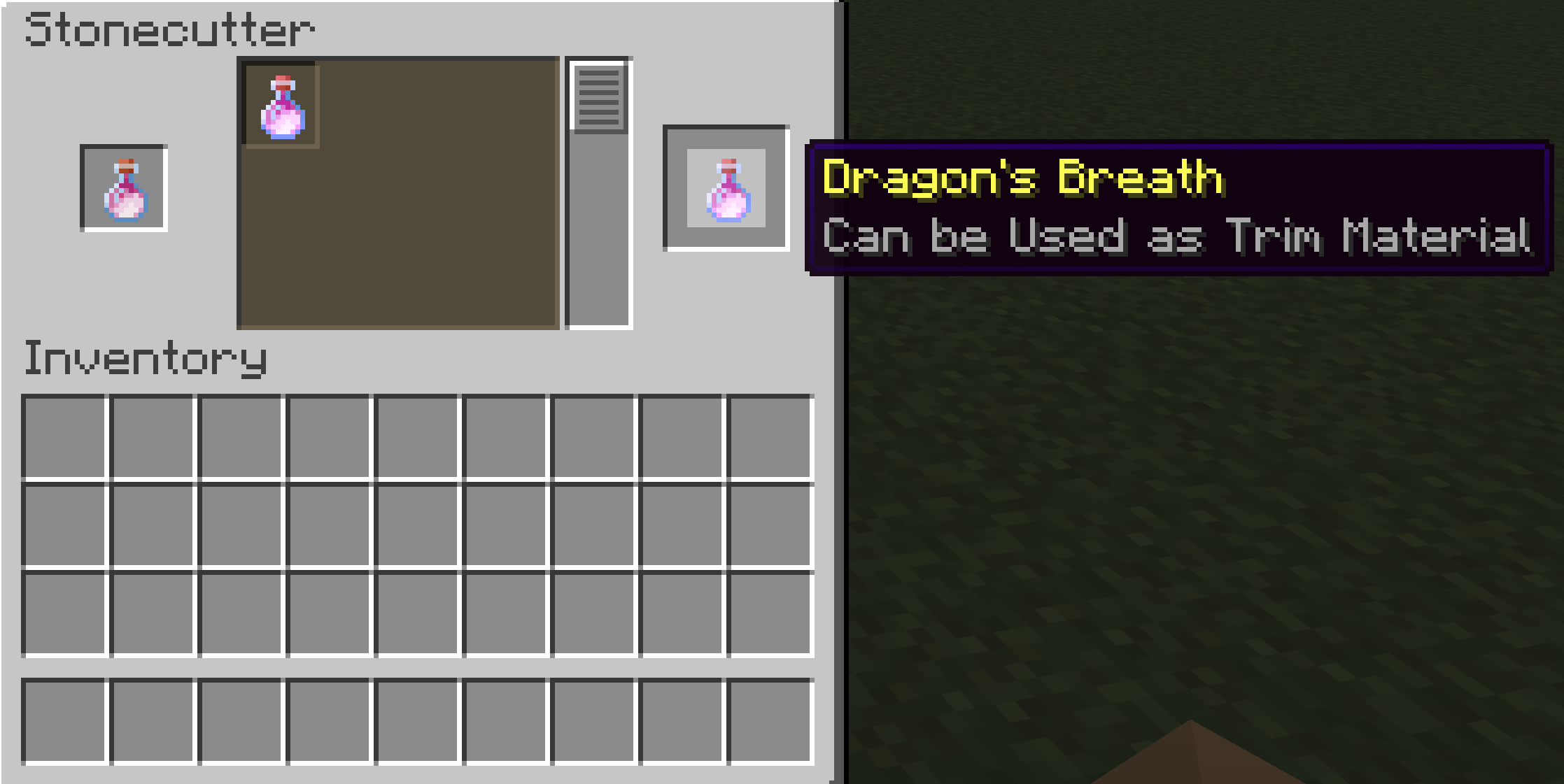
Dragon's Breath
Pointed Dripstone
Echo Shard
End Crystal
Eye of Ender
Ender Pearl
Bottle o' Enchanting
Rotten Flesh
Glistering Melon Slice
Glowstone Dust
Gunpowder
Heart of the Sea
Honeycomb
Leather
Magma Cream
Melon Slice
Phantom Membrane
Nautilus Shell
Nether Brick
Netherite Scrap
Ominous Bottle
Prismarine Crystals
Pumpkin Pie
Rabbit Hide
Name Tag (Rainbow)
Raw Copper
Raw Gold
Raw Iron
Shulker Shell
Slime Ball
Sniffer Egg
Powder Snow Bucket
Fermented Spider Eye
Nether Star
Sugar
Sulfur Spike
TNT
Name Tag (Toast)
Turtle Scute
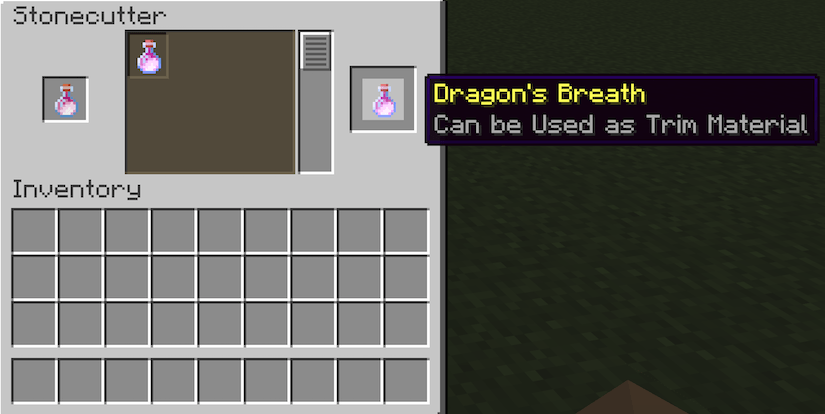
Example of Turning Dragon's Breath into a Trim Material

Example of Turning Dragon's Breath into a Trim Material (Not required in versions before 1.21.5)
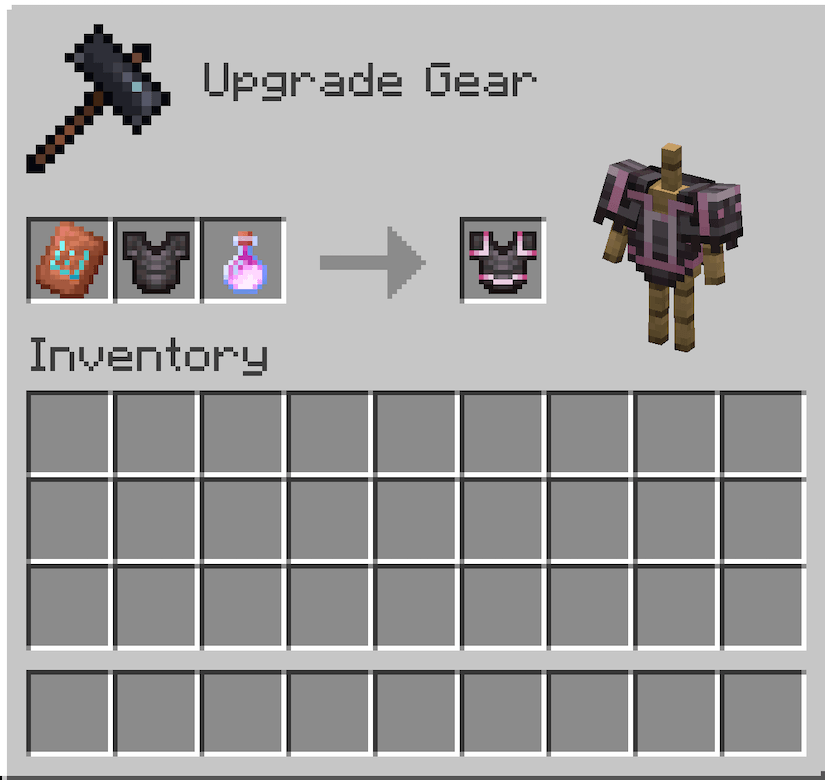
Example of Using Dragon's Breath as a Trim Material

Example of Using Dragon's Breath as a Trim Material


Installation Instructions to Get the Data AND Resource Packs:

1) Select "Files"

2) Select a Version
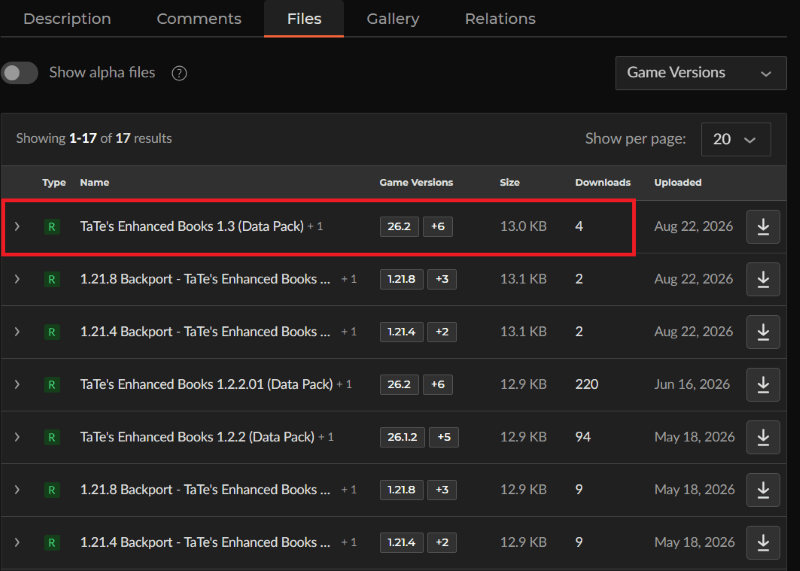
3) Click "View Full Page"
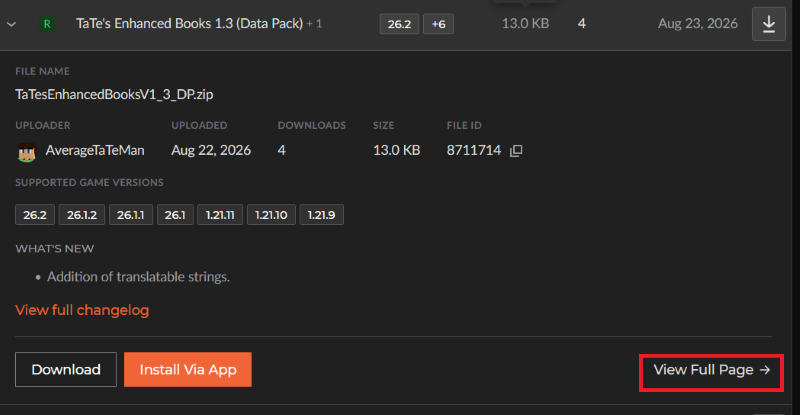
4) Click "Download" to download the data pack file, click "Additonal Files" to show the resource pack file, then click the download icon to download it, as shown below.
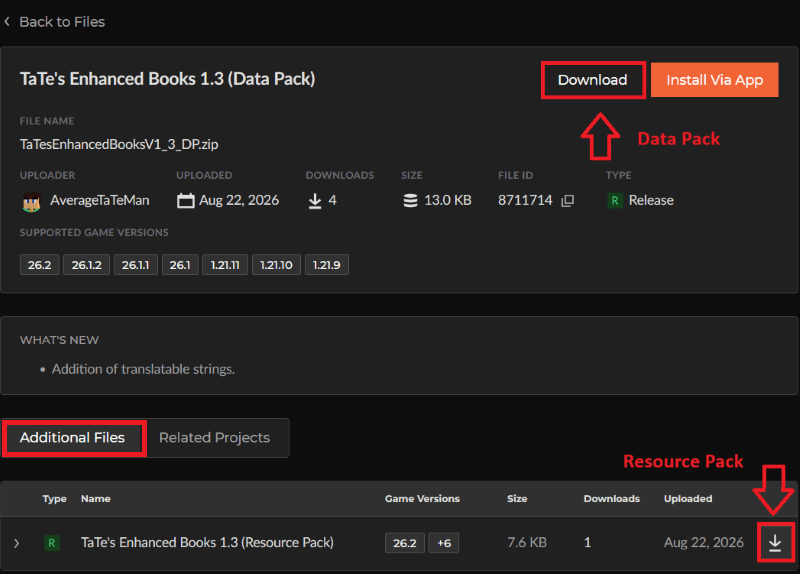
 

5) Unzip the files (optional, but recommended as that's how I use/test them). 

6) Add the resource pack to your Selected Packs (ideally at the top) in your Resource Packs menu. 

7) Add the data pack to either your Selected Packs in the Data Packs menu (if adding at world creation) OR put it in your world's 'datapacks' folder (if adding afterwards.  Recommended to either not have world open at the time or to close and reopen it afterwards).

8) You may get a prompt about experimental settings not being supported when opening the world.  This can safely be ignored, but it's also never a bad idea to make a backup if it's a world you care about.


TaTe's Extra Trims 2.1 (Data Pack)
MC 26.3
Release 2026-09-15 Get
1.20.1 Backport - TaTe's Extra Trims 1.0 (Data Pack)
MC 1.20.1, 1.20
Release 2026-09-14 Get
1.20.2 Backport - TaTe's Extra Trims 1.0 (Data Pack)
MC 1.20.2
Release 2026-09-14 Get
1.20.4 Backport - TaTe's Extra Trims 1.0 (Data Pack)
MC 1.20.4, 1.20.3
Release 2026-09-14 Get
1.20.6 Backport - TaTe's Extra Trims 1.0 (Data Pack)
MC 1.20.5, 1.20.6
Release 2026-09-14 Get
1.21.1 Backport - TaTe's Extra Trims 1.0 (Data Pack)
MC 1.21, 1.21.1
Release 2026-09-14 Get
1.21.3 Backport - TaTe's Extra Trims 1.0 (Data Pack)
MC 1.21.3, 1.21.2
Release 2026-09-14 Get
1.21.4 Backport - TaTe's Extra Trims 1.0 (Data Pack)
MC 1.21.4
Release 2026-09-14 Get
1.21.8 Backport - TaTe's Extra Trims 1.0 (Data Pack)
MC 1.21.8, 1.21.5, 1.21.6, 1.21.7
Release 2026-09-14 Get
1.21.10 Backport - TaTe's Extra Trims 1.0 (Data Pack)
MC 1.21.9, 1.21.10
Release 2026-09-14 Get
26.1 Backport - TaTe's Extra Trims 1.0 (Data Pack)
MC 1.21.11, 26.1, 26.1.1, 26.1.2
Release 2026-09-14 Get
TaTe's Extra Trims 2.0 (Data Pack)
MC 26.2
Release 2026-09-14 Get
TaTe's Extra Trims 1.8 (Data Pack)
MC 26.2
Release 2026-06-16 Get
TaTe's Extra Trims 1.7.1.01 (Data Pack)
MC 1.21.11, 26.1, 26.1.1, 26.1.2
Release 2026-03-26 Get
TaTe's Extra Trims 1.7.1 (Data Pack)
MC 1.21.11, 26.1
Release 2026-03-24 Get
TaTe's Extra Trims 1.7 (Data Pack)
MC 1.21.9, 1.21.10, 1.21.11
Release 2026-02-17 Get
TaTe's Extra Trims 1.6 (Data Pack)
MC 1.21.9, 1.21.10, 1.21.11
Release 2026-01-05 Get
TaTe's Extra Trims 1.5 (Data Pack)
MC 1.21.9, 1.21.10, 1.21.11
Release 2025-12-18 Get
TaTe's Extra Trims 1.4.01 (Data Pack)
MC 1.21.9, 1.21.10, 1.21.11
Release 2025-12-09 Get
TaTe's Extra Trims 1.4 (Data Pack)
MC 1.21.9, 1.21.10
Release 2025-10-02 Get
TaTe's Extra Trims 1.3.02 (Data Pack)
MC 1.21.5, 1.21.8, 1.21.7, 1.21.6
Release 2025-07-01 Get
TaTe's Extra Trims 1.3.01 (Data Pack)
MC 1.21.5, 1.21.6
Release 2025-06-18 Get
TaTe's Extra Trims 1.3 (Data Pack)
MC 1.21.5
Release 2025-03-29 Get
TaTe's Extra Trims 1.2.1 (Data Pack)
MC 1.21.4
Release 2024-12-28 Get
TaTe's Extra Trims 1.2 (Data Pack)
MC 1.21.4
Release 2024-12-09 Get
TaTe's Extra Trims 1.1 (Data Pack)
MC 1.21.3, 1.21.2
Release 2024-10-30 Get
TaTe's Extra Trims 1.0 (Data Pack)
MC 1.21, 1.21.1
Release 2024-07-31 Get

Requirements & install

How to use this data pack in Minecraft
Mods needed
None, works in vanilla
Minecraft
1.21.9 – 26.3
Install folder
saves/<world>/datapacks

How to install data packs

  1. Download the data pack .zip file (do not extract it).
  2. New world: click Data Packs on the world creation screen and drop the .zip in. Existing world: open .minecraft/saves/<world>/datapacks.
  3. Put the .zip into the datapacks folder of the world (servers: world/datapacks).
  4. Run /reload in game (or rejoin the world) and check it with /datapack list.
Browse more: Data Packs for 26.3 All data packs

More from AverageTaTeMan

Advertisement Remove ads with Premium →

You Might Also Like