Mineuniverse
Data Packs
TaTe's Enhanced Books

TaTe's Enhanced Books

DATA PACK
New Items to Improve Enchantining Books!
by AverageTaTeMan
Download Claim this project
1,853 downloads
0 likes
0 followers
Updated Oct 14, 2026
0 hypes
Follow0
Magic Utility
Advertisement Remove ads with Premium →

IMPORTANT - I (AverageTaTeMan) only share my content on Planet Minecraft, Modrinth, and CurseForge.  If you see this project on any other site, IT IS NOT ME AND SHOULD NOT BE TRUSTED!

Introducting TaTe's Enhanced Books!  This is a simple Data/Resource pack combo that adds a new item that can be crafted with Books, Experience Bottles, and Echo Shards, called Enhanced Books.  Enhanced Books have a higher enchantability value than normal books, meaning it's more likely that you'll get high value enchantments!  There are four levels of Enhanced Books, with the higher levels costing more resources, but also having higher enchantability.


Installation Instructions to Get the Data AND Resource Packs:

1) Select "Files"

2) Select a Version
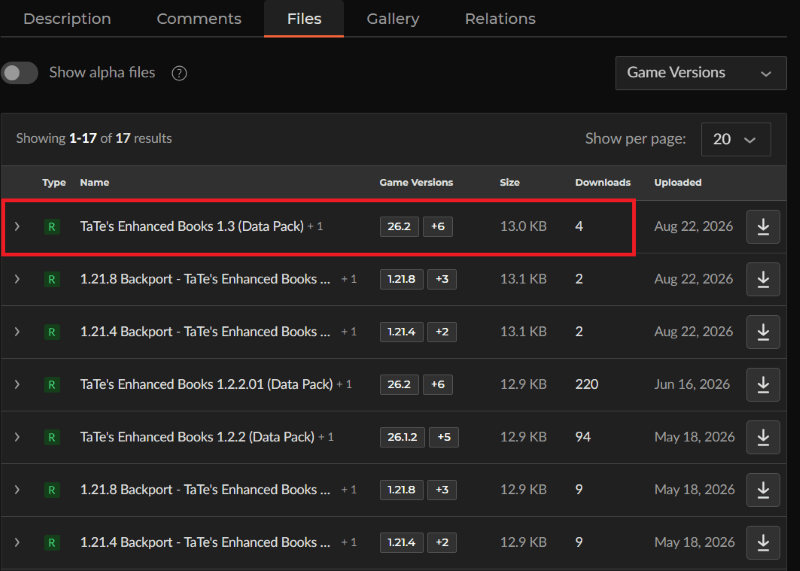
3) Click "View Full Page"
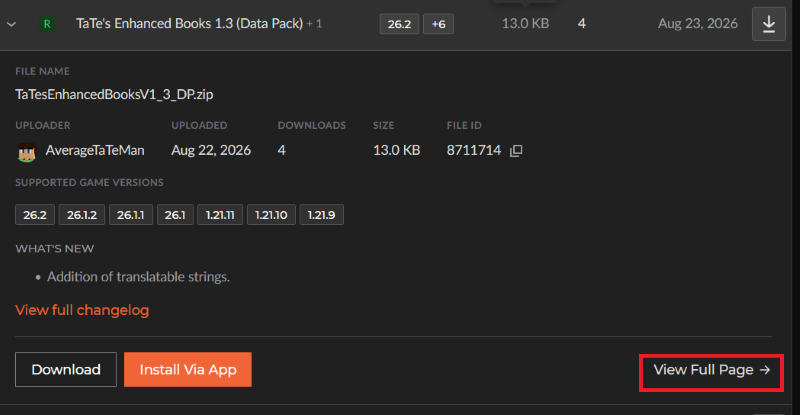
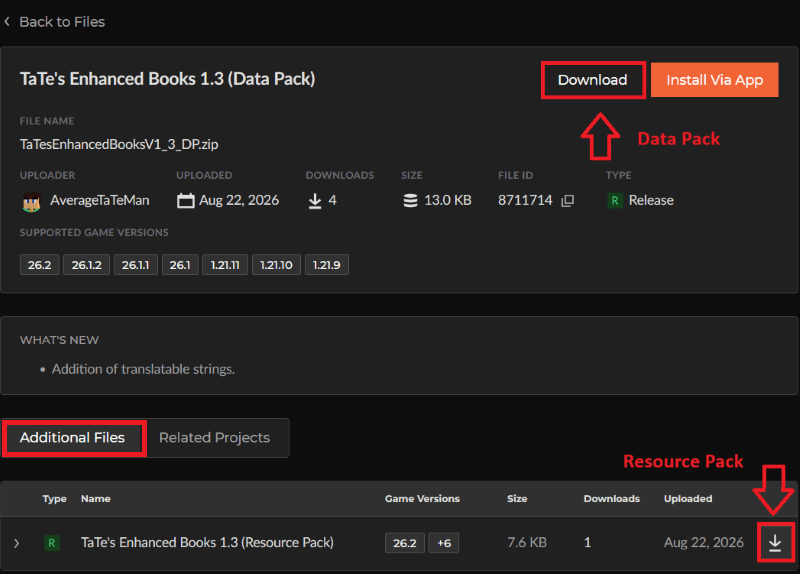
4) Click "Download" to download the data pack file, click "Additonal Files" to show the resource pack file, then click the download icon to download it, as shown below.
 

5) Unzip the files (optional, but recommended as that's how I use/test them). 

6) Add the resource pack to your Selected Packs (ideally at the top) in your Resource Packs menu. 

7) Add the data pack to either your Selected Packs in the Data Packs menu (if adding at world creation) OR put it in your world's 'datapacks' folder (if adding afterwards.  Recommended to either not have world open at the time or to close and reopen it afterwards).

8) You may get a prompt about experimental settings not being supported when opening the world.  This can safely be ignored, but it's also never a bad idea to make a backup if it's a world you care about.


TaTe's Enhanced Books 1.4 (Data Pack)
MC 26.3
Release 2026-09-15 Get
1.21.4 Backport - TaTe's Enhanced Books 1.2 (Data Pack)
MC 1.21.4, 1.21.3, 1.21.2
Release 2026-08-23 Get
1.21.8 Backport - TaTe's Enhanced Books 1.2 (Data Pack)
MC 1.21.8, 1.21.5, 1.21.6, 1.21.7
Release 2026-08-23 Get
TaTe's Enhanced Books 1.3 (Data Pack)
MC 1.21.9, 1.21.10, 1.21.11, 26.1, 26.1.1, 26.1.2, 26.2
Release 2026-08-23 Get
TaTe's Enhanced Books 1.2.2.01 (Data Pack)
MC 1.21.9, 1.21.10, 1.21.11, 26.1, 26.1.1, 26.1.2, 26.2
Release 2026-06-16 Get
1.21.4 Backport - TaTe's Enhanced Books 1.1 (Data Pack)
MC 1.21.4, 1.21.3, 1.21.2
Release 2026-05-18 Get
1.21.8 Backport - TaTe's Enhanced Books 1.1 (Data Pack)
MC 1.21.8, 1.21.5, 1.21.6, 1.21.7
Release 2026-05-18 Get
TaTe's Enhanced Books 1.2.2 (Data Pack)
MC 1.21.9, 1.21.10, 1.21.11, 26.1, 26.1.1, 26.1.2
Release 2026-05-18 Get
1.21.4 Backport - TaTe's Enhanced Books 1.0 (Data Pack)
MC 1.21.4, 1.21.3, 1.21.2
Release 2026-05-16 Get
1.21.8 Backport - TaTe's Enhanced Books 1.0 (Data Pack)
MC 1.21.8, 1.21.5, 1.21.6, 1.21.7
Release 2026-05-16 Get
TaTe's Enhanced Books 1.2.1 (Data Pack)
MC 1.21.9, 1.21.10, 1.21.11, 26.1, 26.1.1, 26.1.2
Release 2026-05-16 Get
TaTe's Enhanced Books 1.2.02 (Data Pack)
MC 1.21.9, 1.21.10, 1.21.11, 26.1, 26.1.1, 26.1.2
Release 2026-03-26 Get
TaTe's Enhanced Books 1.2.01 (Data Pack)
MC 1.21.9, 1.21.10, 1.21.11, 26.1
Release 2026-03-24 Get
TaTe's Enhanced Books 1.2 (Data Pack)
MC 1.21.9, 1.21.10, 1.21.11
Release 2025-12-09 Get
TaTe's Enhanced Books 1.1 (Data Pack)
MC 1.21.9, 1.21.10
Release 2025-10-01 Get
TaTe's Enhanced Books 1.0.02 (Data Pack)
MC 1.21.5, 1.21.8, 1.21.7, 1.21.6
Release 2025-07-01 Get
TaTe's Enhanced Books 1.0.01 (Data Pack)
MC 1.21.5, 1.21.6
Release 2025-06-18 Get
TaTe's Enhanced Books 1.0 (Data Pack)
MC 1.21.5
Release 2025-04-29 Get

Requirements & install

How to use this data pack in Minecraft
Mods needed
None, works in vanilla
Minecraft
1.21.9 – 26.3
Install folder
saves/<world>/datapacks

How to install data packs

  1. Download the data pack .zip file (do not extract it).
  2. New world: click Data Packs on the world creation screen and drop the .zip in. Existing world: open .minecraft/saves/<world>/datapacks.
  3. Put the .zip into the datapacks folder of the world (servers: world/datapacks).
  4. Run /reload in game (or rejoin the world) and check it with /datapack list.
Browse more: Data Packs for 26.3 All data packs

More from AverageTaTeMan

Advertisement Remove ads with Premium →

You Might Also Like