Mineuniverse
Data Packs
Steal Attributes

Steal Attributes

DATA PACK
Steal Attributes is a Minecraft datapack where defeating players lets you steal their attributes and grow stronger. πŸ§¬βš”οΈ Build your stats, reach your limits, and become the strongest!
by VhpOnTop
Download Claim this project
17 downloads
0 likes
Updated Oct 14, 2026
0 hypes
Adventure Magic Miscellaneous Utility
Advertisement Remove ads with Premium →

🧬 Steal Attributes

Steal Attributes is a Minecraft datapack that turns PvP into a battle for power.

Whenever you defeat another player, you have a chance to steal one of their attributes, making you stronger while weakening your opponent.

βš”οΈ Features

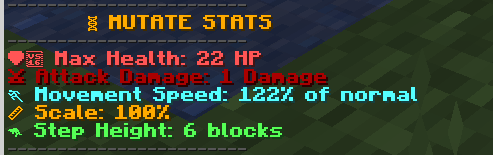
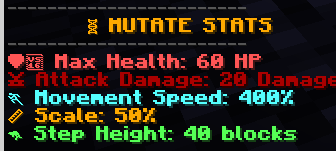
  • 🧬 Random attribute mutations
  • ❀️ Max Health
  • βš”οΈ Attack Damage
  • πŸƒ Movement Speed
  • πŸ“ Scale
  • 🦘 Step Height
  • πŸ“ˆ Attribute progression
  • βš–οΈ Maximum and minimum limits
  • 🎲 Randomized mutations
  • πŸ† Built for PvP and SMPs
  • πŸ› οΈ Testing commands included

Every fight can change your stats. Get stronger, protect your attributes, and become the most powerful player on the server.

πŸ“₯ Installation

  1. Download the Steal Attributes .zip file.
  2. Open your Minecraft server folder.
  3. Go to: world/datapacks
  4. Put the Steal Attributes .zip inside the datapacks folder.
  5. Start the server or run: /reload
  6. Check chat for: πŸ§¬ Steal Attributes loaded!
  7. You're ready to play!

⚠️ Important

Make sure you are using Minecraft Java Edition 26.2 and that the datapack .zip contains the pack.mcmeta file and data folder directly inside it.

For multiplayer, install the datapack on the server, not on each player's computer.

Made by VhpOnTop πŸ’š

Steal Attributes.zip
MC 26.1, 26.1.1, 26.1.2, 26.2
Release 2026-08-28 Get
StealAttributes.zip
MC 26.1, 26.1.1, 26.1.2, 26.2
Release 2026-08-26 Get

Requirements & install

How to use this data pack in Minecraft
Mods needed
None, works in vanilla
Minecraft
26.1 – 26.2
Install folder
saves/<world>/datapacks

How to install data packs

  1. Download the data pack .zip file (do not extract it).
  2. New world: click Data Packs on the world creation screen and drop the .zip in. Existing world: open .minecraft/saves/<world>/datapacks.
  3. Put the .zip into the datapacks folder of the world (servers: world/datapacks).
  4. Run /reload in game (or rejoin the world) and check it with /datapack list.
Browse more: Data Packs for 26.2 All data packs
Advertisement Remove ads with Premium →

You Might Also Like