
Mineuniverse
Data Packs
Simple Origin Changer

Simple Origin Changer

DATA PACK
A simple way to give players the chance to change their origin within a certain time limit after joining
by JoshieGemFinder
Download Claim this project
1,739 downloads
0 likes
Updated Oct 14, 2026
0 hypes
Utility
Advertisement Remove ads with Premium →

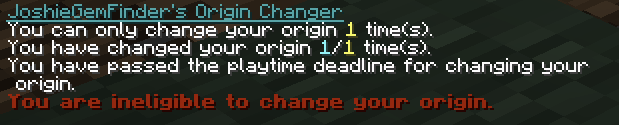
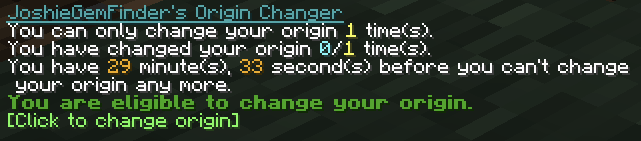
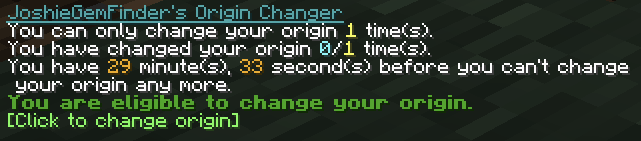
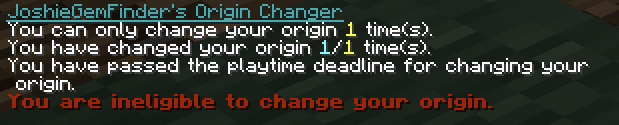
A very simple datapack to allow players to change their origin a configurable amount of times (default 1) within a certain period of time since joining (default 30 minutes).

To access their origin change, players must run /trigger origin-change.

Time players spend in the origin selection gui is not counted towards the time limit for changing their origin.

The time limit and maximum number of origin changes a player can have can be easily adjusted by changing the following scores:

# 36000 is 30 minutes in ticks (30 * 60 * 20)
/scoreboard players set #maxTime origin-change-timer 36000
# 1 max change per person
/scoreboard players set #maxChanges origin-change-used 1

For example, if you wanted to change the time limit to 45 minutes, and the maximum number of changes to 2, you'd run the following commands:

/scoreboard players set #maxTime origin-change-timer 54000/scoreboard players set #maxChanges origin-change-used 2

Feel free to use in all modpacks and servers, as long as you don't remove the credit!

Origin Change 2.2.1+1.20.1-fabric.zip
MC 1.20.1
Release 2025-08-08 Get
Origin Change 2.2.1+1.20.1-universal.zip
MC 1.20.1
Release 2025-08-08 Get
Origin Change 2.2.1+1.20.1-forge.zip
MC 1.20.1, 1.20
Release 2025-02-03 Get
Origin Change 2.2.1+1.21.1.zip
MC 1.21.1
Release 2025-02-03 Get

Requirements & install

How to use this data pack in Minecraft
Mods needed
None, works in vanilla
Minecraft
1.20 – 1.21.1
Install folder
saves/<world>/datapacks

How to install data packs

  1. Download the data pack .zip file (do not extract it).
  2. New world: click Data Packs on the world creation screen and drop the .zip in. Existing world: open .minecraft/saves/<world>/datapacks.
  3. Put the .zip into the datapacks folder of the world (servers: world/datapacks).
  4. Run /reload in game (or rejoin the world) and check it with /datapack list.
Browse more: Data Packs for 1.21.1 All data packs

More from JoshieGemFinder

Advertisement Remove ads with Premium →

You Might Also Like