Mineuniverse
Data Packs
Resettable Repair Costs

Resettable Repair Costs

DATA PACK
Adds a Way to Reset The Repair Cost on Items!
by AverageTaTeMan
Download Claim this project
1,917 downloads
0 likes
0 followers
Updated Oct 14, 2026
0 hypes
Follow0
Utility
Advertisement Remove ads with Premium →

IMPORTANT - I (AverageTaTeMan) only share my content on Planet Minecraft, Modrinth, and CurseForge.  If you see this project on any other site, IT IS NOT ME AND SHOULD NOT BE TRUSTED!

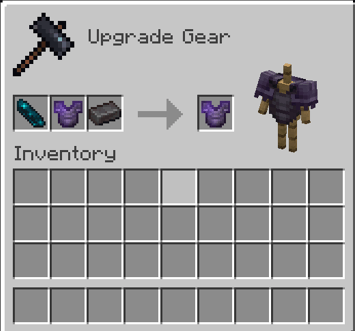
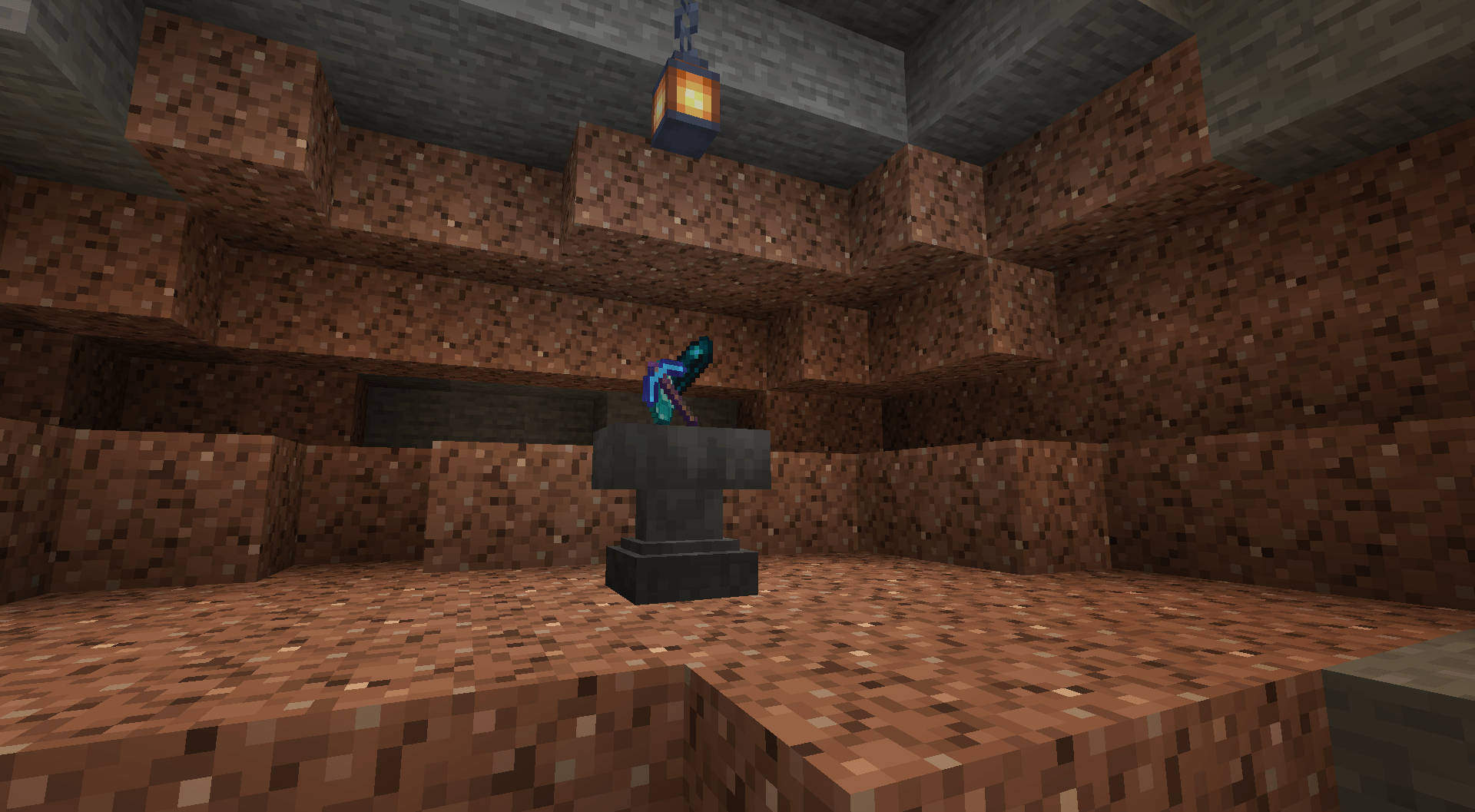
Ever had one of your beloved items say "Too Expensive" when you put it in an anvil? This Data Pack helps to avoid that pain, allowing an items repair cost to be reset by putting it in a Smithing Table with an Echo Shard and one of its repair material. Additionally, several items that didn't have a specified repair item in an Anvil now also have one.


List of Items and Their Associated Repair Items
- Wooden Tools, Shield, Bow, Crossbow, Fishing Rod, Carrot on a Stick, Warped Fungus on a Stick: Any Wooden Planks
- Stone Tools: Cobblestone, Cobbled Deepslate, Blackstone
- Copper Tools/Armor, Brush: Copper Ingots
- Iron Tools/Armor, Chainmail Armor, Flint and Steel, Shears: Iron Ingots
- Golden Tools/Armor: Gold Ingots
- Diamond Tools/Armor: Diamonds
- Netherite Tools/Armor: Netherite Ingots
- Leather Armor: Leather
- Turtle Shell: Turtle Scutes
- Wolf Armor: Armadillo Scutes
- Elytra: Phantom Membrane
- Trident: Prismarine Crystals
- Mace: Breeze Rods


Installation Instructions to Get the Data AND Resource Packs:

1) Select "Files"

2) Select a Version
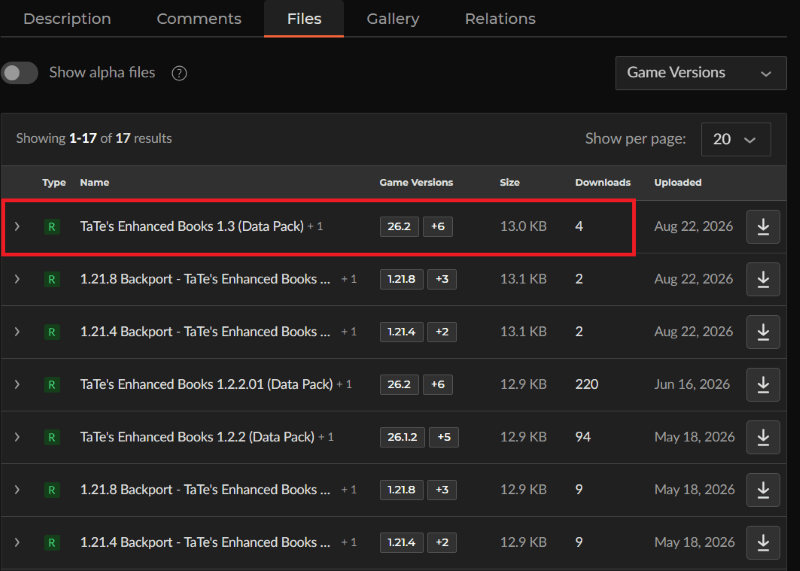
3) Click "View Full Page"
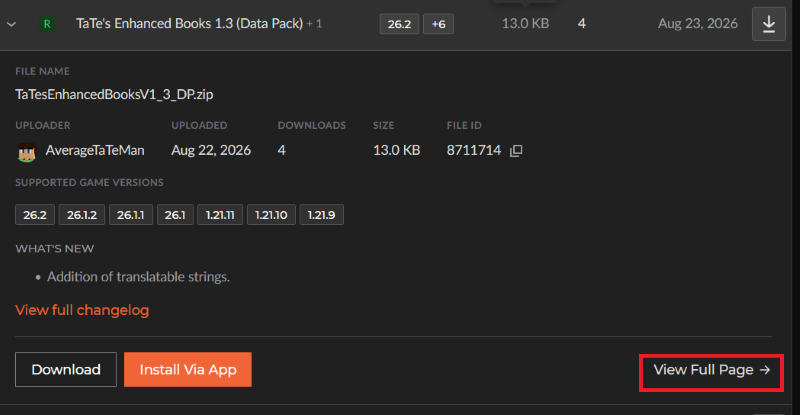
4) Click "Download" to download the data pack file, click "Additonal Files" to show the resource pack file, then click the download icon to download it, as shown below.
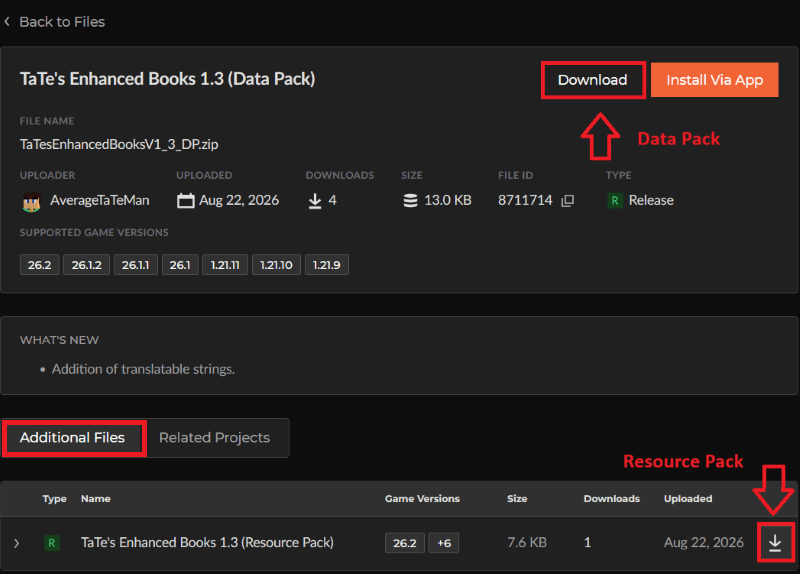
 

5) Unzip the files (optional, but recommended as that's how I use/test them). 

6) Add the resource pack to your Selected Packs (ideally at the top) in your Resource Packs menu. 

7) Add the data pack to either your Selected Packs in the Data Packs menu (if adding at world creation) OR put it in your world's 'datapacks' folder (if adding afterwards.  Recommended to either not have world open at the time or to close and reopen it afterwards).

8) You may get a prompt about experimental settings not being supported when opening the world.  This can safely be ignored, but it's also never a bad idea to make a backup if it's a world you care about.


Resettable Repair Costs 1.7 (Data Pack)
MC 26.3
Release 2026-09-15 Get
1.21.4 Backport - Resettable Repair Costs 1.2 (Data Pack)
MC 1.21.4, 1.21.3, 1.21.2
Release 2026-09-08 Get
1.21.8 Backport - Resettable Repair Costs 1.2 (Data Pack)
MC 1.21.8, 1.21.5, 1.21.6, 1.21.7
Release 2026-09-08 Get
1.21.10 Backport - Resettable Repair Costs 1.2 (Data Pack)
MC 1.21.9, 1.21.10
Release 2026-09-08 Get
Resettable Repair Costs 1.6 (Data Pack)
MC 1.21.11, 26.1, 26.1.1, 26.1.2, 26.2
Release 2026-09-08 Get
1.19.3 Backport - Resettable Repair Costs 1.1 (Data Pack)
MC 1.19.3, 1.19.1, 1.19.2, 1.19
Release 2026-08-25 Get
1.19.4 Backport - Resettable Repair Costs 1.1 (Data Pack)
MC 1.19.4
Release 2026-08-25 Get
1.20.2 Backport - Resettable Repair Costs 1.1 (Data Pack)
MC 1.20.2, 1.20.1, 1.20
Release 2026-08-25 Get
1.20.4 Backport - Resettable Repair Costs 1.1 (Data Pack)
MC 1.20.4, 1.20.3
Release 2026-08-25 Get
1.20.6 Backport - Resettable Repair Costs 1.1 (Data Pack)
MC 1.20.5, 1.20.6
Release 2026-08-25 Get
1.21.1 Backport - Resettable Repair Costs 1.1 (Data Pack)
MC 1.21, 1.21.1
Release 2026-08-25 Get
1.21.4 Backport - Resettable Repair Costs 1.1 (Data Pack)
MC 1.21.4, 1.21.3, 1.21.2
Release 2026-08-25 Get
1.21.8 Backport - Resettable Repair Costs 1.1 (Data Pack)
MC 1.21.8, 1.21.5, 1.21.6, 1.21.7
Release 2026-08-25 Get
1.21.10 Backport - Resettable Repair Costs 1.1 (Data Pack)
MC 1.21.9, 1.21.10
Release 2026-08-25 Get
Resettable Repair Costs 1.5 (Data Pack)
MC 1.21.11, 26.1, 26.1.1, 26.1.2, 26.2
Release 2026-08-25 Get
Resettable Repair Costs 1.4.01
MC 1.21.11, 26.1, 26.1.1, 26.1.2, 26.2
Release 2026-06-16 Get
1.19.3 Backport - Resettable Repair Costs 1.0
MC 1.19.3, 1.19.1, 1.19.2, 1.19
Release 2026-05-20 Get
1.19.4 Backport - Resettable Repair Costs 1.0
MC 1.19.4
Release 2026-05-20 Get
1.20.2 Backport - Resettable Repair Costs 1.0
MC 1.20.2, 1.20.1, 1.20
Release 2026-05-20 Get
1.20.6 Backport - Resettable Repair Costs 1.0
MC 1.20.5, 1.20.6
Release 2026-05-20 Get
1.21.1 Backport - Resettable Repair Costs 1.0
MC 1.21, 1.21.1
Release 2026-05-20 Get
1.21.4 Backport - Resettable Repair Costs 1.0
MC 1.21.4, 1.21.3, 1.21.2
Release 2026-05-20 Get
1.21.8 Backport - Resettable Repair Costs 1.0
MC 1.21.8, 1.21.5, 1.21.6, 1.21.7
Release 2026-05-20 Get
1.21.10 Backport - Resettable Repair Costs 1.0
MC 1.21.9, 1.21.10
Release 2026-05-20 Get
Resettable Repair Costs 1.4
MC 1.21.11, 26.1, 26.1.1, 26.1.2
Release 2026-05-20 Get
Resettable Repair Costs 1.3.02
MC 1.21.11, 26.1, 26.1.1, 26.1.2
Release 2026-03-26 Get
Resettable Repair Costs 1.3.01
MC 1.21.11, 26.1
Release 2026-03-24 Get
Resettable Repair Costs 1.3
MC 1.21.11
Release 2025-12-09 Get
Resettable Repair Costs 1.2
MC 1.21.9, 1.21.10
Release 2025-10-01 Get
Resettable Repair Costs 1.1
MC 1.21.5, 1.21.8, 1.21.7, 1.21.6
Release 2025-07-19 Get
Resettable Repair Costs 1.0.01
MC 1.21.5, 1.21.8, 1.21.7, 1.21.6
Release 2025-07-01 Get
Resettable Repair Costs 1.0
MC 1.21.5, 1.21.6
Release 2025-06-19 Get

Requirements & install

How to use this data pack in Minecraft
Mods needed
None, works in vanilla
Minecraft
1.21.9 – 26.3
Install folder
saves/<world>/datapacks

How to install data packs

  1. Download the data pack .zip file (do not extract it).
  2. New world: click Data Packs on the world creation screen and drop the .zip in. Existing world: open .minecraft/saves/<world>/datapacks.
  3. Put the .zip into the datapacks folder of the world (servers: world/datapacks).
  4. Run /reload in game (or rejoin the world) and check it with /datapack list.
Browse more: Data Packs for 26.3 All data packs

More from AverageTaTeMan

Advertisement Remove ads with Premium →

You Might Also Like