Mineuniverse
Data Packs
R.I.P. - Renamed Items Persist

R.I.P. - Renamed Items Persist

DATA PACK
Renaming items prevent them from despawning
by NotUnaNancyOwen
Download Claim this project
Add a badge to your pageLink to R.I.P. - Renamed Items Persist from a README, website or forum post.
Preview: Badge

Badges update automatically and link to the data pack page on MineUniverse.

353 downloads
0 likes
0 followers
Updated Oct 14, 2026
0 hypes
Follow0
Miscellaneous Utility
Advertisement Remove ads with Premium →

In older versions of Pocket Edition, renaming items prevented them from despawning. However, Mojang saw this as more of a bug than a feature and ended up patching it.

This datapack makes it so items cannot despawn when renamed in an anvil. Long story short, Renamed Items Persist now!

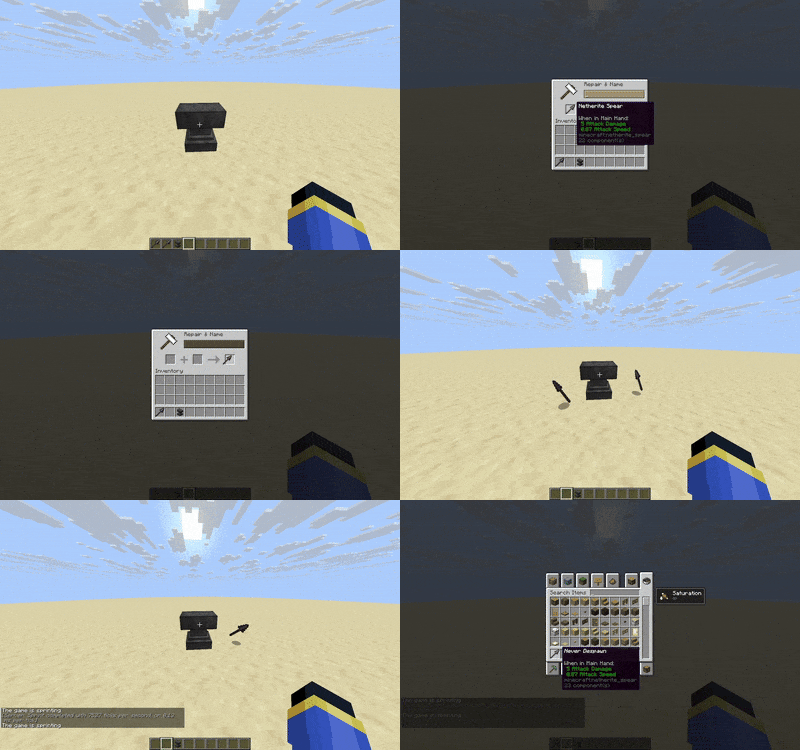
As shown in this GIF, I renamed a Netherite Spear and fast forward time by 10 minutes. The unnamed spear despawned but not the named one.

How does this work? This datapack runs a function every 5 minutes to check for any item with their minecraft:custom_name component changed, and when it does, it resets its despawn timer.


Renamed Items Persist.zip
MC 1.21, 1.21.8, 1.21.5, 1.21.4, 1.21.1, 1.21.6, 1.21.3, 1.21.7, 1.21.2, 1.21.9, 1.21.10, 1.21.11, 26.1
Release 2025-11-06 Get

Requirements & install

How to use this data pack in Minecraft
Mods needed
None, works in vanilla
Minecraft
1.21.5 – 26.1
Install folder
saves/<world>/datapacks

How to install data packs

  1. Download the data pack .zip file (do not extract it).
  2. New world: click Data Packs on the world creation screen and drop the .zip in. Existing world: open .minecraft/saves/<world>/datapacks.
  3. Put the .zip into the datapacks folder of the world (servers: world/datapacks).
  4. Run /reload in game (or rejoin the world) and check it with /datapack list.
Browse more: Data Packs for 26.1 All data packs

More from NotUnaNancyOwen

Advertisement Remove ads with Premium →

You Might Also Like