Mineuniverse
Data Packs
Quick Homes

Quick Homes

DATA PACK
Allows players to set homes and teleport to them using the Quick Actions menu.
by joxer021
Download Claim this project
898 downloads
0 likes
Updated Oct 14, 2026
0 hypes
Adventure Miscellaneous Utility
Advertisement Remove ads with Premium →

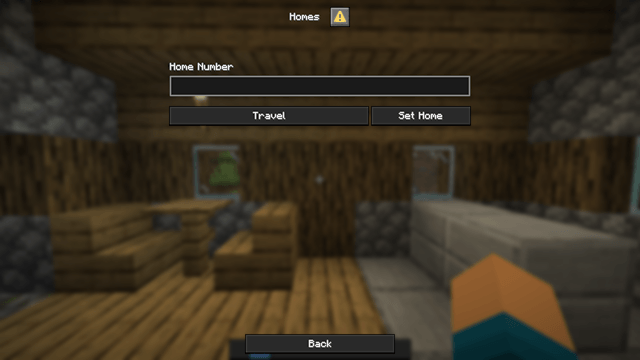
Players can now set homes through the Quick Actions menu (opened with G by default). First, select a home slot between 1 and the maximum number allowed by the configuration.

Choosing Set Home saves your current location to the selected slot. Choosing Travel teleports you to the home saved in that slot, allowing you to return to any of your saved locations at any time.

Config:

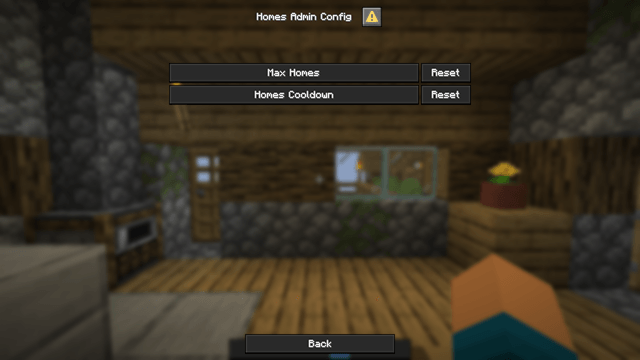
The datapack configuration is now available from the game's pause menu. From there, you can set the maximum number of home slots that each player is allowed to have and also set a cooldown for Home travel.

Notes:

The initial release is not compatible with newer versions. Players updating from that version will need to set their homes again.

More features and improvements are planned for future updates. In the meantime, feel free to share any suggestions or feedback—they're always appreciated!

QuickHomes_v1.1.zip
MC 1.21.11, 26.1, 26.1.1, 26.1.2, 26.2, 26.3
Release 2026-07-25 Get
QuickHomes_v1.0.zip
MC 1.21.11, 26.1, 26.1.1, 26.1.2, 26.2
Release 2026-07-17 Get

Requirements & install

How to use this data pack in Minecraft
Mods needed
None, works in vanilla
Minecraft
1.21.11 – 26.3
Install folder
saves/<world>/datapacks

How to install data packs

  1. Download the data pack .zip file (do not extract it).
  2. New world: click Data Packs on the world creation screen and drop the .zip in. Existing world: open .minecraft/saves/<world>/datapacks.
  3. Put the .zip into the datapacks folder of the world (servers: world/datapacks).
  4. Run /reload in game (or rejoin the world) and check it with /datapack list.
Browse more: Data Packs for 26.3 All data packs

More from joxer021

Advertisement Remove ads with Premium →

You Might Also Like