Mineuniverse
Data Packs
Player Health Display

Player Health Display

DATA PACK
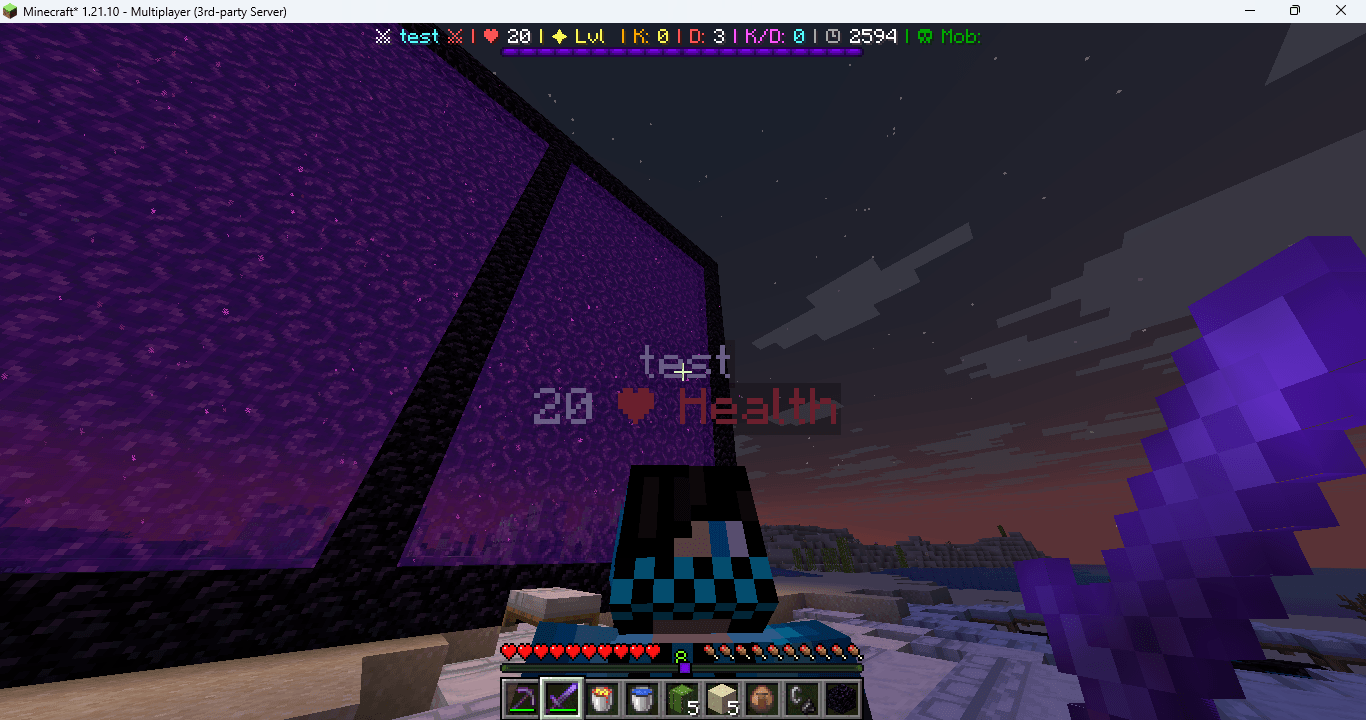
Shows a live health bar under every player's name using easy scoreboard visuals. Works in survival, creative, and multiplayer. Lightweight and fully automatic.
by AbhiTech
Download Claim this project
3,374 downloads
0 likes
0 followers
Updated Oct 14, 2026
0 hypes
Follow0
Utility
Advertisement Remove ads with Premium →

❤️ Health Indicator Datapack
This datapack adds a clean and dynamic health bar under player names, just like popular Minecraft servers. As players take damage or heal, the heart count updates instantly — no lag, no mods, no plugins.

Perfect for PvP, SMP worlds, minigames, or simply tracking player health in survival.


⭐ Features

✔ Display health under player name
✔ Real-time updates (0-lag tick function)
✔ Works in multiplayer + singleplayer
✔ Shows exact heart amount
✔ Compatible with armor, potions & effects
✔ No setup — works automatically
✔ Supports Minecraft 1.21+


🎯 Perfect For

  • SMP servers

  • PvP arenas

  • Minigames

  • Hardcore worlds

  • Friendly survival with friends


📦 Installation

  1. Download the .zip

  2. Move it to world/datapacks/

  3. Run /reload

  4. Done — hearts will appear instantly under names.

Health Indigator
MC 1.21.8, 1.21.6, 1.21.7, 1.21.9, 1.21.10
Release 2025-11-20 Get

Requirements & install

How to use this data pack in Minecraft
Mods needed
None, works in vanilla
Minecraft
1.21.6 – 1.21.10
Install folder
saves/<world>/datapacks

How to install data packs

  1. Download the data pack .zip file (do not extract it).
  2. New world: click Data Packs on the world creation screen and drop the .zip in. Existing world: open .minecraft/saves/<world>/datapacks.
  3. Put the .zip into the datapacks folder of the world (servers: world/datapacks).
  4. Run /reload in game (or rejoin the world) and check it with /datapack list.
Browse more: Data Packs for 1.21.10 All data packs

More from AbhiTech

Advertisement Remove ads with Premium →

You Might Also Like