Mineuniverse
Data Packs
No more mistake with color

No more mistake with color

DATA PACK
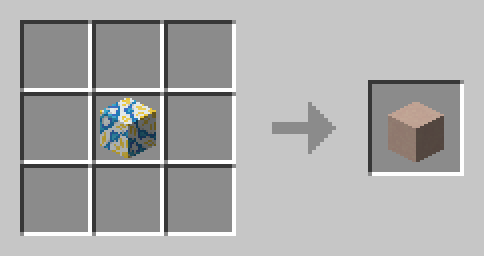
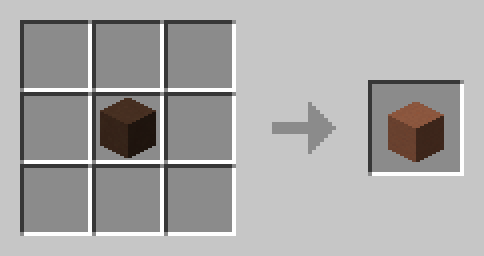
this data pack allows you change colored block back to standart block
by RollsRoyce
Download Claim this project
Add a badge to your pageLink to No more mistake with color from a README, website or forum post.
Preview: Badge

Badges update automatically and link to the data pack page on MineUniverse.

267 downloads
0 likes
0 followers
Updated Oct 14, 2026
0 hypes
Follow0
Tech Utility
Advertisement Remove ads with Premium →

No more mistake with color

Say goodbye to color mishaps with the No More Mistakes with Color data pack! This handy tool allows you to effortlessly revert dyed blocks  like stained glass, wool, terracotta  back to their original, undyed state. Whether you’re reworking a design or just want a fresh palette, this data pack makes sure that you never have to worry about wasted materials or time.
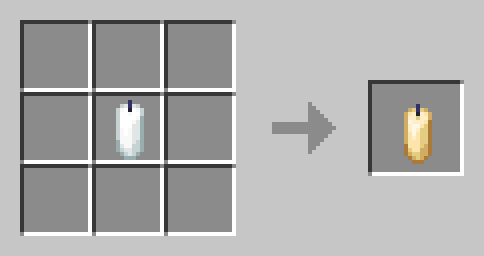
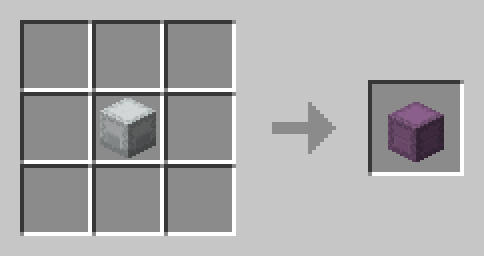
With No More Mistakes with Color, you can build with confidence, knowing that any color error is just a quick fix away!

No more mistake with color.zip
MC 1.16-Snapshot, 1.17.1, 1.16.3, 1.13.1, 1.19.3, 1.20.2, 1.15-Snapshot, 1.16.1, 1.18.1, 1.19.4-Snapshot, 1.20.5, 1.14.4, 1.14.1, 1.17, 1.20.2-Snapshot, 1.20.5-Snapshot, 1.14.3, 1.15
Release 2024-09-28 Get

Requirements & install

How to use this data pack in Minecraft
Mods needed
None, works in vanilla
Minecraft
1.17.1 – 1.20.5
Install folder
saves/<world>/datapacks

How to install data packs

  1. Download the data pack .zip file (do not extract it).
  2. New world: click Data Packs on the world creation screen and drop the .zip in. Existing world: open .minecraft/saves/<world>/datapacks.
  3. Put the .zip into the datapacks folder of the world (servers: world/datapacks).
  4. Run /reload in game (or rejoin the world) and check it with /datapack list.
Browse more: Data Packs for 1.20.5 All data packs

More from RollsRoyce

Advertisement Remove ads with Premium →

You Might Also Like