Mineuniverse
Data Packs
New Lodestone Recipe - Datapack

New Lodestone Recipe - Datapack

DATA PACK
Adding the new Lodestone recipe introduced in snapshot 25w02a to older versions of minecraft
by 4_Square
Download Claim this project
1,443 downloads
0 likes
Updated Oct 14, 2026
0 hypes
Miscellaneous Utility
Advertisement Remove ads with Premium →

New Lodestone recipe to old minecraft versions

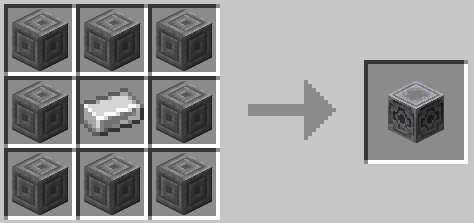
In Snapshot 25w02a Mojang changed the crafting recipe of the lodestone to have an iron ingot instead of a netherite ingot.

If you want to download the MOD CLICK HERE

DO NOT CLICK ON THE DOWNLOAD BUTTON

INSTEAD GO TO FILES AND SELECT THE RIGHT ONE FOR YOUR VERSION

This datapack adds that recipe change to older versions of minecraft 

New Lodestone Crafting Recipe:

This datapack won't work under 1.16 as Lodestones haven't even been introduced 

If you're using older versions of minecraft such as 1.16 or 1.17 you will see that the datapack says that its made for a newer version of minecraft. This does not matter and the datapack will work as regular


Any Bug reports, Feedback and Suggestions are welcome, Please DM 4_Square on discord

New Lodestone Recipe 1.2.0
MC 1.17.1, 1.18.1, 1.19.3, 1.20.2, 1.19.4, 1.17, 1.18, 1.20.1, 1.20, 1.19.1, 1.18.2, 1.19.2, 1.20.3, 1.19
Release 2026-07-01 Get
New Lodestone Recipe 1.1 - 1.21
MC 1.21, 1.21.4, 1.21.1, 1.21.3, 1.21.2
Release 2026-01-23 Get
New Lodestone Recipe 1.0 1.20-
MC 1.17.1, 1.16.3, 1.19.3, 1.20.2, 1.16.1, 1.18.1, 1.17, 1.16, 1.19.4, 1.16.5, 1.18.2, 1.19.2, 1.20.1, 1.20, 1.19.1, 1.18, 1.16.4, 1.16.2, 1.19
Release 2025-01-12 Get
New Lodestone Recipe 1.0 1.21+
MC 1.21, 1.21.4, 1.21.3, 1.21.1, 1.21.2
Release 2025-01-12 Get

Requirements & install

How to use this data pack in Minecraft
Mods needed
None, works in vanilla
Minecraft
1.20.1 – 1.21.4
Install folder
saves/<world>/datapacks

How to install data packs

  1. Download the data pack .zip file (do not extract it).
  2. New world: click Data Packs on the world creation screen and drop the .zip in. Existing world: open .minecraft/saves/<world>/datapacks.
  3. Put the .zip into the datapacks folder of the world (servers: world/datapacks).
  4. Run /reload in game (or rejoin the world) and check it with /datapack list.
Browse more: Data Packs for 1.21.4 All data packs

More from 4_Square

Advertisement Remove ads with Premium →

You Might Also Like