Mineuniverse
Data Packs
Name Tag Craft

Name Tag Craft

DATA PACK
This data pack will add crafting tags from 26.1
by Bekezhan531
Download Claim this project
344 downloads
0 likes
0 followers
Updated Oct 14, 2026
0 hypes
Follow0
Miscellaneous Utility
Advertisement Remove ads with Premium →

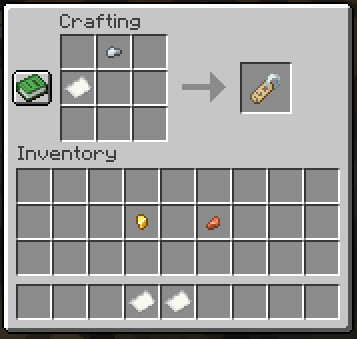
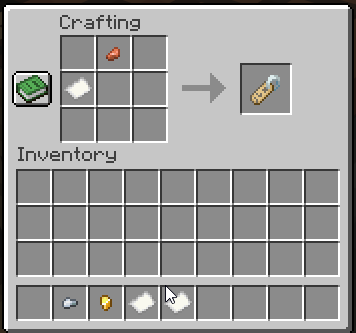
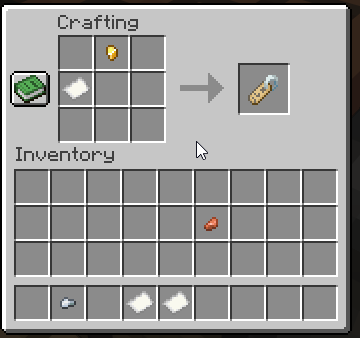
This datapack adds Name Tag Craft for 1.21.11 and below (for users 26.1 and higher сraft tags have already been added in 26.1 and higher)
How to use:

  1. Download the zip file
  2. Put it into your "datapacks" folder inside your world save.
  3. Use the /reload command or restart your world.
  4. Enjoy! How to craft in Photos: Craft in copper nugget Craft in golden nugget Craft in iron nugget
1.1 downgrade 1 name tag craft for 1.20.4 and below
MC 1.16.3, 1.13.1, 1.17.1, 1.16.1, 1.18.1, 1.14.3, 1.15, 1.16, 1.13, 1.16.5, 1.19.3, 1.20.2, 1.19.4, 1.14.4, 1.14.1, 1.17, 1.18, 1.20.1, 1.20, 1.15.2, 1.14, 1.19.1, 1.20.4
Release 2026-05-03 Get
1.1 downgrade 2 name tag craft for 1.20.6 and below
MC 1.20.5, 1.20.6
Release 2026-05-03 Get
1.1 downgrade 3 name tag craft for 1.21.1 and below
MC 1.21, 1.21.1
Release 2026-05-03 Get
1.1 downgrade 4 name tag craft for 1.21.2 and higher.zip
MC 1.21.8, 1.21.5, 1.21.4, 1.21.6, 1.21.3, 1.21.7, 1.21.2
Release 2026-05-03 Get
Version 1.1
MC 1.21.9, 1.21.10, 1.21.11
Release 2026-04-28 Get
name tag craft for 1.20.4 and below downgrade-1
MC 1.16.3, 1.13.1, 1.17.1, 1.16.1, 1.18.1, 1.14.3, 1.15, 1.16, 1.13, 1.16.5, 1.19.3, 1.20.2, 1.19.4, 1.14.4, 1.14.1, 1.17, 1.18, 1.20.1, 1.20, 1.15.2, 1.14, 1.19.1, 1.20.4
Release 2026-04-27 Get
name tag craft for 1.20.6 and below downgrade-2
MC 1.20.5, 1.20.6
Release 2026-04-27 Get
name tag craft for 1.21.1 and below-downgrade 3
MC 1.21, 1.21.1
Release 2026-04-27 Get
name tag craft for 1.21.2 and higher-downgrade 4
MC 1.21.8, 1.21.5, 1.21.4, 1.21.6, 1.21.3, 1.21.7, 1.21.2
Release 2026-04-27 Get
First Version
MC 1.21.9, 1.21.10, 1.21.11
Release 2026-04-26 Get

Requirements & install

How to use this data pack in Minecraft
Mods needed
None, works in vanilla
Minecraft
1.21.4 – 1.21.11
Install folder
saves/<world>/datapacks

How to install data packs

  1. Download the data pack .zip file (do not extract it).
  2. New world: click Data Packs on the world creation screen and drop the .zip in. Existing world: open .minecraft/saves/<world>/datapacks.
  3. Put the .zip into the datapacks folder of the world (servers: world/datapacks).
  4. Run /reload in game (or rejoin the world) and check it with /datapack list.
Browse more: Data Packs for 1.21.11 All data packs

More from Bekezhan531

Advertisement Remove ads with Premium →

You Might Also Like