Mineuniverse
Data Packs
More Slabs!

More Slabs!

DATA PACK
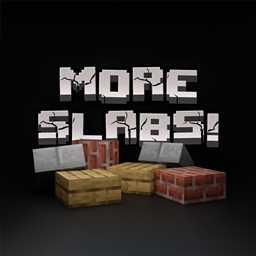
🌟 A clever solution for allowing you to recraft slabs back into full blocks.
by LightAndy
Download Claim this project
479 downloads
0 likes
Updated Oct 14, 2026
0 hypes
Miscellaneous Utility
Advertisement Remove ads with Premium →

🌟 More Slabs - Recraft the Full Blocks! 🌟

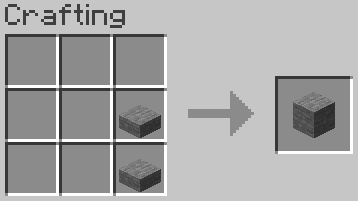
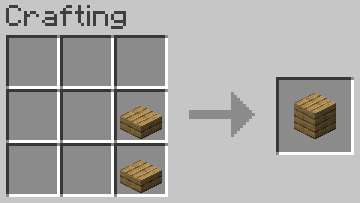
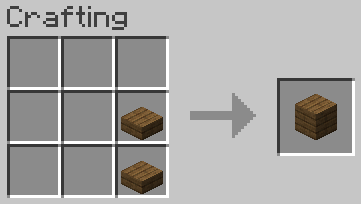
Do you ever find yourself frustrated by the resource drain when crafting full blocks into slabs, only to realize you need those blocks in their original form later? Fear not! "More Slabs" has come to your rescue! πŸš€ This Minecraft datapack presents an ingenious solution, enabling you to recraft slabs back into full blocks effortlessly. With "More Slabs," you have the power to convert any slab back into a full block, granting you unparalleled resource efficiency. Say farewell to the agony of wasted building blocks! πŸ—οΈ

πŸ› οΈ Features:

  • Reverse Crafting: Effortlessly convert slabs back into full blocks.
  • Resource Efficiency: Maximize your materials and keep your inventory organized.
  • User-Friendly: Craft with convenience at any crafting table.
  • Block Compatibility: Works seamlessly with all available slab types.

🏑 Build with Confidence:

"More Slabs" is the ultimate datapack for builders and resource-conscious players. Never again will you let your resources go to waste! Craft your way to perfection with "More Slabs" by your side. πŸ’ͺ

πŸ’š Leave Your Feedback:

If you find this datapack valuable, please consider leaving a review and rating. Your feedback is highly appreciated. πŸ™

Note: This datapack is designed for Minecraft versions 1.20.*.

More Slabs! - 1.1
MC 1.20.2, 1.20.3, 1.20.1, 1.20, 1.20.4
Beta 2024-03-21 Get
More Slabs! - 1.3
MC 1.20.2, 1.20.3, 1.20.1, 1.20, 1.20.4
Release 2024-03-21 Get
More Slabs! - 1.4
MC 1.20.2, 1.20.3, 1.20.1, 1.20, 1.20.4
Release 2024-03-21 Get
More Slabs! - 1.2
MC 1.20.2, 1.20.3, 1.20.1, 1.20, 1.20.4
Beta 2024-03-21 Get
More Slabs! - 1.0
MC 1.20.2, 1.20.3, 1.20.1, 1.20, 1.20.4
Alpha 2024-03-21 Get

Requirements & install

How to use this data pack in Minecraft
Mods needed
None, works in vanilla
Minecraft
1.20 – 1.20.4
Install folder
saves/<world>/datapacks

How to install data packs

  1. Download the data pack .zip file (do not extract it).
  2. New world: click Data Packs on the world creation screen and drop the .zip in. Existing world: open .minecraft/saves/<world>/datapacks.
  3. Put the .zip into the datapacks folder of the world (servers: world/datapacks).
  4. Run /reload in game (or rejoin the world) and check it with /datapack list.
Browse more: Data Packs for 1.20.4 All data packs

More from LightAndy

Advertisement Remove ads with Premium →

You Might Also Like