Mineuniverse
Data Packs
[MGG] Glowing Berries

[MGG] Glowing Berries

DATA PACK
Glowing Berries adds a simple area effect to Glow Berries. When you eat one, nearby entities are illuminated with the Glowing effect, making them visible through walls and in dark areas.
by MrGreenGames
Download Claim this project
12 downloads
0 likes
Updated Oct 14, 2026
0 hypes
Adventure Miscellaneous Utility
Advertisement Remove ads with Premium →

Features

  • Glow Berry Activation — Eating a Glow Berry activates a moving Glowing effect for 10 seconds.
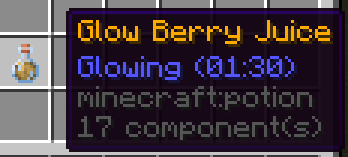
  • Glow Berry Juice — Craft a special golden potion that extends the effect to 1 minute and 30 seconds.
  • Moving Glow Range — Nearby entities glow as you move, automatically updating when they enter or leave the range.
  • Configurable Range — Adjust the default 30-block radius anywhere from 1 to 128 blocks.
  • Multiplayer Support — Players can independently activate Glowing with overlapping detection ranges.
  • Existing Effect Protection — Preserves pre-existing Glowing effects when detected before activation.
  • Lightweight — Uses advancements and optimized functions to manage Glowing automatically.

How to Use

Simply eat a Glow Berry to activate Glowing for 10 seconds.

Nearby entities automatically receive Glowing while within range. As you move, new entities begin glowing and those left behind lose the applied effect.

Glow Berry Juice

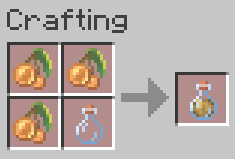
Craft Glow Berry Juice using the 2x2 inventory crafting grid:

  • 3 Glow Berries
  • 1 Glass Bottle

Ingredients can be placed in any arrangement.

Drinking Glow Berry Juice activates Glowing for 1 minute and 30 seconds. Eating additional Glow Berries will not shorten an active longer-lasting effect.

Customize the Range

Operators can adjust the detection radius using:

/function mgg_glowing:range {blocks:48}

  • Default range: 30 blocks.
  • Adjustable range: 1–128 blocks.
  • Applies globally to Glow Berries and Glow Berry Juice.
  • Changes take effect immediately and persist through world reloads and restarts.

Restore the default range:

/function mgg_glowing:range {blocks:30}

No commands are required for normal gameplay.


Installation

  1. Download the datapack.
  2. Place the .zip file inside your world's datapacks folder.
  3. Load or reload the world.

Check that it is enabled with:

/datapack list

No client mods or resource packs required.


Enjoying the datapack? Follow MrGreenGames and leave feedback in the comments! 💚

🟢 Feel free to use this datapack in your videos!
If you feature the datapack in a video or showcase, linking back to the original datapack page in your description is greatly appreciated, but not required.

🔴 Please do not redistribute or repurpose the datapack.
You may not reupload the datapack to other websites, launchers, or platforms, nor reuse its data or other assets in separate projects.

Do not place the datapack behind ad-based or redirect services such as AdFly, and do not sell the datapack or include it in any paid modpack.

💚 This datapack is intended to remain free and accessible to everyone.

MGG-Glowing-Berries-1.0.0.zip
MC 1.21.10, 1.21.11-snapshot, 1.21.11, 26.1, 26.1.1, 26.1.2, 26.2
Release 2026-10-04 Get

Requirements & install

How to use this data pack in Minecraft
Mods needed
None, works in vanilla
Minecraft
1.21.10 – 26.2
Install folder
saves/<world>/datapacks

How to install data packs

  1. Download the data pack .zip file (do not extract it).
  2. New world: click Data Packs on the world creation screen and drop the .zip in. Existing world: open .minecraft/saves/<world>/datapacks.
  3. Put the .zip into the datapacks folder of the world (servers: world/datapacks).
  4. Run /reload in game (or rejoin the world) and check it with /datapack list.
Browse more: Data Packs for 26.2 All data packs

More from MrGreenGames

Advertisement Remove ads with Premium →

You Might Also Like