Mineuniverse
Data Packs
Guns, Gadgetery & Mission Editor

Guns, Gadgetery & Mission Editor

DATA PACK
Guns, Gadgets, New Mobs with guns, Gun shops and Mission/Quest Editor
by FlyingDustman
Download Claim this project
Add a badge to your pageLink to Guns, Gadgetery & Mission Editor from a README, website or forum post.
Preview: Badge

Badges update automatically and link to the data pack page on MineUniverse.

9,234 downloads
0 likes
0 followers
Updated Oct 14, 2026
0 hypes
Follow0
Adventure Fantasy Miscellaneous Utility
Advertisement Remove ads with Premium →

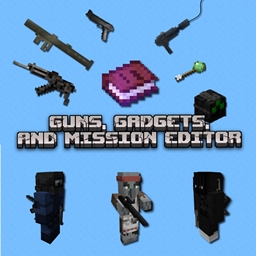
This datapack mainly adds the following features to Minecraft:

- Guns
- Gadgets
- New NPCs with guns
- Gun Shops
- Mission/Quest Editor

It's an utility freely inspired by level/scenario editors in RTS video games such as Age Of Empires, Empire Earth, Empires: Dawn of a Modern World... but also by this mod from Jedi Knight 3: Jedi Academy

How this data pack has been designed:


🕹 Singleplayer and multiplayer
🌏 To run on your own worlds or any free downloadable Minecraft worlds
📕 Use the Game Master's Book to edit Missions, summon NPCs who can shoot at you, change game options ...


Informations:


⚠️ Please download the resource pack to correctly display the new items and entities.

Resource Pack v1.7.3

Resource Pack v1.7.2

Resource Pack v1.7.1

Resource Pack v1.7.0


⌨️ /give commands


⚠️​Your world must have [​Allow Commands] ON when it is created (= cheats enabled) for the commands below to work:

Give guns, ammo and gadgets command:
/function give:guns
/function give:ammo
/function give:gadgets

Game Master's Book command:
/function give:game_master_book


🖱️ Special Controls


Reload Gun:

Press "Drop item" button

So, it is highly recommended to set the "drop" key to the “r” button.

Drop Item:

Long press "Drop item" button


🎳 Installation/Uninstall tips


⚠️To ensure that this data pack works properly after installation, leave your map and return to it (or reload your server once).

⚠️A warning message about Experimental Settings appears when launching the map, this is perfectly normal, you can click on the [​I know what I'm doing!] button.

Command to uninstall this data pack:

/function guns:main/uninstall


All Features:


MULTIPLAYER COMPATIBLE

  • Team selection with the Game Master's Book
  • Assign yourself, other players and other mobs to a team to complete missions and activate the AI of new mobs. You can also leave a team.

MODERN GUNS

  • From simple revolvers to heavy weapons
  • Possibility of holding a handgun in each hand
  • Scope for sniper rifle
  • Explosive, smoke, tear-gas, remote-controlled grenades
  • Localized damage on entities, headshots possible, blood splatters ON/OFF
  • Game difficulty affects gun damage and mob shooting accuracy
  • Armor protects against bullets, but alters at the same time
  • Bullets collide with TNT, glass panes and metal doors
  • Bullet gravitation

GADGETS

  • Grappling Hook
  • Jetboots
    • Fuel required
  • Night Vision Goggles
    • Battery required
  • Sonar Vision Goggles
    • Battery required
  • Diving Helmet/Rebreather
  • Slime arrows
  • Tranquilizers
  • Telescopic Scanner
    • Indicates the entity type
    • its team
    • its health points
    • its distance from your position
  • Spy Garb
    • It lets you infiltrate your opponent's team
  • Parachute
  • Bandages

NEW MOBS

  • Enemy spawners + BOSS
    • Custom mob skins or random armors with random patterns
      • Knight
      • Bandit
      • Robber
      • Burglar
    • Can use guns
    • Can throw grenades
  • Allies Spawners on your team to protect you + HERO
    • Custom mob skins or random armors with random patterns
      • Knight
      • Cowboy
      • Police officer
      • Spec Ops
    • Shoot at the enemy
    • React to team killing
    • Can follow players who have the Rally Banner
  • Special AI
    • Can open doors
    • Avoid sinking
    • Chase players over long distances
    • Success of the shot according to difficulty
  • Customization+
    • Give the items and pieces of armor you want to the NPC you want to appear with what you have on you and in your offhand
    • Make spawn a tamed mount with a saddle. Humanoid mobs will mount it if they are close.

GAME MASTER'S BOOK

  • Menu with clickable options
  • Allows you to create missions
    • Kill the Boss
    • Elimination
    • Parkour
    • Steal
  • Edit teams
  • Give all spawn eggs of the mobs in this data pack
  • Give all items of this data pack
  • Place random loot boxes
  • Place shops
  • Options for modifying game rules
  • Changes the world's game time
  • Guide

All rights reserved


Lara Croft's Manor - Tomb Raider 3 Minecraft Map

Guns, Gadgetery & Mission Editor 1.7.3
MC 26.3
Release 2026-10-05 Get
Guns, Gadgetery & Mission Editor 1.7.2
MC 26.2
Release 2026-06-27 Get
Guns, Gadgetery & Mission Editor v1.7.1
MC 26.1, 26.1.1, 26.1.2
Release 2026-04-08 Get
Guns, Gadgetery & Mission Editor v1.7.0
MC 1.21.11
Release 2026-01-05 Get

Requirements & install

How to use this data pack in Minecraft
Mods needed
None, works in vanilla
Minecraft
1.21.11 – 26.3
Install folder
saves/<world>/datapacks

How to install data packs

  1. Download the data pack .zip file (do not extract it).
  2. New world: click Data Packs on the world creation screen and drop the .zip in. Existing world: open .minecraft/saves/<world>/datapacks.
  3. Put the .zip into the datapacks folder of the world (servers: world/datapacks).
  4. Run /reload in game (or rejoin the world) and check it with /datapack list.
Browse more: Data Packs for 26.3 All data packs

More from FlyingDustman

Advertisement Remove ads with Premium →

You Might Also Like