Explosive Arrows is a lightweight Vanilla+ datapack that adds explosive arrows to Minecraft without changing the core survival experience.
Shoot them from a bow or crossbow and watch them explode on impact. Simple, useful, and just a little bit dangerous. 💥
- 🏹 Explosive Arrows compatible with bows and crossbows.
- 💣 Explosions on impact with blocks, mobs, and players.
- 🎯 Explosions are correctly attributed to the player who fired the arrow.
- 💨 Subtle TNT particle trail while the arrow is flying.
- ✨ Custom item with unique name, lore, rarity, and enchantment glint.
- 📖 Recipe automatically available in the recipe book.
- 🎮 Designed to fit naturally into Vanilla+ survival.
- ⚡ Lightweight — no mods or resource packs required.
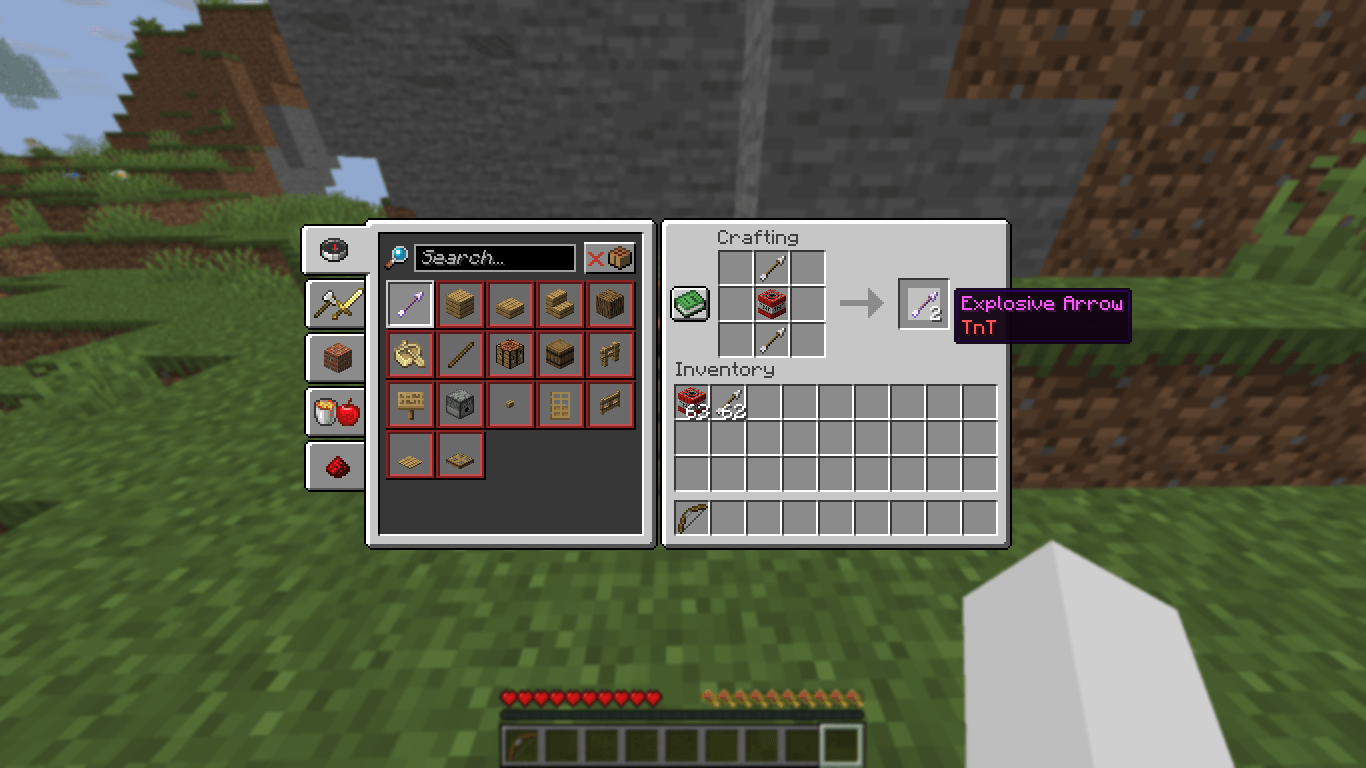
Craft 2 Explosive Arrows using:
Place a normal arrow above and below a TNT block.
- Minecraft Java Edition 26.3
- Datapack format 121
- Works in singleplayer and multiplayer.
- No resource pack required.
This is the 1.0 Beta release. The datapack is fully playable, but minor bugs or compatibility issues may still be discovered.
If you find a bug, please report it so it can be addressed in a future update.
Youtube:
---
Created by Wybie (DJFxKMD)