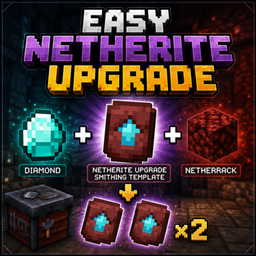
A simple data pack that makes Netherite Upgrade Smithing Templates easier to duplicate.
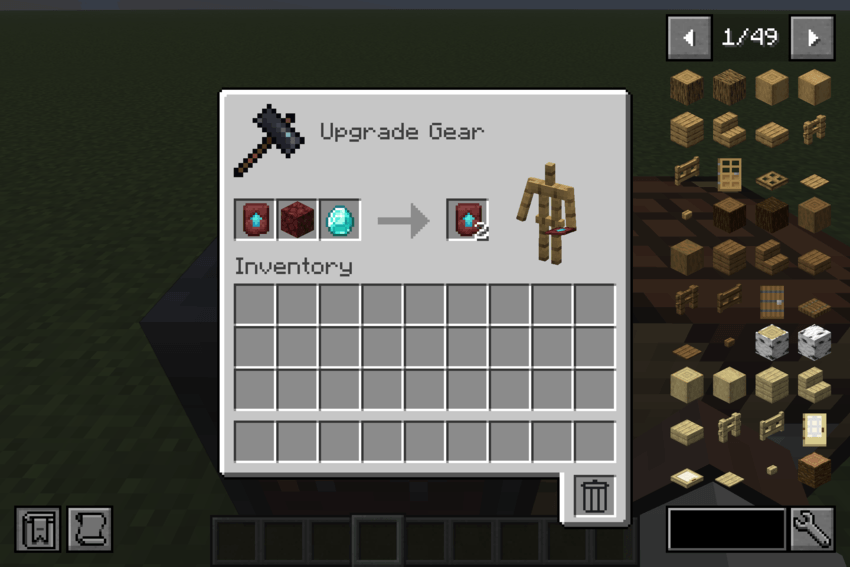
Instead of using the expensive vanilla duplication recipe, this data pack lets you duplicate a Netherite Upgrade Smithing Template using only 1 Diamond and 1 Netherrack.
Easy Netherite Upgrade Smithing Template duplication
Only 1 Diamond required
Only 1 Netherrack required
Produces 2 Netherite Upgrade Smithing Templates
Uses the vanilla Smithing Table
No mods required
Place the following items in a Smithing Table:
Template: Netherite Upgrade Smithing Template
Base: Netherrack
Addition: Diamond
Result: 2× Netherite Upgrade Smithing Template
Netherite Upgrade Smithing Templates can be expensive to obtain and duplicate. This data pack provides a much cheaper alternative while keeping the original template requirement.
Minecraft Java Edition
See the Files section for supported Minecraft versions.
Download the data pack for your Minecraft version.
Place the .zip file into the datapacks folder of your world.
Start or reload the world.
Use a Smithing Table to duplicate the Netherite Upgrade Smithing Template.
No additional mods are required.
License: All Rights Reserved
Redistribution or re-uploading this project without permission is not allowed.