Mineuniverse
Data Packs
Dyes Reimagined

Dyes Reimagined

DATA PACK
Changes how Minecraft's dye crafting mechanic works a little bit and adds several new recipes for making dyes. Formerly known as "Make a Dye Out Of It".
by _Syhmac
Download Claim this project
Add a badge to your pageLink to Dyes Reimagined from a README, website or forum post.
Preview: Badge

Badges update automatically and link to the data pack page on MineUniverse.

2,350 downloads
0 likes
0 followers
Updated Oct 14, 2026
0 hypes
Follow0
Miscellaneous
Advertisement Remove ads with Premium →

Modrinth Downloads CurseForge Datapack Downloads CurseForge Mod Downloads

Modrinth Version Static Badge Static Badge

About Datapack

This project is formerly known as "Make a Dye Out Of It"

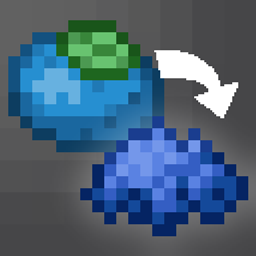
Dyes Reimagined changes how Minecraft's dye crafting works. It modifies some recipes, making them more universal, deletes the ones that are not necessary and adds a bunch of new ones giving you more ways to craft dyes and glow ink sacs.

Mod version

Looking for something more convinient to use on modded Minecraft? Check out the Mod version, avalible on all major mod loaders!

Recipes

This datapack modifies, deletes, and adds a lot of recipes. Gives the opportunity to craft dyes in new ways and also to craft glow ink sacs.

Crafting recipe for glow ink sac

Advancements

Dyes Reimagined adds in total 17 advancements. 16 for crafting each dye color, and 1 hidden challenge you'll need to find by yourself, or read about it in the documentation.

Minecraft advancement called "Orange is the New Dye"

It also adds a second advancement tree that is meant to guide you in the new dye mixing. Advancements from this tree does not grant any rewards and are purely informational.

Future datapack support

I plan on updating this datapack once new full releases of Minecraft comes out.

Compatibility with other mods

If you want some extra compatibility for items or dyes introduced with other mods, let me know on Discord and I will release additional add-ons giving compatibility with desired mods!

2.1 for MC 26.1 - 26.4-snapshot-1
MC 26.1, 26.1.1, 26.1.2, 26.2, 26.3
Release 2026-09-26 Get
2.0 for MC 26.1 - 26.2
MC 26.1, 26.1.1, 26.1.2, 26.2
Release 2026-06-27 Get
1.4.7 for MC 1.21.x
MC 1.21, 1.21.8, 1.21.5, 1.21.4, 1.21.1, 1.21.6, 1.21.3, 1.21.7, 1.21.2, 1.21.9, 1.21.10, 1.21.11
Release 2026-05-28 Get
1.4.7 for MC 26.1.x
MC 26.1, 26.1.1, 26.1.2
Release 2026-05-28 Get
1.4.6 for MC 26.1.x
MC 26.1, 26.1.1, 26.1.2
Release 2026-05-01 Get
1.4.6 for MC 1.21 - 1.21.11
MC 1.21, 1.21.8, 1.21.5, 1.21.4, 1.21.1, 1.21.6, 1.21.3, 1.21.7, 1.21.2, 1.21.9, 1.21.10, 1.21.11
Release 2026-02-24 Get
1.4.5 for MC 1.21 - 1.21.10
MC 1.21, 1.21.5, 1.21.8, 1.21.9, 1.21.10, 1.21.4, 1.21.3, 1.21.7, 1.21.1, 1.21.6, 1.21.2
Release 2025-10-10 Get
1.4.4-hotfix for MC 1.20 - 1.21.8
MC 1.20.2, 1.21, 1.20.5, 1.21.5, 1.21.8, 1.21.4, 1.20.3, 1.20.1, 1.20, 1.20.6, 1.20.4, 1.21.3, 1.21.7, 1.21.1, 1.21.6, 1.21.2
Release 2025-07-02 Get
1.4.3 for MC 1.20 - 1.21.7
MC 1.20.2, 1.21, 1.20.5, 1.21.5, 1.21.4, 1.20.3, 1.20.1, 1.20, 1.20.6, 1.20.4, 1.21.3, 1.21.7, 1.21.1, 1.21.6, 1.21.2
Release 2025-07-01 Get
1.4.2 for MC 1.20 - 1.21.6
MC 1.20.2, 1.21, 1.20.5, 1.21.5, 1.21.4, 1.20.3, 1.20.1, 1.20, 1.20.6, 1.20.4, 1.21.3, 1.21.1, 1.21.6, 1.21.2
Release 2025-06-20 Get
1.4.1 for MC 1.20 - 1.21.5
MC 1.20.2, 1.21, 1.20.5, 1.21.5, 1.21.4, 1.20.3, 1.20.1, 1.20, 1.20.6, 1.20.4, 1.21.3, 1.21.1, 1.21.2
Release 2025-05-25 Get
1.4 for MC 1.20 - 1.21.5
MC 1.20.2, 1.21, 1.20.5, 1.21.5, 1.21.4, 1.20.3, 1.20.1, 1.20, 1.20.6, 1.20.4, 1.21.3, 1.21.1, 1.21.2
Release 2025-05-15 Get
1.3 for MC 1.20 - 1.21.3
MC 1.20.2, 1.21, 1.20.5, 1.20.3, 1.20.1, 1.20, 1.20.6, 1.20.4, 1.21.3, 1.21.1, 1.21.2
Release 2024-11-01 Get
1.2 for MC 1.20 - 1.21.1
MC 1.20.2, 1.21, 1.20.5, 1.20.3, 1.20.1, 1.20, 1.20.6, 1.20.4, 1.21.1
Release 2024-08-08 Get
1.1.1 for MC 1.20 - 1.21
MC 1.20.2, 1.21, 1.20.5, 1.20.3, 1.20.1, 1.20, 1.20.6, 1.20.4
Release 2024-08-05 Get
1.1 for MC 1.20 - 1.21
MC 1.20.2, 1.21, 1.20.5, 1.20.3, 1.20.1, 1.20, 1.20.6, 1.20.4
Release 2024-07-02 Get
1.0 for MC 1.20 - 1.21
MC 1.20.2, 1.21, 1.20.5, 1.20.3, 1.20.1, 1.20, 1.20.6, 1.20.4
Release 2024-06-28 Get

Requirements & install

How to use this data pack in Minecraft
Mods needed
None, works in vanilla
Minecraft
1.21.9 – 26.3
Install folder
saves/<world>/datapacks

How to install data packs

  1. Download the data pack .zip file (do not extract it).
  2. New world: click Data Packs on the world creation screen and drop the .zip in. Existing world: open .minecraft/saves/<world>/datapacks.
  3. Put the .zip into the datapacks folder of the world (servers: world/datapacks).
  4. Run /reload in game (or rejoin the world) and check it with /datapack list.
Browse more: Data Packs for 26.3 All data packs

More from _Syhmac

Advertisement Remove ads with Premium →

You Might Also Like