Mineuniverse
Data Packs
Day Counter by takapii_kun0717

Day Counter by takapii_kun0717

DATA PACK
day counter
by takapii_kun
Download Claim this project
Add a badge to your pageLink to Day Counter by takapii_kun0717 from a README, website or forum post.
Preview: Badge

Badges update automatically and link to the data pack page on MineUniverse.
2,081 downloads
0 likes
0 followers
Updated Oct 14, 2026
0 hypes
Follow0
Miscellaneous Utility
Advertisement Remove ads with Premium →

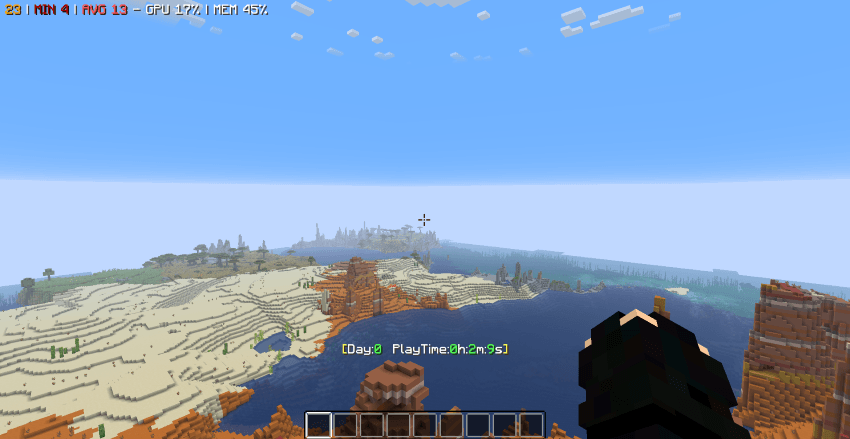
経過日数と時間を表示します。

設定で表示、非表示を切り替えられます。

/function day_setting_on   表示

/function day_setting_off  非表示


権限がないプレイヤーでも設定可能

/trigger day_setting set 1  表示

/trigger day_setting set 0  非表示


Displays the elapsed days and time.
You can toggle display on/off in settings.
/function day_setting_on   Display
/function day_setting_off  Hide


Players without permissions can also set this.
/trigger day_setting set 1  Display
/trigger day_setting set 0  Hide


DayCounter_v1.0_takapii_kun0717.zip
MC 1.21, 1.20.2, 1.21.8, 1.20.5, 1.21.5, 1.21.4, 1.20.1, 1.20.6, 1.21.1, 1.21.6, 1.21.3, 1.21.7, 1.20.4, 1.20.3, 1.21.2, 1.21.9, 1.21.10, 1.21.11
Release 2025-12-21 Get

Requirements & install

How to use this data pack in Minecraft
Mods needed
None, works in vanilla
Minecraft
1.21.4 – 1.21.11
Install folder
saves/<world>/datapacks

How to install data packs

  1. Download the data pack .zip file (do not extract it).
  2. New world: click Data Packs on the world creation screen and drop the .zip in. Existing world: open .minecraft/saves/<world>/datapacks.
  3. Put the .zip into the datapacks folder of the world (servers: world/datapacks).
  4. Run /reload in game (or rejoin the world) and check it with /datapack list.
Browse more: Data Packs for 1.21.11 All data packs

More from takapii_kun

Advertisement Remove ads with Premium →

You Might Also Like