Mineuniverse
Data Packs
Day Counter

Day Counter

DATA PACK
A simple Day Counter Datapack
by Avie29
Download Claim this project
165,083 downloads
0 likes
0 followers
Updated Oct 14, 2026
0 hypes
Follow0
Miscellaneous Utility
Advertisement Remove ads with Premium →

Avies Day Counter

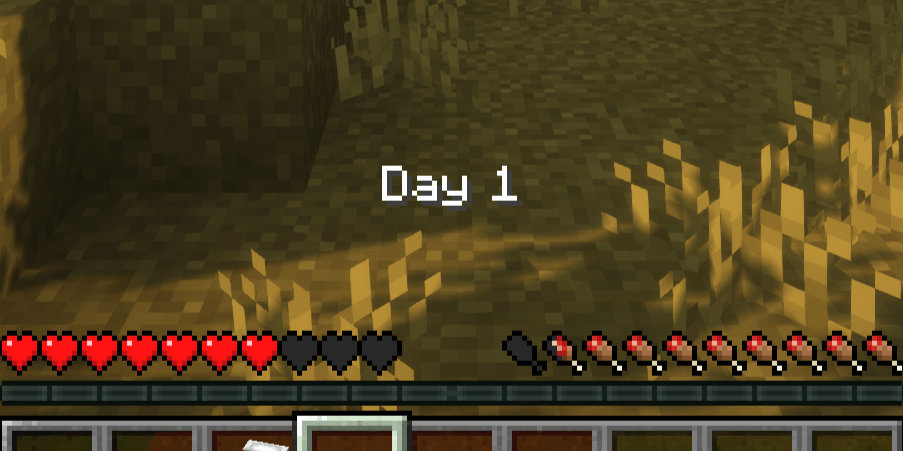
This datapack adds a simple day counter above the hotbar to the game.

The Day Counter automatically counts the number of days played in a world and requires no configuration whatsoever. Once installed, it is ready to use straight away and is fully optimised for survival gameplay. The display is deliberately minimalist and blends seamlessly into the game, allowing players to focus entirely on survival whilst keeping track of their progress. This makes Day Counter the perfect addition to hardcore worlds, where every day survived really counts.

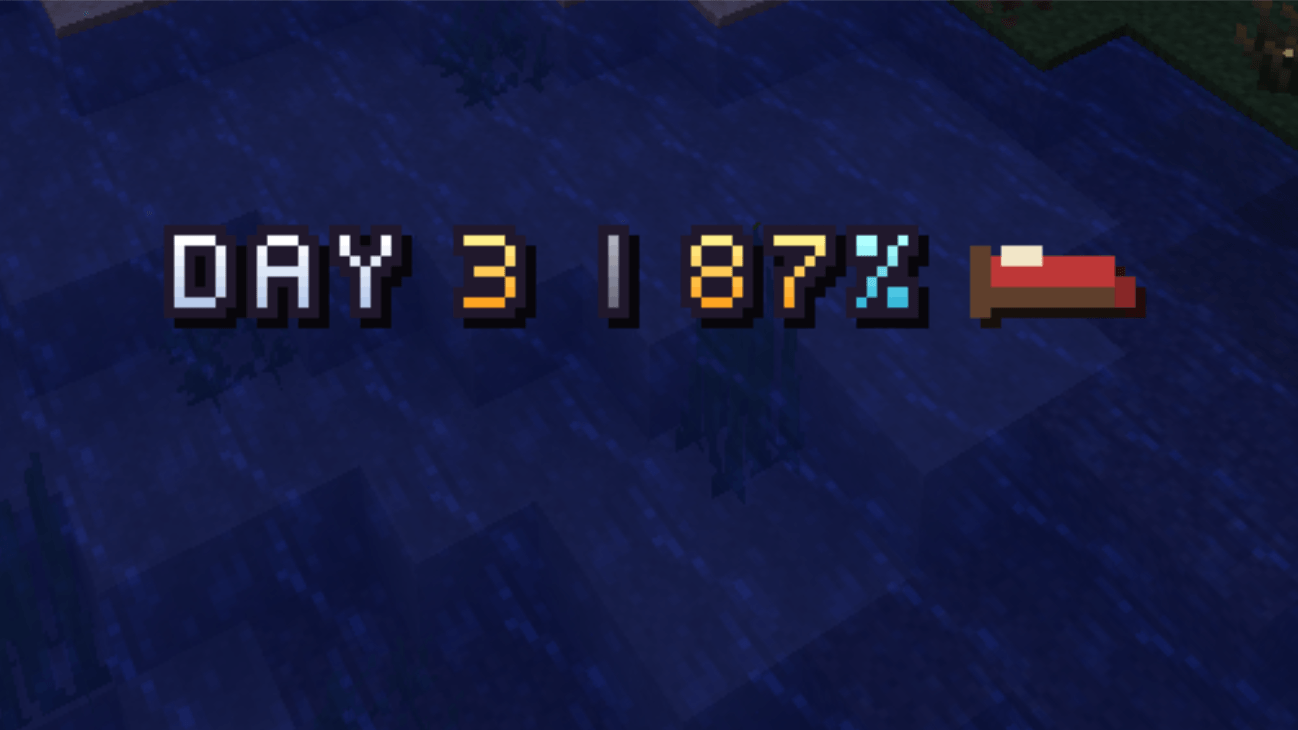
You can change the visibilty of the day counter with /trigger dc_toggle. Since version 3-26.x: Personal display mode: DAY or DAY + progress /trigger dc_mode_toggle. Sunrise and sunset titles, per player /trigger dc_sun_toggle. Settings menu in the pause screen and via /trigger dc_menu.

Requires Resourcepack:

Optional bed indicator when you can sleep, needs the resource pack /trigger dc_bed_toggle. Optional custom font for the counter, needs the resource pack /trigger dc_font_toggle.

content

License

This mod is under the Creative Commons Attribution-NonCommercial 4.0 International license.

3-26.x
MC 26.1, 26.1.1, 26.1.2, 26.2, 26.3
Release 2026-10-08 Get
2-1.17
MC 1.17.1, 1.17
Release 2026-09-28 Get
2-1.18
MC 1.18.1, 1.18, 1.18.2
Release 2026-09-28 Get
2-1.19
MC 1.19.3, 1.19.4, 1.19.1, 1.19.2, 1.19
Release 2026-09-28 Get
2-1.20
MC 1.20.2, 1.20.5, 1.20.1, 1.20, 1.20.6, 1.20.4, 1.20.3
Release 2026-09-28 Get
2-1.21
MC 1.21, 1.21.8, 1.21.5, 1.21.4, 1.21.1, 1.21.6, 1.21.3, 1.21.7, 1.21.2, 1.21.9, 1.21.10, 1.21.11
Release 2026-09-28 Get
2-26.2
MC 26.1, 26.1.1, 26.1.2, 26.2
Release 2026-09-28 Get
2-26.3
MC 26.3
Release 2026-09-28 Get
day_counter-1.17-release+2.zip
MC 1.17.1, 1.17
Release 2026-09-15 Get
day_counter-1.18-release+2.zip
MC 1.18.1, 1.18, 1.18.2
Release 2026-09-15 Get
day_counter-1.19-release+2.zip
MC 1.19.3, 1.19.4, 1.19.1, 1.19.2, 1.19
Release 2026-09-15 Get
day_counter-1.20-release+2.zip
MC 1.20.2, 1.20.5, 1.20.1, 1.20, 1.20.6, 1.20.4, 1.20.3
Release 2026-09-15 Get
day_counter-1.21-release+6.zip
MC 1.21, 1.21.8, 1.21.5, 1.21.4, 1.21.1, 1.21.6, 1.21.3, 1.21.7, 1.21.2, 1.21.9, 1.21.10, 1.21.11
Release 2026-09-15 Get
day_counter-26.2-release+4.zip
MC 26.1, 26.1.1, 26.1.2, 26.2
Release 2026-09-15 Get
day_counter-26.3-release+1.zip
MC 26.3
Release 2026-09-15 Get
day_counter-1.20-release+3.zip
MC 1.20.2, 1.20.5, 1.20.1, 1.20, 1.20.6, 1.20.4, 1.20.3
Release 2026-09-15 Get
day_counter-26.3-snapshot+2.zip
MC 26.3-snapshot
Release 2026-08-09 Get
day_counter-1.17-release+1.zip
MC 1.17.1, 1.17
Release 2026-07-11 Get
day_counter-1.18-release+1.zip
MC 1.18.1, 1.18, 1.18.2
Release 2026-07-11 Get
day_counter-1.19-release+1.zip
MC 1.19.3, 1.19.4, 1.19.1, 1.19.2, 1.19
Release 2026-07-11 Get
day_counter-1.20-release+1.zip
MC 1.20.2, 1.20.5, 1.20.1, 1.20, 1.20.6, 1.20.4, 1.20.3
Release 2026-07-11 Get
day_counter-1.21-release+5.zip
MC 1.21, 1.21.8, 1.21.5, 1.21.4, 1.21.1, 1.21.6, 1.21.3, 1.21.7, 1.21.2, 1.21.9, 1.21.10, 1.21.11
Release 2026-07-11 Get
day_counter-26.2-release+3.zip
MC 26.1, 26.1.1, 26.1.2, 26.2
Release 2026-07-11 Get
day_counter_26.2-release+2.zip
MC 26.1, 26.1.1, 26.1.2, 26.2
Release 2026-07-01 Get
day_counter_26.2-release+1.zip
MC 26.1, 26.1.1, 26.1.2, 26.2
Beta 2026-06-30 Get
day_counter_1.21-release+4.zip
MC 1.21, 1.21.8, 1.21.5, 1.21.4, 1.21.1, 1.21.6, 1.21.3, 1.21.7, 1.21.2, 1.21.9, 1.21.10, 1.21.11
Release 2025-07-14 Get
day_counter_1.21-release+3.zip
MC 1.21.7
Release 2025-06-30 Get
day_counter_1.21-release+2.zip
MC 1.21.6
Release 2025-06-17 Get
day_counter_1.21-release+1.zip
MC 1.21.5
Release 2025-05-09 Get

Requirements & install

How to use this data pack in Minecraft
Mods needed
None, works in vanilla
Minecraft
1.21.10 – 26.3
Install folder
saves/<world>/datapacks

How to install data packs

  1. Download the data pack .zip file (do not extract it).
  2. New world: click Data Packs on the world creation screen and drop the .zip in. Existing world: open .minecraft/saves/<world>/datapacks.
  3. Put the .zip into the datapacks folder of the world (servers: world/datapacks).
  4. Run /reload in game (or rejoin the world) and check it with /datapack list.
Browse more: Data Packs for 26.3 All data packs

More from Avie29

Advertisement Remove ads with Premium →

You Might Also Like