Mineuniverse
Data Packs
[DAI] Survival Interface (Data)

[DAI] Survival Interface (Data)

DATA PACK
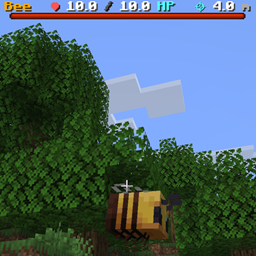
A true screen-space RPG target interface for DAI showing target name, current/max health, health progress, and approximate range simply by aiming at a living entity.
by J12H36H
Download Claim this project
49 downloads
0 likes
Updated Oct 14, 2026
0 hypes
Library Miscellaneous Mod Support Utility
Advertisement Remove ads with Premium →

DAI Survival Interface

DAI Survival Interface adds a true screen-space RPG-style target HUD to the Decisions and Impulses framework.

Simply aim at a living entity and its information appears on-screen immediately.

You do not need to attack the target first.

The interface uses Minecraft's native bossbar HUD for dynamic information instead of attaching floating display entities to the player's camera, keeping the interface stable and genuinely screen-space.

Target Information

The interface displays:

  • Target name
  • Current health
  • Maximum health
  • Visual health progress bar
  • Approximate distance from the player

Health values are displayed to one decimal place.

Range is calculated from the player's aim ray and displayed in meters.

Target Recognition

Survival Interface continuously checks what the player is aiming at.

When a living entity is detected, the interface immediately updates with that entity's information.

A short 2.5-second target-lock grace period keeps the interface visible during brief crosshair misses, reducing flickering when either the player or target is moving.

True HUD Presentation

Survival Interface does not use floating text_display entities.

Instead, it uses Minecraft's native bossbar system to provide:

  • Stable screen-space positioning
  • Dynamic target names
  • Dynamic health values
  • Native health progress
  • Dynamic range information

Multiplayer Support

The current version contains eight isolated HUD lanes for local and LAN multiplayer environments, preventing nearby players from sharing the same target interface.

Designed To Stack

Survival Interface contains no floating damage-number logic.

Combat numbers are handled separately by DAI Damage Indicators, allowing either addon to be installed independently or both to be combined.

Commands

  • /function survival_interface:toggle
  • /function survival_interface:enable
  • /function survival_interface:disable

Requires Minecraft Java 26.2 and Decisions and Impulses / DAI 1.9.5+.

DAI_Survival_Interface_v0.4.0.zip
MC 26.2
Release 2026-08-27 Get
DAI_Survival_Interface_v0.2.zip
MC 26.2
Release 2026-08-19 Get
DAI_Survival_Interface_v0.1.zip
MC 26.2
Release 2026-08-18 Get

Requirements & install

How to use this data pack in Minecraft
Mods needed
None, works in vanilla
Minecraft
26.2
Install folder
saves/<world>/datapacks

How to install data packs

  1. Download the data pack .zip file (do not extract it).
  2. New world: click Data Packs on the world creation screen and drop the .zip in. Existing world: open .minecraft/saves/<world>/datapacks.
  3. Put the .zip into the datapacks folder of the world (servers: world/datapacks).
  4. Run /reload in game (or rejoin the world) and check it with /datapack list.
Browse more: Data Packs for 26.2 All data packs

More from J12H36H

Advertisement Remove ads with Premium →

You Might Also Like