Mineuniverse
Data Packs
cutemayro's Better Smithing Table

cutemayro's Better Smithing Table

DATA PACK
Adds A Survival Friendly Weapon, Tools, And Armor Upgrade System Using The Smithing Table
by cutemayro
Download Claim this project
73 downloads
0 likes
Updated Oct 14, 2026
0 hypes
Miscellaneous Tech Utility
Advertisement Remove ads with Premium →

cutemayro's Better Smithing Table

Adds A Survival Friendly Weapon, Tools, And Armor Upgrade System Using The Smithing Table

Weird.. There Is A Preview Here But Seems Like You Can't See It. Try Again Later Or Use Another Device

How To Upgrade Your Tools

Currently The Datapack Only Offers Upgrading Of Swords, Tools And Armor

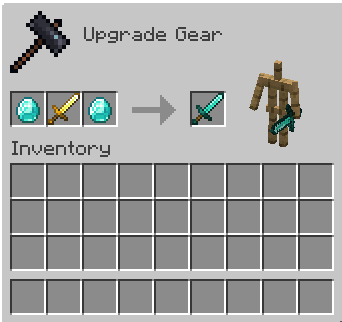
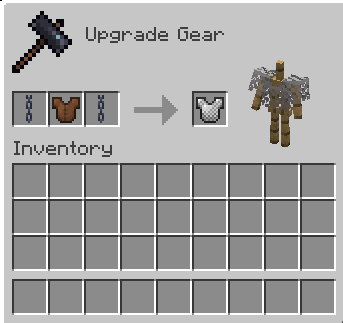
To Upgrade A Tool You Need 2 Of The Higher Progression Tier Materials And The Tool It Self

By Putting The Material In The Template And Material Slot With The Tool In The Middle You Can Upgrade Your Tool
Weird.. There Is A Preview Here But Seems Like You Can't See It. Try Again Later Or Use Another Device

You Can See The Progression Line For Every Class Down Below

The Progression

Swords

Wooden -> Stone -> Iron -> Gold -> Diamond

Tools (Axe, Shovel, Pickaxe etc.)

Wooden -> Stone -> Iron -> Gold -> Diamond

Armor

Leather -> Chainmail -> Iron -> Gold -> Diamond

Advancments

If You Ever Feel Lost, Feel Free To Pay A Visit To The Advancments Tab

I Have Added Advancment For Every Tier Of Progression To Help

Modrinth Page

https://modrinth.com/datapack/cutemayros-better-smithing

Made With Love, By cutemayro

v1.0.0
MC 1.21, 1.21.8, 1.21.5, 1.21.4, 1.21.1, 1.21.6, 1.21.3, 1.21.7, 1.21.2
Release 2026-05-25 Get
v1.0.5
MC 1.21, 1.21.8, 1.21.5, 1.21.4, 1.21.1, 1.21.6, 1.21.3, 1.21.7, 1.21.2
Release 2026-05-25 Get

Requirements & install

How to use this data pack in Minecraft
Mods needed
None, works in vanilla
Minecraft
1.21.1 – 1.21.8
Install folder
saves/<world>/datapacks

How to install data packs

  1. Download the data pack .zip file (do not extract it).
  2. New world: click Data Packs on the world creation screen and drop the .zip in. Existing world: open .minecraft/saves/<world>/datapacks.
  3. Put the .zip into the datapacks folder of the world (servers: world/datapacks).
  4. Run /reload in game (or rejoin the world) and check it with /datapack list.
Browse more: Data Packs for 1.21.8 All data packs
Advertisement Remove ads with Premium →

You Might Also Like





