Mineuniverse
Data Packs
CreeperBeeper

CreeperBeeper

DATA PACK
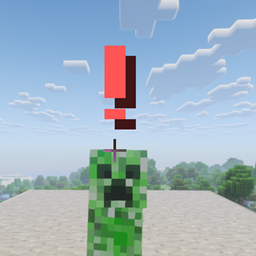
Displays a color-changing warning icon and plays a proximity sound when creepers get close!
by StickyStickman
Download Claim this project
189 downloads
0 likes
0 followers
Updated Oct 14, 2026
0 hypes
Follow0
Utility
Advertisement Remove ads with Premium →

CreeperBeeper is a lightweight Minecraft Data Pack designed to give you a quick visual and audible warning whenever a Creeper gets too close to you.

Whether you're mining deep underground, building at night, or sorting through your chests, CreeperBeeper keeps you safe before it’s too late!

✨ Features

  • Proximity Warning System: Displays a minimalist exclamation mark (!) right at your crosshair that changes color depending on how close a Creeper is:

    • 🟢 Green ! (6–10 blocks away): Early warning + soft sound pulse.

    • 🟡 Yellow ! (3–6 blocks away): Approaching threat + medium sound pulse.

    • 🔴 Red ! (0–3 blocks away): Immediate danger + high-pitched sound alert!

  • Non-Intrusive Display: A clean, minimal indicator that stays out of your way and disappears instantly once the threat is gone or defeated.

  • Proximity Audio Alerts: Dynamic note block sounds speed up and change pitch as the Creeper gets closer.

  • Zero Lag: Highly optimized function code that runs seamlessly in singleplayer and multiplayer.

🚀 Installation Guide

  1. Download the CreeperBeeper.zip file.

  2. Place the .zip file into your world's datapacks folder:

    • .minecraft/saves/<your_world>/datapacks/

  3. Enter your world and run /reload in the chat!

CreeperBeeper
MC 1.21.2-Snapshot, 1.21, 1.21.6-snapshot, 1.21.1-Snapshot, 1.21.8, 1.21.5, 1.21.4, 1.21.5-Snapshot, 1.21.1, 1.21.6, 1.21.3, 1.21.7, 1.21-Snapshot, 1.21.4-Snapshot, 1.21.2
Release 2026-07-22 Get

Requirements & install

How to use this data pack in Minecraft
Mods needed
None, works in vanilla
Minecraft
1.21.4-Snapshot – 1.21.8
Install folder
saves/<world>/datapacks

How to install data packs

  1. Download the data pack .zip file (do not extract it).
  2. New world: click Data Packs on the world creation screen and drop the .zip in. Existing world: open .minecraft/saves/<world>/datapacks.
  3. Put the .zip into the datapacks folder of the world (servers: world/datapacks).
  4. Run /reload in game (or rejoin the world) and check it with /datapack list.
Browse more: Data Packs for 1.21.8 All data packs
Advertisement Remove ads with Premium →

You Might Also Like