Mineuniverse
Data Packs
crafting expanded dp

crafting expanded dp

DATA PACK
balanced recipes for a survival life
by maaku
Download Claim this project
37 downloads
0 likes
Updated Oct 14, 2026
0 hypes
Utility
Advertisement Remove ads with Premium →

crafting expanded: logical & balanced recipes

this data pack adds a collection of balanced and logical crafting recipes to minecraft 1.20.1. it is designed to enhance the survival experience by allowing players to reclaim resources and craft essential items that are normally uncraftable.

🪵 resource reclamation (de-crafting)

  • slabs to planks: revert any wood slab back into its corresponding plank.
  • stairs to blocks: return 4 stairs to get 3 blocks back (balanced ratio).
  • wool to string: break down any wool block into 4 strings.
  • sandstone to sand: smelt 1 sandstone to get 1 sand (10s).

🛠️ essential items

  • horse armor: crafted with iron, gold, or diamonds in an 'h' pattern.
  • saddle & name tag: craftable survival essentials using leather, iron nuggets, and paper.
  • grass block: create grass blocks using wheat seeds and dirt.
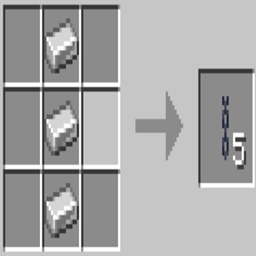
  • cobweb: crafted using 5 strings in an 'x' pattern.

🔮 magic & utility

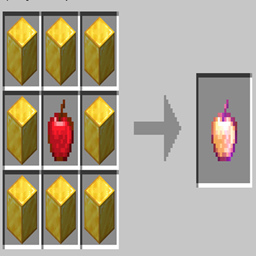
  • enchanted golden apple: the legendary crafting recipe is back (8 gold blocks + apple).
  • experience bottle: convert 1 emerald + 1 glass bottle into an xp bottle.
  • eye of ender to pearl: extract 1 ender pearl from an ender eye.
  • purified potato: smelt a poisonous potato for 30 seconds to turn it into a regular potato.

🚀 installation

  1. download the .zip file.
  2. place it into your world's datapacks folder.
  3. use /reload in-game or restart your server.

compatible with minecraft 1.20.1 (java edition)

crafting-expanded.zip
MC 1.20.1
Release 2026-03-17 Get

Requirements & install

How to use this data pack in Minecraft
Mods needed
None, works in vanilla
Minecraft
1.20.1
Install folder
saves/<world>/datapacks

How to install data packs

  1. Download the data pack .zip file (do not extract it).
  2. New world: click Data Packs on the world creation screen and drop the .zip in. Existing world: open .minecraft/saves/<world>/datapacks.
  3. Put the .zip into the datapacks folder of the world (servers: world/datapacks).
  4. Run /reload in game (or rejoin the world) and check it with /datapack list.
Browse more: Data Packs for 1.20.1 All data packs

More from maaku

Advertisement Remove ads with Premium →

You Might Also Like